AI Agents vs AI Assistants vs Automations: What's the Difference?
One question separates the three: who decides the next step. Plain definitions from Google, OpenAI and Anthropic, real products in each group, one task built three ways, and how to choose.
 Roman Shalabanov
Published
11 min read
An AI assistant answers when you ask and leaves the next move to you: ChatGPT drafting an email you then send yourself. An automation runs a fixed sequence of steps when a trigger fires: a Zap that copies every new form entry into a spreadsheet. An AI agent gets a goal and decides on its own which steps to take and which tools to call until the job is done. Think of a coding agent that reads your project, edits files, runs the tests and fixes what fails.
The quickest test is to ask who decides what happens next. You, the rules or the model. The terms overlap in marketing, so this guide sticks to the definitions that Google, OpenAI and Anthropic publish. It shows products in each group as of November 2026 and builds one task three ways, so you can see where each one fits.
Ask one question: who decides the next step?
All three can use the same language model. What differs is where the control sits.
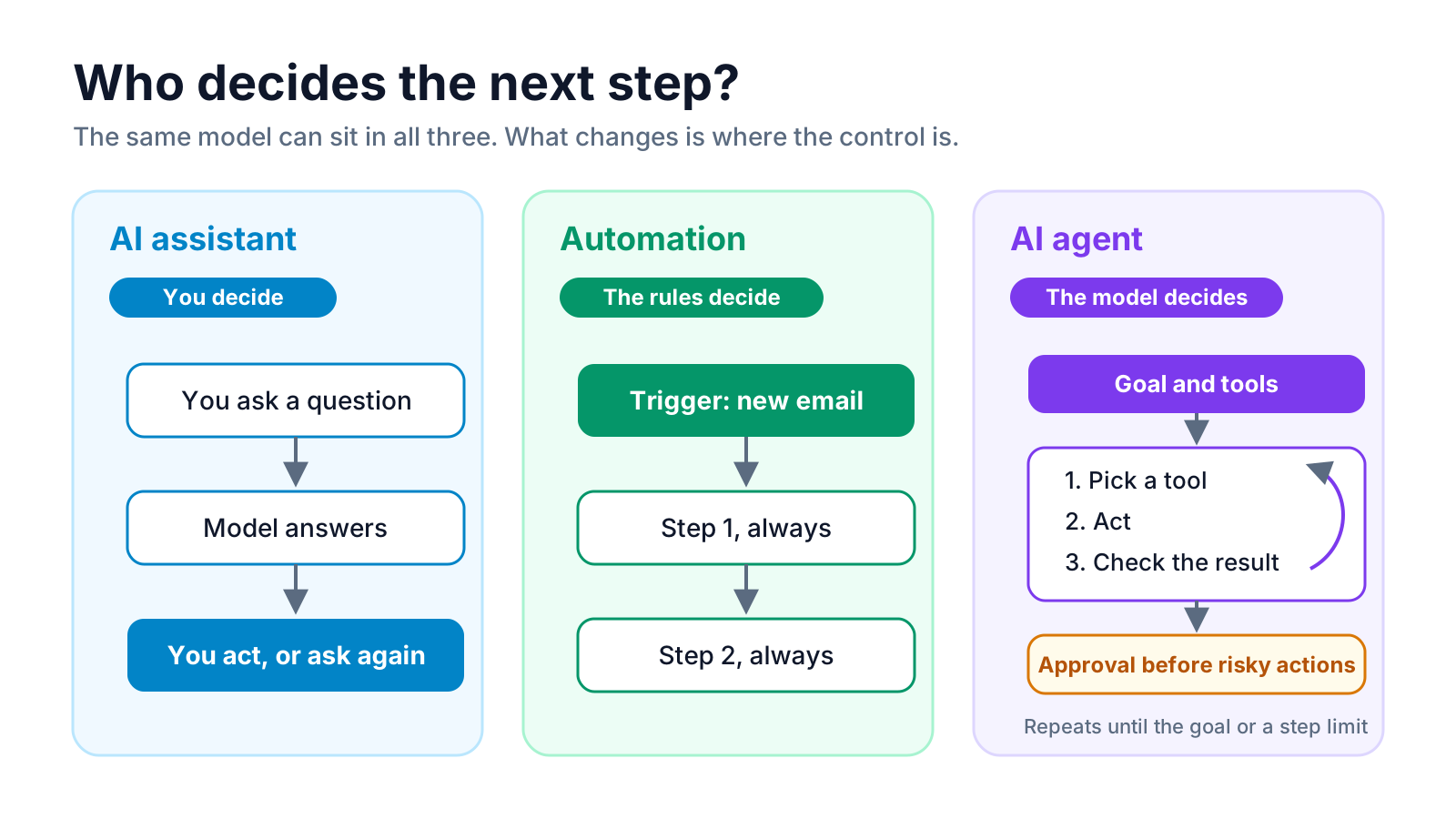
- Assistant: you decide. Each turn starts with your message and ends with an answer. Nothing happens until you ask again.
- Automation: the rules decide. You draw the path once, as a trigger and a list of actions. Every run follows it.
- Agent: the model decides. You set the goal, the tools and the limits. The model picks a step, looks at the result and picks the next one.
Google Cloud puts it the same way in its explainer on AI agents. An assistant "can recommend actions but decision-making is done by the user", while agents "have the highest degree of autonomy, able to operate and make decisions independently to achieve a goal". Rule-based bots, the third group on that page, "are the least autonomous, typically following pre-programmed rules".
AI assistants: they answer, you act
An assistant is a chat or voice interface on top of a model. You ask, it answers, and you decide what to do with the answer. Google's page describes it as reactive: it "responds to user requests".
Examples: ChatGPT, Claude and Gemini in their chat apps, or Perplexity answering a research question with sources. For a job-by-job comparison of the big three, see ChatGPT vs Claude vs Gemini.
Assistants now take small steps on their own inside a single answer. When an assistant decides to search the web before it replies, or runs a bit of code to check a calculation, the model chose that step. That is agent-like behaviour inside one turn. The difference is scope: the assistant returns to you after each answer, and it acts in the world only through the tools you switched on.
Use an assistant when the work is thinking with you: drafting, explaining, summarising, brainstorming, reviewing. You stay in the loop by design, so mistakes are cheap: you read the answer before anything happens.
Automations: rules that run without you
An automation is a workflow you design once and the software repeats. Zapier's help center defines a Zap as "a workflow that connects your apps to automate repetitive tasks", made of "a trigger, which starts the Zap, and one or more actions" (What is a Zap?). Make calls the same thing a scenario, n8n a workflow, IFTTT an applet.
Examples: Zapier, Make, n8n, IFTTT and Microsoft Power Automate.
Adding an AI step does not turn an automation into an agent. A Zap that sends each support email to a model, asks for a category and routes the email by that category still follows one fixed path. Anthropic draws this line in Building effective agents (December 2024). Workflows are "systems where LLMs and tools are orchestrated through predefined code paths". Agents are systems where "LLMs dynamically direct their own processes and tool usage".
Use an automation when you can write the steps down in advance. It runs the same way every time, it is easy to test, and it is cheap: you pay for the steps, not for a model thinking about which step to take. How the big three tools bill those steps is in Zapier vs Make vs n8n.
AI agents: a goal, tools and a loop
OpenAI's practical guide to building agents gives a one-line definition: "Agents are systems that independently accomplish tasks on your behalf". It names three parts:
- Model: the LLM that reasons and decides.
- Tools: "external functions or APIs the agent can use to take action", such as reading a spreadsheet or sending a message.
- Instructions: "explicit guidelines and guardrails defining how the agent behaves".
The same guide says what is not an agent: apps that use a model but do not let it control the workflow, such as "simple chatbots, single-turn LLMs, or sentiment classifiers". An agent runs in a loop. It reads the goal, calls a tool, reads the result, and decides whether to call another tool, ask a question or stop.
Products in this group, as of November 2026:
- Coding agents. Anthropic describes Claude Code as "an agentic coding tool that reads your codebase, edits files, runs commands, and integrates with your development tools" (overview).
- Agents inside automation tools. n8n's AI Agent node connects a chat model to tools, "and the agent decides which tools to call to complete a task". Zapier is moving its standalone Zapier Agents into Zaps as AI by Zapier steps with tools, according to its migration guide updated October 1, 2026.
- Agent builders. Dify, Botpress and Voiceflow build agents for chat and support, and LangChain is a framework for building them in code.
Many agents connect to their tools through the Model Context Protocol. If that term is new, read What is MCP.
Compare the three side by side
Assistants, automations and agents compared
| AI assistant | Automation | AI agent | |
|---|---|---|---|
| Who starts it | You, with a message | A trigger: a new email, a form, a schedule | A trigger or a request |
| Who decides the next step | You | The rules you wrote | The model, within its tools and limits |
| Handles input it has not seen before | Yes | Only along its fixed path | Yes |
| Same path every run | No | Yes | No |
| Acts in other apps | Only with tools you switch on | Yes | Yes |
| Typical cost per run | Your subscription | Per step or per run | Per run plus every model call in the loop |
| Typical failure | A wrong answer you can catch | A broken step stops the run | A wrong action taken with confidence |
| Examples | ChatGPT, Claude, Gemini chat | Zaps, Make scenarios, n8n workflows | Claude Code, n8n AI Agent node, AI by Zapier with tools |
The cost row matters more than it looks. Anthropic notes that "agentic systems often trade latency and cost for better task performance": an agent may call the model five or ten times to finish what an automation does in one fixed pass.
See the same task built three ways
Take one job: answering an email that asks for a refund.
With an assistant. You paste the email into Claude or ChatGPT and ask for a polite reply under your refund policy. You check the order in your shop, edit the draft and send it. The assistant saved you writing time; every decision stayed with you.
With an automation. A Gmail trigger catches new emails to your support address. An AI step labels each one as refund, shipping or other. A filter sends refund emails down one path: create a row in a refunds sheet and post a Slack message to the person who handles refunds. It runs the same way for every email. An unusual email, say a refund request buried in a complaint about shipping, still lands in one of the three boxes, possibly the wrong one.
With an agent. The same trigger hands the email to an agent with three tools: look up the order, read the refund policy and draft a reply. The agent decides whether it needs the order, notices the shipping complaint, checks the policy for late deliveries and writes a reply that covers both. If you give it a tool that issues refunds, it should not use it without a person's approval.
The agent handles the messy email better. It also costs more per email, and it can be wrong in new ways, which is why the approval step is part of the design rather than an extra.
Decide which one your task needs
OpenAI's guide suggests agents for workflows with "complex decision-making", "difficult-to-maintain rules" or "heavy reliance on unstructured data", and adds that otherwise "a deterministic solution may suffice". Anthropic recommends "finding the simplest solution possible, and only increasing complexity when needed". Put together:
- Choose an assistant when a person should read every answer anyway: writing, research, analysis, one-off questions.
- Choose an automation when you can list the steps, the inputs look alike and the same path works every time: syncing records, sending notifications, filing attachments, sorting by a clear rule.
- Choose an agent when the path depends on what the input says, the rules have too many exceptions to write down, or the task needs several lookups before an answer.
- Combine them when only one step needs judgment. A common pattern is an automation that calls an agent for that step and keeps the trigger, logging and notifications as fixed steps.
Keep agents on a short leash
The more an AI decides on its own, the more a mistake can cost. The vendors' own guides agree on a few controls:
- Approve risky actions. OpenAI's guide says actions that are "sensitive, irreversible, or have high stakes" should trigger human oversight, and gives examples such as canceling orders, authorizing large refunds and making payments. n8n lets you put a human review step in front of chosen tools. In AI by Zapier, the Require approval before running switch is off by default, so you turn it on per tool.
- Limit the loop. Anthropic recommends stopping conditions "such as a maximum number of iterations". n8n's AI Agent node has a Max Iterations option that defaults to 10, as of November 2026.
- Give fewer tools. Each tool is something the agent can get wrong. Start with read-only tools and add write access one tool at a time.
- Watch what the agent reads. An email or web page can contain instructions aimed at the agent. Treat outside text as data, and keep tools that send or delete behind an approval.
- Check where the data goes. Every model call sends your input to a model provider. See is it safe to paste company data into AI tools before you connect an agent to customer records.
Tools to try in each group
These products in our directory cover the three groups: assistants, automation platforms and agent builders.

Automate workflows across 7,000 applications seamlessly.
Create automated workflows to connect apps and streamline tasks.
Browse more in the AI agents, AI assistants and workflows categories, or let the finder pick a shortlist by task and budget.
AI Tool Finder Answer three questions and get matching tools from our directory.FAQ
Is ChatGPT an AI agent or an AI assistant?
In its normal chat it is an assistant: it answers and you decide what to do next. It acts like an agent within one answer when it decides to search the web or run code. Features that carry out multi-step tasks for you push it further toward the agent end.
Is a Zapier or Make workflow with an AI step an agent?
No. If the steps and their order are fixed, it is an automation that uses AI for one step. It becomes an agent when the model chooses which tools to call and in what order, as in n8n's AI Agent node or an AI by Zapier step with tools.
Are AI agents better than automations?
Not in general. Agents handle varied input and judgment calls better; automations are cheaper, faster and more predictable. For a task you can describe as fixed steps, an automation is usually the better choice.
Do AI agents need a human in the loop?
For anything that sends messages, spends money or changes records, yes, at least until you have checked many runs. OpenAI's guide recommends human oversight for sensitive or irreversible actions, and n8n and Zapier let you require approval for chosen tools.
What is agentic AI?
It is a broad label for systems where a model plans and takes steps on its own. Anthropic uses "agentic systems" for both workflows and agents, and reserves "agent" for systems where the model directs its own process.