What Is RAG? Retrieval-Augmented Generation for Non-Engineers
Retrieval-augmented generation in plain words: how AI tools search your documents before they answer, what embeddings and chunks are, when RAG beats fine-tuning or a long prompt, and how to spot it in a product.
 Roman Shalabanov
Published
9 min read
Roman Shalabanov
Published
9 min read
RAG, short for retrieval-augmented generation, is a way to make an AI model answer from a specific set of documents instead of from memory alone. When you ask a question, the system first searches a collection, such as your company wiki, your PDFs or a product manual, for the passages most related to the question. It adds those passages to the prompt, and the model writes the answer from them, often with citations so you can check the source.
The name comes from a 2020 paper by Patrick Lewis and colleagues at Facebook AI Research, University College London and New York University, Retrieval-Augmented Generation for Knowledge-Intensive NLP Tasks. Today the term covers any setup where search results feed a language model. If an AI tool says it can "chat with your documents" or "answer from your knowledge base", it almost certainly uses RAG.
How RAG works, step by step
A RAG system has two phases. The first runs once, when you add documents. The second runs every time someone asks a question.
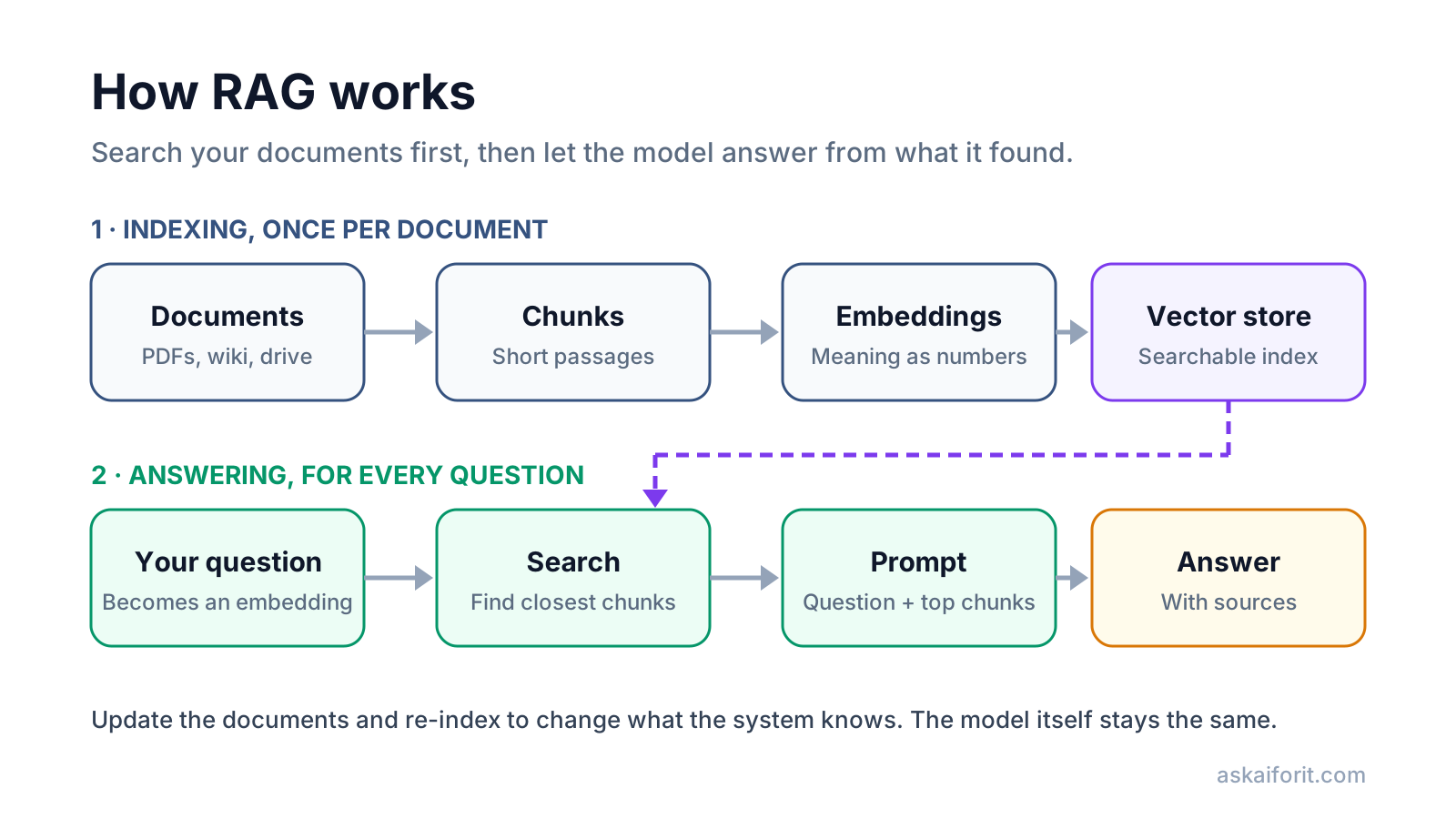
Phase 1: indexing. The system reads your documents, splits them into short passages called chunks, turns each chunk into an embedding (a list of numbers that captures its meaning) and stores the chunks and embeddings in a searchable index, often called a vector store.
Phase 2: answering. Your question is turned into an embedding the same way. The system finds the chunks whose embeddings are closest to it, usually a handful and sometimes 20 or more, and puts them into the prompt next to your question. The model then writes an answer based on those chunks.
Google's RAG Engine overview describes the same pipeline in six steps: ingestion, transformation (chunking), embedding, indexing, retrieval and generation.
21M
100-word Wikipedia passages in the original RAG index
70%
correct answers about 2016 world leaders with a 2016 index
4%
correct answers about 2018 leaders with the outdated 2016 index
Source: Lewis et al., 2020, Retrieval-Augmented Generation for Knowledge-Intensive NLP Tasks
That last experiment shows the main appeal of RAG. The researchers swapped the document index without retraining the model, and its answers followed the new documents. To update what a RAG system knows, you update the documents.
Embeddings and chunks, in plain words
Embeddings. OpenAI's embeddings guide defines an embedding as a list of floating-point numbers, where the distance between two lists measures how related the texts are. "How do I reset my password?" and "I forgot my login" share almost no words, but their embeddings sit close together. That is what lets RAG find a passage by meaning, not only by matching keywords.
Many systems combine both kinds of search. OpenAI's hosted file search, for example, uses semantic and keyword search. Keyword search helps with exact terms such as product codes and names, which meaning-based search can miss.
Chunks. A whole manual is too big to put into every prompt, so it is cut into pieces. The size matters. Small chunks are precise but lose context; large ones keep context but bring in unrelated text. As an example of typical defaults, OpenAI's retrieval guide splits files into chunks of up to 800 tokens, with 400 tokens shared between neighboring chunks.
Chunking has a known weak spot. A chunk that says "revenue grew 3% over the previous quarter" is useless if it no longer says which company or which quarter. Anthropic's write-up on contextual retrieval tackles this by adding a short explanation of where each chunk comes from before indexing it. In its tests, that cut the share of failed retrievals considerably:
Source: Anthropic, Introducing Contextual Retrieval, September 2024
Show data
| Method | Failure rate |
|---|---|
| Standard embeddings | 5.7% |
| Contextual embeddings | 3.7% |
| Contextual embeddings + keyword search | 2.9% |
| All of the above + reranking | 1.9% |
For you as a user, the takeaway is simple: a RAG tool is only as good as its search. When an answer is wrong, the cause is often that the right passage was never retrieved.
Why citations matter
Because the answer is built from specific passages, a RAG system can show you which ones it used. The original paper lists "providing provenance" for decisions as one of the problems retrieval helps with. In practice, that shows up as numbered sources, footnotes or "Sources" panels with links to the document and page.
Citations let you check the answer in seconds. They do not guarantee it is right. The model can still misread a passage, combine two passages wrongly or cite a source that only partly supports the claim. Open the source for anything that matters, especially numbers, dates and quotes.
When RAG helps, and when fine-tuning or long context is better
RAG is one of three common ways to give a model knowledge or behavior it did not have. They solve different problems.
RAG vs long context vs fine-tuning
| RAG | Long context | Fine-tuning | |
|---|---|---|---|
| What you do | Search documents, add the best passages to the prompt | Paste all the material into the prompt | Train the model further on examples |
| Best for | Large or changing knowledge bases | A few documents for one task | Consistent format, style or a narrow task |
| Keeps up with new documents | ✓ Re-index and go | ✓ Paste the new version | ✗ Needs retraining |
| Shows sources | Yes | Possible, if you ask | No |
| Size limit | Very large collections | The model's context window | Training data budget |
| Setup effort | Medium | Low | High |
Choose long context when the material is small. Anthropic's advice is that if your knowledge base is under about 200,000 tokens, roughly 500 pages, you can include all of it in the prompt and skip RAG. Count it first with our Token Counter. Read tokens and context windows explained for why very long prompts still lose detail.
Choose RAG when the material is large, changes often or needs permissions. Thousands of help articles, a contract archive or a company drive will not fit in any prompt, and they change every week.
Choose fine-tuning for behavior, not facts. OpenAI's optimization guide describes fine-tuning as a way to make a model format responses consistently or handle specialized tasks such as classification. It is a poor way to store facts that change, because each change means training again.
Privacy: where your documents go
Connecting documents to an AI tool copies them. Before you connect a drive or upload files, know the path your data takes.
- The index stores your text. Chunks are saved, usually as plain text next to their embeddings, in the vendor's database or yours.
- Embeddings are not anonymous. Research shows embeddings can be turned back into much of the original text: one method recovered 92% of 32-token inputs exactly (Morris et al., 2023). Protect them like the documents themselves.
- Embedding and model calls may go to a third party. Many tools send each chunk to an embedding API and each question with its retrieved chunks to a model provider.
- Permissions must carry over. If the index ignores who may see which document, anyone with access to the assistant can pull out passages from HR files or board decks. Ask whether retrieval respects the original sharing settings.
- Documents can carry instructions. A retrieved web page or file can contain hidden text that tries to steer the model, an attack known as indirect prompt injection (Greshake et al., 2023).
- Ask where the index is stored and in which region.
- Ask whether your documents or questions are used to train models.
- Ask whether retrieval follows your existing file permissions.
- Ask how deletion works: does removing a file remove its chunks and embeddings?
- For sensitive material, consider a local setup. LM Studio, for example, can chat with documents fully offline; see how to run an LLM locally.
How to spot RAG in an AI product
Vendors rarely say "RAG" on the pricing page. Look for these signs instead:
- Sources or citations under answers, with links to specific documents or pages.
- A "knowledge base", "workspace files" or "project files" feature where you upload documents once and ask questions later.
- Connectors to Google Drive, Notion, Confluence, SharePoint or a website crawler.
- "Answers only from your content" or "grounded" in the product description.
- Limits on the number of files or pages rather than on prompt length, because the files are indexed, not pasted.
If a tool has these, ask the privacy questions above. Then test it with a question whose answer sits in one specific document, and check whether it finds and cites the right passage.
These tools answer questions from the documents you give them. Ask the privacy questions above before you connect anything sensitive:
User-friendly interface for leveraging large language models.

FAQ
What does RAG stand for?
Retrieval-augmented generation. The system retrieves relevant passages from a set of documents and uses them to augment the prompt before the model generates an answer.
Is RAG the same as training the AI on my data?
No. RAG leaves the model unchanged and looks up your documents at question time. Training or fine-tuning changes the model's weights. With RAG, deleting a document from the index removes it from future answers.
Does RAG stop AI hallucinations?
It reduces them by giving the model the right text to work from, but it does not stop them. The search can miss the right passage, and the model can still misread what it gets. Check the cited sources.
Is ChatGPT a RAG system?
A chat assistant uses RAG when it searches the web, your uploaded files or connected apps before answering. Answers without any search come from the model's training alone.
Do I need a vector database for RAG?
For large collections, a vector store or a search index is the usual choice. Hosted tools such as OpenAI's file search or Google's RAG Engine manage the index for you. For a handful of documents, you may not need RAG at all.
What is a good chunk size?
There is no single answer. Many systems use a few hundred tokens per chunk with some overlap; OpenAI's default is up to 800 tokens with a 400-token overlap. Test with your own documents and questions.