What Is MCP (Model Context Protocol) and Which Tools Support It
The Model Context Protocol in plain terms: what it is, who started it, how hosts, clients and servers talk, which AI apps support it as of October 2026, and how to connect a server safely.
 Roman Shalabanov
Published
9 min read
Roman Shalabanov
Published
9 min read
MCP, the Model Context Protocol, is an open standard that lets AI applications connect to external systems: files, databases, business apps, search engines and other tools. Instead of every AI app building its own integration with every service, a service publishes one MCP server, and any app that speaks MCP can use it. The official introduction compares it to a USB-C port for AI applications.
Anthropic open-sourced MCP on November 25, 2024. On December 9, 2025 it donated the protocol to the Agentic AI Foundation, a directed fund under the Linux Foundation co-founded by Anthropic, Block and OpenAI. Today most major AI assistants and code editors support it; the list below shows which ones, as of October 2026.
What MCP is and why it exists
Before MCP, connecting a chat assistant to, say, your issue tracker meant a custom plugin for that one assistant. Ten assistants and fifty services meant hundreds of separate integrations, each with its own format and its own bugs.
MCP replaces that with one protocol. Its specification says it takes inspiration from the Language Server Protocol, which did the same for programming languages in code editors. The service owner writes a server once. Each AI app writes a client once. After that they work together.
What MCP does not do: it does not choose a model, store your chats or decide how the app uses the context it gets. The architecture overview says MCP focuses solely on the protocol for exchanging context.
How MCP works: hosts, clients and servers
MCP has three participants:
- Host. The AI application you use, such as Claude Desktop, VS Code or Cursor.
- Client. A connector inside the host. The host creates one client for each server it connects to, and each client keeps its own connection.
- Server. A program that provides context and actions. It can run on your computer or on the internet.
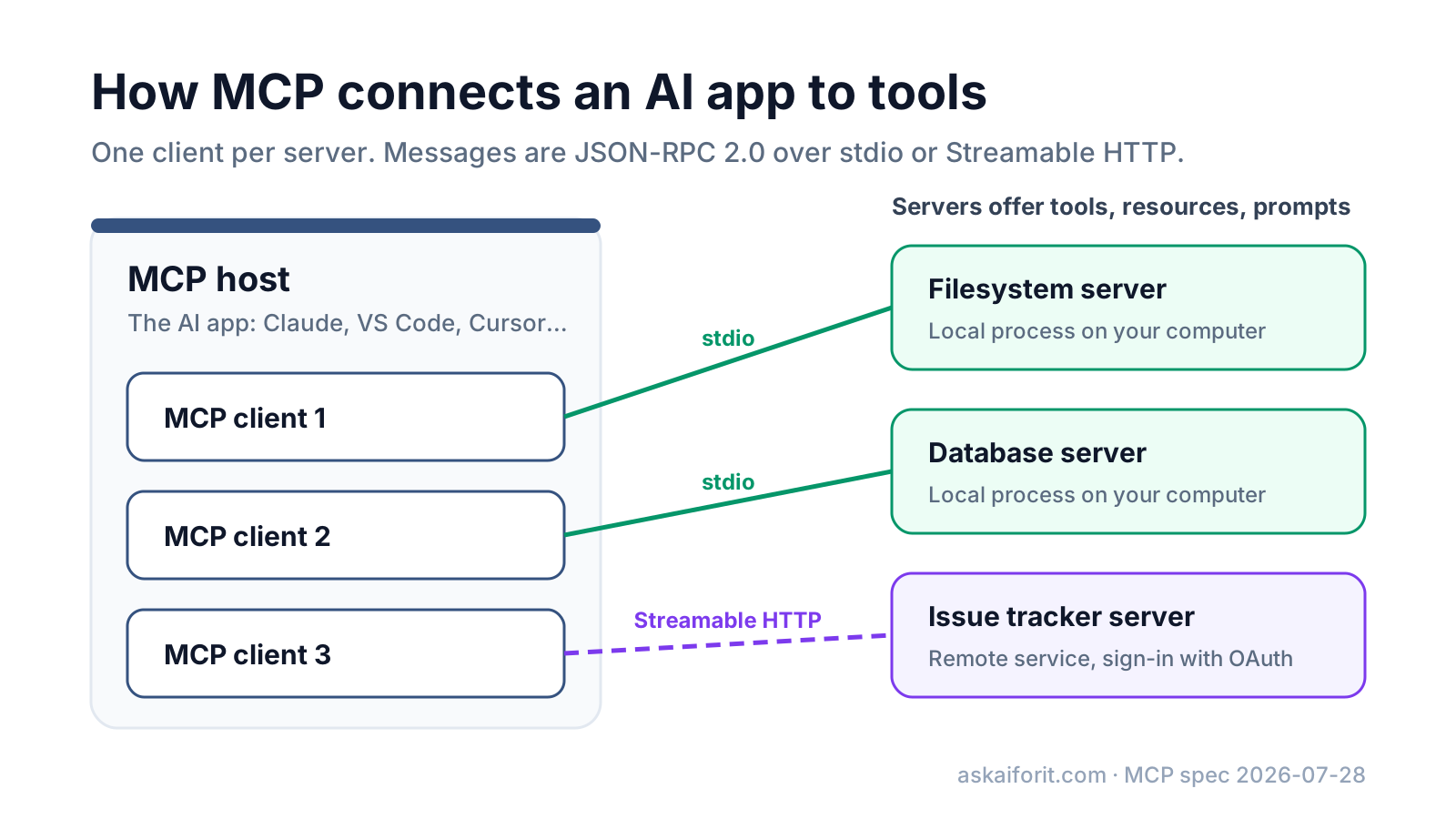
The messages use JSON-RPC 2.0, a simple request-and-response format. Two transports carry them:
- stdio. The host starts the server as a local process and talks to it through standard input and output. This is a "local" server.
- Streamable HTTP. The client sends HTTP POST requests to a server on the network, which can stream results back. This is a "remote" server, and the docs recommend OAuth for signing in.
A tool call looks like this. The host asks the server to run a tool by name with arguments, and the server returns content the model can read:
{
  "jsonrpc": "2.0",
  "id": 3,
  "method": "tools/call",
  "params": {
    "name": "weather_current",
    "arguments": { "location": "San Francisco", "units": "imperial" },
    "_meta": { "io.modelcontextprotocol/protocolVersion": "2026-07-28" }
  }
}
The example is shortened from the architecture overview. In practice you never write these messages: the SDKs and the host handle them. Official SDKs exist for TypeScript, Python, C#, Go, Rust, Ruby, Java, Swift, PHP and Kotlin, per the SDK list.
What an MCP server can offer: tools, resources and prompts
Servers expose three kinds of building blocks, which the specification calls primitives.
MCP server primitives
| Primitive | What it is | Who uses it | Example |
|---|---|---|---|
| Tools | Functions the model can call to act | The model, with your approval | Create an issue, run a database query |
| Resources | Data the app can read for context | The app or you | A file, a database schema, a record |
| Prompts | Ready-made templates | You, from a menu or slash command | "Summarize this pull request" |
Clients can offer features to servers too. The main one in the current version is elicitation: the server asks you for missing information or for confirmation, for example "Which project should this issue go to?" Sampling, which let a server ask the host's model for a completion, is deprecated as of the 2026-07-28 version of the protocol.
Not every app supports every primitive. Tools have the widest support; some editors support only tools and prompts. Check your client's documentation before you build a server that depends on resources.
What changed in the 2026-07-28 version
The specification is versioned by date: 2024-11-05, 2025-03-26, 2025-06-18, 2025-11-25 and, as of October 2026, 2026-07-28. The latest changelog lists changes that matter if you build servers:
- Stateless requests. The opening handshake and protocol-level sessions are gone. Every request carries its protocol version and capabilities, which makes remote servers easier to scale.
- Discovery. Servers must answer a
server/discoverrequest with their versions, capabilities and identity. - Subscriptions. Clients opt in to change notifications through one
subscriptions/listenstream. - Extensions. Optional features live outside the core: Tasks for long-running jobs and MCP Apps for interactive UI such as charts and forms inside the chat.
Clients and servers that speak older versions still exist. If something does not connect, a version mismatch is one of the first things to check.
Which apps support MCP as of October 2026
These are the clients we confirmed in each vendor's documentation on October 19, 2026. Support for individual features varies, so the notes list what each vendor documents.
MCP clients, checked October 2026
| App | Kind | What the docs confirm |
|---|---|---|
| Claude (claude.ai, Desktop, mobile, Claude Code) | Assistant, coding agent | Remote servers as connectors in every app; tools, prompts and resources; no sampling (docs) |
| ChatGPT and Codex | Assistant, coding agent | Custom MCP servers through plugins; the API's Responses endpoint can call remote servers (docs) |
| Visual Studio Code with GitHub Copilot | Code editor | stdio and HTTP servers; tools, resources, prompts (docs) |
| Cursor | Code editor | stdio, SSE and Streamable HTTP; tools, prompts, resources, roots, elicitation (docs) |
| JetBrains AI Assistant | IDE assistant | stdio and Streamable HTTP, SSE for older servers (docs) |
| Zed | Code editor | Tools and prompts (docs) |
| Microsoft Copilot Studio | Agent builder | Tools and resources from MCP servers (docs) |
| Gemini CLI | Terminal agent | stdio, SSE and Streamable HTTP (docs); unpaid and Google One users moved to Antigravity CLI in June 2026 |
| LM Studio | Local model app | MCP host since version 0.3.17, local and remote servers (docs) |
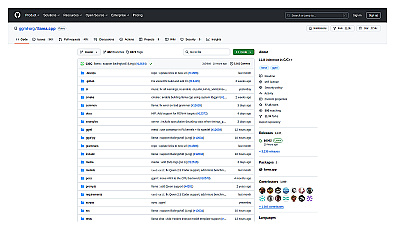
| llama.cpp server | Local model server | stdio servers only (docs) |
Two local apps on that list, LM Studio and llama.cpp, let you combine MCP with a model running on your own computer. See how to run an LLM locally if that is what you want.
To find servers, the MCP Registry is the official metadata catalog for public servers. It is in preview as of October 2026. The project's own reference servers (Fetch, Filesystem, Git, Memory and a few others) are good for learning, not as production tools.
How to add an MCP server to your AI app
The steps are similar in every app: add the server, sign in if it asks, then allow its tools.
- Find the server's address (for a remote server) or its install command (for a local one) in the service's documentation or the MCP Registry.
- Add it to your app. In Claude and ChatGPT that is a connector or plugin setting; in editors it is usually an
mcp.jsonfile. - Sign in when the server asks. Remote servers typically use OAuth, so you approve access in your browser instead of pasting a password.
- Check the list of tools the server exposes and turn off the ones you do not need.
- Approve tool calls as they happen until you trust the server.
In Claude Code, one command adds a remote server, as shown in its MCP docs:
claude mcp add --transport http notion https://mcp.notion.com/mcpIn Cursor, a local server goes into .cursor/mcp.json in your project or ~/.cursor/mcp.json for all projects. This entry starts the reference Filesystem server with access to one folder:
{
  "mcpServers": {
    "filesystem": {
      "command": "npx",
      "args": ["-y", "@modelcontextprotocol/server-filesystem", "/Users/you/notes"]
    }
  }
}
VS Code uses a similar file but names the top-level key servers instead of mcpServers, so copy configurations with care.
MCP security: what to check before you connect a server
MCP gives a model real access: it can read files, query systems and take actions. The specification's security principles say users must consent to all data access and actions, and that hosts must get explicit consent before invoking any tool. The protocol cannot enforce that by itself. Your app and your choices do.
The MCP project's guide to local server security points out that a local server is an ordinary process: it runs with your account's permissions, can read anything you can read, including SSH keys and cloud credentials, and can connect anywhere on the internet. Its checklist comes down to these habits:
- Remove servers you no longer use, and know where each remaining one comes from.
- Prefer servers from an identifiable publisher, and pin their versions.
- Prefer a remote server when it needs nothing from your machine.
- Run third-party local servers in a container or sandbox when you can.
- Give each server its own narrowly scoped credentials, not your full shell environment.
- Limit file access to specific folders, read-only where possible.
- Skim each server's tool descriptions, and choose a client that asks again when a tool definition changes.
For teams, add an allowlist of approved servers and keep an inventory of what is installed on managed machines. Developers who build remote servers should read the security best practices, which cover token passthrough, the confused deputy problem and scope minimization.
Ready to connect a server? Start with one of these MCP hosts from the table above:

AI-driven code editor that accelerates software development.
Lightweight code editor for efficient programming and debugging.
FAQ
What does MCP stand for in AI?
Model Context Protocol. It is an open standard for connecting AI applications to external tools, data and workflows.
Who created MCP?
Anthropic released it as an open-source project on November 25, 2024. Since December 9, 2025 it has been a project of the Agentic AI Foundation, a directed fund under the Linux Foundation.
Is MCP only for Claude?
No. As of October 2026, ChatGPT, Visual Studio Code, Cursor, JetBrains AI Assistant, Zed, Microsoft Copilot Studio, LM Studio and other apps support it, alongside Claude.
What is the difference between an MCP server and an API?
An API is how a service exposes its functions to programs. An MCP server wraps those functions in a standard format that AI apps can discover and call on their own, with names, descriptions and input schemas the model can read. Many MCP servers call the service's regular API behind the scenes.
Is MCP safe to use?
It is as safe as the servers you connect and the permissions you grant. Use servers from publishers you trust, limit what they can access, and approve tool calls, especially ones that change or send data.
Do I need to code to use MCP?
No. In most assistants you add a server from a settings screen or a directory of connectors. Writing your own server takes code, with SDKs in languages such as TypeScript and Python.