Is It Safe to Paste Company Data into AI Tools? A Privacy Checklist
Personal and business AI plans treat your prompts very differently. What OpenAI, Anthropic, Google and Microsoft document about training, retention and data location, and a checklist to run before you paste.
 Roman Shalabanov
Published
11 min read
Pasting company data into ChatGPT, Claude, Gemini or Copilot is reasonably safe only when three things are true. You use a business plan your company signed up for. Your company's policy allows that data in that tool. And you have removed what the task does not need. On a personal account, free or paid, your chats may train future models unless you opt out, and some may be read by human reviewers.
The vendors say so plainly. OpenAI does not train on ChatGPT Business, Enterprise or API data by default, but on personal Free, Plus and Pro accounts "data sharing is enabled by default" (OpenAI Help). Google tells people who use Gemini with a personal account: "Please don't enter confidential information that you wouldn't want a reviewer to see or Google to use to improve our services" (Gemini Apps Privacy Hub). Below: what each vendor documents, what "no training" leaves open, and a checklist.
Why the plan matters more than the brand
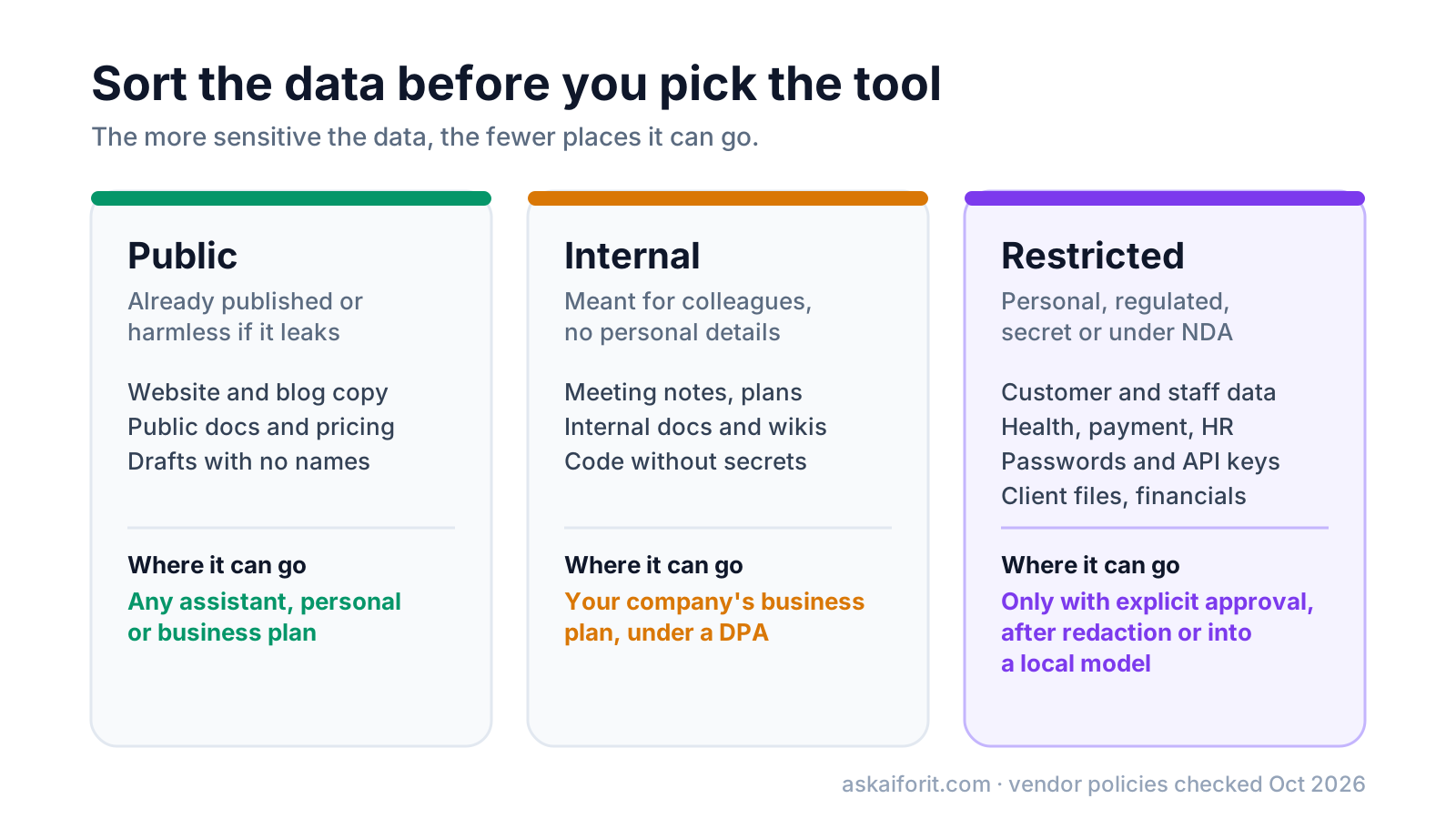
Each vendor runs two sets of terms. On consumer plans, the vendor decides how to use your chats within the limits of its privacy policy. On business plans, it processes your data on your company's instructions under commercial terms and a data processing agreement (DPA).
That split decides three things. Training: all four vendors exclude business data by default, while consumer defaults differ. Control: business plans give admins retention settings, audit exports and the power to switch features off; a personal account has only your own settings. Paperwork: a DPA, SOC 2 reports and, for health data, a business associate agreement exist on the business side only.
A paid personal plan is still a consumer plan. ChatGPT Plus or Claude Max buys more usage, not business terms.
Compare consumer and business plans at a glance
Plan names and defaults change, so open the linked pages before you rely on a row.
How the four assistants handle your chats (checked November 5, 2026)
| Plan | Trains on your chats by default | Retention | Admin controls | Choice of data region |
|---|---|---|---|---|
| ChatGPT Free, Plus, Pro | Yes, until you switch it off | Kept until you delete; deleted chats purged within 30 days | No | No |
| ChatGPT Business | No | Admins set retention; deleted chats purged within 30 days | Yes | No |
| ChatGPT Enterprise, Edu | No | Admins set retention | Yes | ✓ New customers, 10 regions (as of October 23, 2026) |
| Claude Free, Pro, Max | You choose at signup | Up to 5 years if you allow training; deleted chats purged within 30 days | No | No |
| Claude Team | No | Kept until you delete; purged within 30 days | Yes | No |
| Claude Enterprise | No | Custom retention, minimum 30 days | Yes | US only on Anthropic's own platform |
| Gemini, personal account | Yes, Keep Activity is on by default for adults | Auto-delete after 18 months by default; reviewed chats up to 3 years | No | No |
| Gemini in Google Workspace | No | Admins set, up to 36 months in the Gemini app | Yes | ✓ US or Europe |
| Microsoft Copilot app, personal account | No, in the app version released August 18, 2026 | Delete chats in the chat list or the privacy dashboard | No | No |
| Microsoft Copilot, work account | No | Admins set Purview retention policies | Yes | ✓ EU Data Boundary, Advanced Data Residency |
ChatGPT: what OpenAI documents
Personal plans (Free, Plus, Pro). Training is on by default. Turn it off under Settings → Data controls → Improve the model for everyone, which also covers Codex tasks; voice mode has a separate control (Data controls FAQ). Temporary Chats stay out of your history and training but "may be retained for up to 30 days for safety purposes". Deleted chats are scheduled for permanent deletion within 30 days, unless OpenAI must keep them for security or legal reasons (Deleting chats).
Legal holds are real. A preservation order in The New York Times lawsuit made OpenAI keep consumer ChatGPT and API content, deleted chats included. OpenAI says the order's obligations ended on September 26, 2025, and that it still holds limited April to September 2025 data under legal hold (OpenAI).
Business plans. OpenAI's enterprise privacy page (updated January 8, 2026) says it does not train on inputs and outputs from ChatGPT Business, Enterprise, Edu, for Healthcare, for Teachers or the API by default. On Business, admins can view, export and delete members' conversations and set retention. Enterprise and Edu add the Compliance API, an audit log of conversations for admins. OpenAI signs a DPA for Business, Enterprise and the API.
Data residency. New Enterprise and Edu customers, and eligible API customers, can store content at rest in Australia, Canada, Europe (EEA and Switzerland), India, Japan, Singapore, South Korea, the UAE, the UK or the US. In ChatGPT, model processing can also stay in-region in Europe, the US and the UAE (data residency). Data sent to connected apps, MCP servers and web search may leave the region.
API. Inputs and outputs are kept for up to 30 days for abuse monitoring; zero data retention needs OpenAI's approval (API data controls).
Claude: what Anthropic documents
Consumer plans (Free, Pro, Max, and Claude Code on those accounts). Since Anthropic's 2025 consumer terms update, you choose whether your chats and coding sessions train its models; new users choose at signup (Anthropic). Change it any time under Settings → Privacy. If you allow training, de-identified data may be kept for up to five years. Deleted conversations leave the back end within 30 days, and Incognito chats are never used for training (retention).
Two exceptions apply on every plan. Chats flagged for Usage Policy violations are kept for up to two years, with classifier scores kept for up to seven. Anything sent with the thumbs up or down button is stored for five years and may be used for training.
Commercial plans (Team, Enterprise, API, Claude Gov, Claude for Education). Inputs and outputs are not used for training by default (Anthropic), and Team and Enterprise owners can switch off the feedback button with the Rate chats setting. API data is deleted within 30 days unless you use a storage feature such as the Files API or have a zero data retention agreement (organization data).
Enterprise owners can set a custom retention period of at least 30 days; without one, data is kept indefinitely (Claude Help). Since June 9, 2026, prompts and outputs of Anthropic's most capable "covered models" are kept for 30 days for safety work, even for organizations that otherwise have zero retention. The exception is organizations Anthropic has told they can use Fable with zero retention (covered models).
Data residency. On Anthropic's own platform, data at rest is stored in the US only, and you can pin model processing to the US at 1.1 times the standard price for current models (docs). For Europe, Canada or Asia-Pacific, Anthropic points to Claude on AWS Bedrock and Google Cloud Vertex AI (regional compliance).
Gemini: what Google documents
Personal Google accounts, including paid Google AI plans. Keep Activity is on by default if you are 18 or over (Gemini Apps Help). While it is on, Google uses your chats to improve its services, including training generative AI models, with help from human reviewers. Activity auto-deletes after 18 months by default; you can pick 3 or 36 months or no auto-delete. Reviewed chats are disconnected from your account and kept for up to three years, even if you delete your activity.
With Keep Activity off, or in a temporary chat, Google keeps conversations for 72 hours and does not train on them unless you send feedback. The free tier of the Gemini API is stricter: its terms say "Do not submit sensitive, confidential, or personal information to the Unpaid Services". On the paid tier, Google does not use prompts and responses to improve its products (Gemini API terms).
Work and school accounts (Google Workspace). The Workspace privacy hub (updated October 6, 2026) says your content is "not human reviewed or otherwise used for Generative AI model training outside your domain without permission". Admins set retention. Gemini app chats auto-delete after 3, 18 or 36 months (18 by default). Gemini conversations in Gmail, Docs and other apps are kept indefinitely unless an admin picks 3, 18 or 36 months (conversation history). Workspace DLP rules and rights-management labels limit what Gemini can read.
Data regions. Business Standard and higher editions can keep Gemini prompts and responses at rest in the US or Europe. Keeping the processing in-region too needs Enterprise Data Regions (Enterprise Plus, Frontline Plus or the add-on) or Assured Controls (data regions).
Microsoft Copilot: what Microsoft documents
Two products share the name. The Microsoft Copilot app is the consumer assistant for personal Microsoft accounts. Microsoft Copilot and Copilot Chat for work, formerly Microsoft 365 Copilot and Microsoft 365 Copilot Chat, run on a work (Entra ID) account.
Personal Microsoft account. For the Copilot app version released on August 18, 2026, Microsoft says "Prompts, responses, and your file contents when using the Microsoft Copilot app aren't used to train foundation models" (Microsoft Support). Its privacy controls cover saved memories, web search, ad personalization and a One shared experience switch that shares activity with Bing, Edge and MSN. The older app trains on signed-in adults' conversations unless they opt out, stores conversations for 18 months by default and offers no opt-out from human review (older FAQ). Check which version you have.
Work account. Use with an Entra ID account falls under Microsoft's DPA and Product Terms, with Microsoft as a data processor. Prompts, responses and data reached through Microsoft Graph "aren't used to train foundation models" (enterprise data protection). Admins set retention with Microsoft Purview, and EU users' traffic stays within the EU Data Boundary. Since March 1, 2024, Copilot is covered by the data residency commitments of Advanced Data Residency and Multi-Geo (Copilot privacy).
Web search queries go to Bing under the Microsoft Services Agreement, with Microsoft as an independent data controller, so the DPA and the EU Data Boundary do not cover them. Anthropic models inside Copilot are also currently excluded from the EU Data Boundary.
Know what "not used for training" leaves out
A no-training promise answers one question. Six others matter too:
- Safety retention. Even with training off, chats are stored for days or weeks.
- Human review. Google's reviewers read a sample of Gemini chats on personal accounts, the older Copilot app has no opt-out from review, and OpenAI staff and contractors may access ChatGPT Business chats to investigate abuse.
- Feedback buttons. At OpenAI, a thumbs up or down can send the whole conversation for training even after you opt out.
- Legal holds. A court can order a vendor to keep data it would otherwise delete.
- Connectors and agents. Web search, MCP servers, third-party GPTs and agents send data to other services under their own terms.
- Hidden instructions. Text pasted from emails or web pages can carry invisible instructions for an assistant that can reach your files. The AI Text Cleaner decodes hidden tag characters in your browser without uploading the text.
Run this checklist before you paste
- Classify the data. Customer and employee personal data, health and payment data, credentials, client files under NDA and unreleased financials stay out unless your company approved a tool for them.
- Check the account. A personal Gmail or Microsoft account means consumer terms, even on a paid plan.
- Use the company plan, or ask for one. Until you have it, switch training off and paste only public or anonymized text.
- Paste less. Send the paragraph, not the folder. Replace names, emails and account numbers with placeholders such as
[CLIENT_A]. - Never paste secrets. If an API key or password went into a chat, rotate it.
- Check connectors and agents. Know which mailboxes, drives and tools the assistant can reach before you let it act.
- Skip feedback buttons on sensitive chats.
- Delete what you no longer need, and remember that deletion takes up to 30 days.
- Get the paperwork. For client or regulated data, ask for the DPA, SOC 2 report or BAA before the first upload.
Choose a safer setup for sensitive work
A business plan with a DPA. ChatGPT, Claude, Gemini and Microsoft Copilot all sell one. If your company already pays for Google Workspace or Microsoft 365, start there.
A local model. Ollama, LM Studio, Jan, GPT4All and AnythingLLM run open models on your own computer, so prompts stay on it. Ollama also offers cloud models; its docs say to disable cloud features to stay local (Ollama). Our guide to running an LLM locally covers the hardware.
Your own API key. OpenAI and Anthropic do not train on API data by default, and Google does not on the paid Gemini API. TypingMind lets you chat through your own keys, and Langdock says it is hosted in Europe. Each front end is one more company that sees your data, so read its terms too.
Guardrails. MaskMyPrompt swaps names of people, organizations and places for made-up ones before you send a prompt. Nightfall AI and Lakera Guard watch for sensitive data leaking into AI apps and agents.

FAQ
Is ChatGPT Plus safe for company data?
Plus is a personal plan: training is on by default, with no admin controls and no DPA. For company data, use ChatGPT Business or Enterprise under a contract your company signed.
Does turning off training make my chats private?
No. It stops training on new chats. The vendor still stores them, may keep deleted chats for up to 30 days, reviews flagged content and must follow legal holds.
Can my employer read my AI chats?
On a company plan, often yes. ChatGPT Business admins can view and export members' conversations, Enterprise exposes them through the Compliance API, and Microsoft Purview lets admins search Copilot activity.
Is using AI with customer data allowed under GDPR?
Ask your data protection officer. In general you need a legal basis and a processor agreement such as a DPA, which only business plans offer, and some plans let you keep data in the EU.