Zapier vs Make vs n8n for AI Automations: Pricing Units, AI Steps and Self-Hosting
The three tools meter usage in different units, and AI steps change the bill. A worked example with plan limits checked in November 2026, the AI building blocks of each tool, and what n8n's free self-hosted edition allows.
 Roman Shalabanov
Published
12 min read
Pick Zapier if you want the largest app directory and the least setup, and you can accept paying per action. Pick Make if your workflows have many steps and you want a visual builder with a low entry price. Pick n8n if you run long AI workflows at volume, want to pay per run instead of per step, or need to keep data on your own servers.
For AI automations, the deciding factor is how each tool meters usage. Zapier counts tasks, Make counts credits and n8n counts executions, and a single AI step can cost one unit or five. Below, each unit is explained from the vendor's own docs, one AI workflow is priced on all three with plan limits checked on November 5, 2026, and n8n's self-hosting licence is spelled out.
Zapier, Make and n8n at a glance
Zapier vs Make vs n8n (checked November 5, 2026)
| Zapier | Make | n8n | |
|---|---|---|---|
| Billing unit | Task: one successful action | Credit: most module runs cost 1 | Execution: one run of a whole workflow |
| Free option | 100 tasks a month, two-step Zaps | 1,000 credits a month, 2 active scenarios | Self-hosted Community edition; Cloud has a 14-day trial |
| Entry paid plan, billed yearly | Professional from $19.99/mo, 750 tasks | Core $9 to $12/mo by country, 10,000 credits | Starter €20/mo, 2,500 executions |
| Apps and integrations | 9,000+ apps | 3,500+ apps | 2,000+ integrations |
| Built-in AI step | AI by Zapier, paid plans | Make AI Toolkit, all plans | AI Agent and AI nodes, all plans |
| AI agents | Zapier Agents | Make AI Agents (beta) | AI Agent node with tools |
| Custom code | Code by Zapier | Make Code App, paid plans | Code node, JavaScript or Python |
| Self-hosting | No | No | Yes |
| Licence | Proprietary service | Proprietary service | Sustainable Use License (fair-code) |
App counts come from each vendor's own pages. n8n lists prices in euros. Make prices its plans by the visitor's country. On November 5, 2026, Core with 10,000 credits cost $9 a month billed yearly in Poland, Czechia or Brazil, $11 in the UK, Germany, France or Canada, and $12 in the US. Yearly billing saves 33% on Zapier and 17% on n8n, per their pricing pages, and 15% to 31% on Make's Core plan, depending on the country's price list.
How each tool counts usage
Zapier: tasks
Zapier's help center defines a task as "any successful action that runs in Zapier". As of November 2026:
- Free: trigger steps, Filter and Paths steps, actions that fail or halt, and steps of the built-in Formatter, Delay, Looping, Digest and Storage apps. Zapier Tables and Forms steps are free too.
- One task: each other successful action, such as creating a CRM record or sending a Slack message. Code by Zapier is 1 task per run at standard runtime.
- AI by Zapier: priced by model tier. Standard models cost 1 task per run, Advanced 3 and Premium 5. Each tool call the step makes adds the same amount again, so a Premium step with two tool calls costs 15 tasks. New steps on paid plans default to Premium, and bringing your own API key costs 1 task per run.
- Other AI products: Zapier MCP costs 2 tasks per successful tool call. Zapier Agents bill in "activities", not tasks, on separate plans: 400 a month on Agents Free and 1,500 on Agents Pro, $33.33 a month billed yearly.
On Free, Zaps stop at the limit. Paid plans can switch on pay-per-task billing, at 1.25 times the base task rate on yearly plans and 2.5 times on monthly plans, capped at three times your plan's tasks. Sources: Tasks in Zapier, AI by Zapier model tier pricing, Zapier pricing and Zapier's guide to tasks for the pay-per-task rates.
Make: credits
Make's help center says "an operation is a single module run to process data or check for new data", and Make now bills in credits: by default one operation costs one credit. Three rules decide most bills:
- The trigger counts. A polling trigger uses one operation per check, even when it finds nothing. A scenario that checks every 15 minutes runs 96 checks a day, roughly 2,880 credits in a 30-day month before any data arrives. Instant triggers through webhooks run only when data comes in.
- Bundles multiply. If a trigger returns 10 records, each later module runs 10 times. Router modules and error handler modules cost no credits.
- AI is billed two ways. Make's own AI Provider, used by Make AI Agents and the AI Toolkit, charges by tokens at rates such as 3,616 input tokens or 452 output tokens per credit for GPT-5 mini. With your own AI provider connection, you pay credits per operation and pay the model provider directly.
Custom code in the Make Code App costs 2 credits per second of execution. Unused credits expire at the end of the term, and paid plans can buy extra credits in bundles of 1,000 or 10,000. Sources: Make operations, Make credits and Make pricing.
n8n: executions
n8n's pricing page says "an execution is a single run of your entire workflow" and "it doesn't matter how many steps are in the workflow or how much data it processes". A two-step workflow and a forty-step AI agent each cost one execution per run.
Paid plans include a monthly allowance: 2,500 executions on Cloud Starter, 10,000 on Cloud Pro and 40,000 on the self-hosted Business plan. On the free self-hosted Community edition there is no plan to meter against; your server sets the limit.
Model calls are separate. You can add your own OpenAI, Anthropic or Google credentials, or on Cloud Starter and Pro use Gateway credits, a prepaid balance that n8n bills per request. Assistant credits only pay for n8n Assistant, the AI that helps you build workflows; AI nodes in your workflows draw on Gateway credits or your own keys instead (n8n Gateway credits).
Worked example: one AI workflow, three bills
Here is one lead-triage workflow on all three tools, worked out from the published rules above. It is an example, not a measured bill.
- A web form sends 1,000 leads a month through an instant trigger.
- An AI step classifies each lead as hot, warm or cold and writes a one-line summary.
- A filter lets only hot leads through. Assume 30%, so 300 a month.
- Hot leads get a CRM deal and a Slack alert.
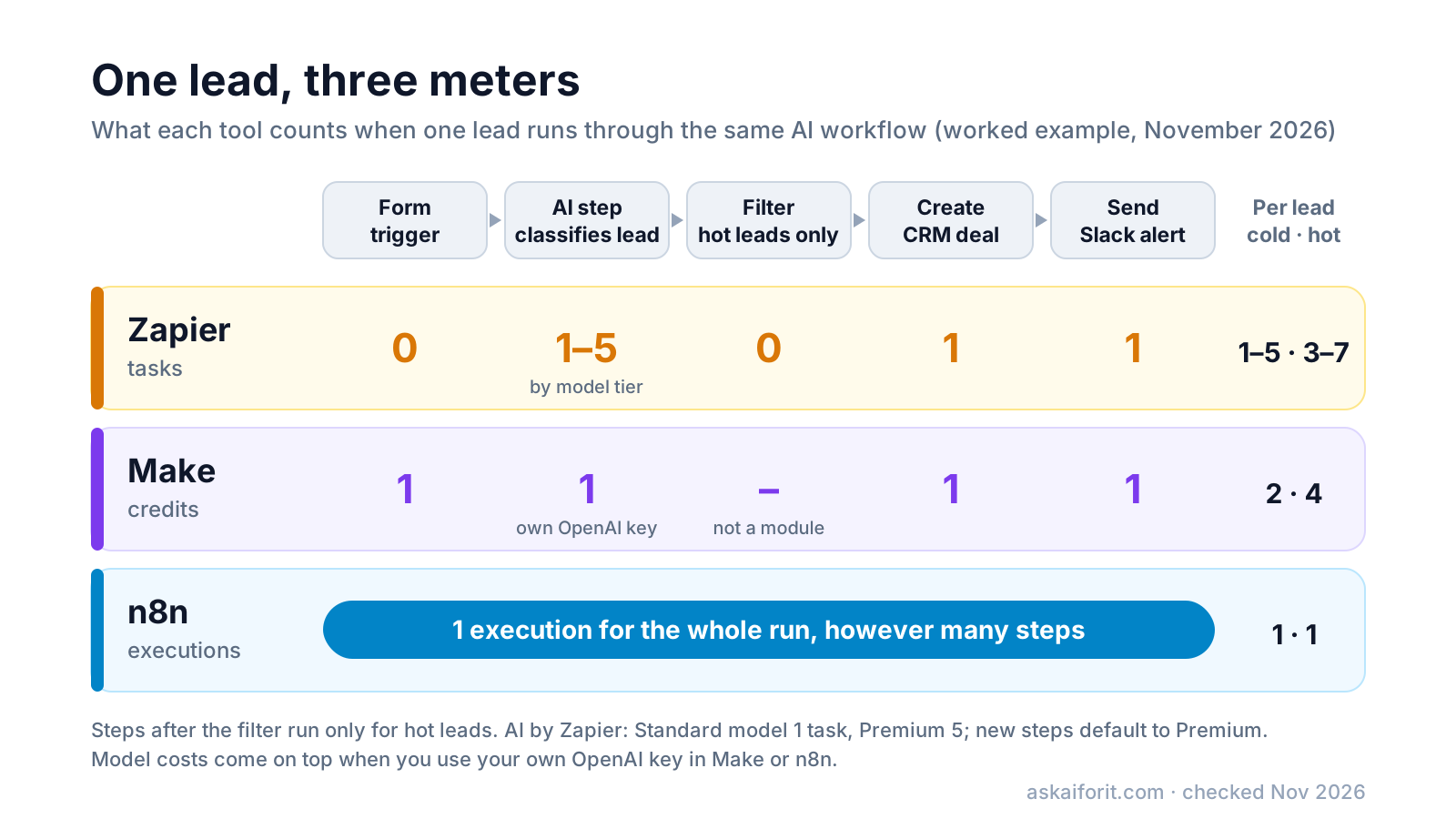
Zapier counts 1,000 AI runs plus 600 actions for hot leads. Make counts 1,000 trigger runs, 1,000 AI module runs and 600 module runs for hot leads. n8n counts one execution per lead.
Worked example: 1,000 leads a month, 300 of them hot (prices checked November 5, 2026)
| Tool and setup | Usage a month | Smallest plan that fits | Price, billed yearly |
|---|---|---|---|
| Zapier, AI step on a Standard model | 1,600 tasks | Professional, 2,000 tasks | $49/mo ($73.50 billed monthly) |
| Zapier, AI step on Premium, the default | 5,600 tasks | Professional, 10,000 tasks | $129/mo ($193.50 billed monthly) |
| Make, AI module with your own OpenAI key | 2,600 credits | Core, 10,000 credits | $9 to $12/mo by country, plus model usage |
| n8n Cloud, your own key or Gateway credits | 1,000 executions | Starter, 2,500 executions | €20/mo, plus model usage |
| n8n Community edition, self-hosted | 1,000 executions | No plan needed | €0 to n8n, plus server and model usage |
What the example shows:
- Zapier's bill depends on the AI tier. The same workflow costs $49 or $129 a month on yearly billing. With your own API key, the AI step drops to 1 task, but you pay the model provider.
- Make stays cheap if the trigger is instant. With a 15-minute polling trigger instead of a webhook, the checks alone would add about 2,880 credits. The total would still fit in 10,000.
- n8n doesn't charge per step. Add an enrichment lookup, a second AI call and an email, and n8n still counts 1,000 executions. Zapier and Make would count every added action.
At ten times the volume, 10,000 leads a month, Zapier needs 16,000 tasks on a Standard model ($189/mo for 20,000 tasks, billed yearly) or 56,000 on Premium ($489/mo for 100,000). n8n's Pro plan covers exactly 10,000 executions for €50/mo billed yearly. Make sets prices for higher credit volumes with a slider on its pricing page, so check it for your number.
Build AI steps and agents in each tool
All three tools can call a language model, act on its answer and run agents that choose their own tools.
Zapier adds AI by Zapier as a step on paid plans. Advanced and Premium models can call tools and read knowledge sources during the step. If one run reaches 75 tasks, Zapier pauses it and asks you to approve; you can raise that limit to 500. Zapier MCP lets an outside AI assistant call Zapier actions, and Zapier Copilot helps you build Zaps in chat.
Make lists Maia by Make, which builds automations and AI agents through conversation, plus Make AI Agents (beta), the AI Toolkit, an AI Content Extractor and an MCP server on every plan, Free included. You can run agents on Make's AI Provider or on your own model key.
n8n builds AI into the workflow canvas. The AI Agent node connects a model to tools, memory and MCP servers, and you can require a human to approve a tool call before it runs, for example before an agent sends a message or deletes a record. On Cloud, n8n Assistant helps you build, with 1,600 Assistant credits a month on Starter and up to 9,600 on Pro. For self-hosting, n8n publishes an AI starter kit, a Docker Compose template that runs n8n with Ollama for local models, the Qdrant vector store and PostgreSQL.
Self-host n8n: what is free and what the licence allows
n8n runs on your own infrastructure with Docker or Docker Compose. Without a licence key it runs as the free Community edition, which n8n describes as "almost the complete feature set". Its docs offer a one-line setup for Linux or macOS with Docker installed:
curl -fsSL https://get.n8n.io | shFor production, n8n's docs point to Docker Compose, which adds a database and other services.
What the free edition leaves out. SSO (SAML and LDAP), projects, sharing workflows and credentials with other users, environments, Git version control, external secrets, external binary storage, log streaming and multi-main mode need a paid plan. Registering the Community edition with your email adds folders, debugging in the editor and custom execution data for free. The self-hosted Business plan costs €667/mo billed yearly and includes 40,000 executions (compare editions).
What the licence allows. n8n's source code is under the Sustainable Use License, and files with .ee. in the name are under the n8n Enterprise License. n8n calls this model fair-code and does not describe n8n as open source, because the licence restricts use. The licence lets you use n8n "only for your own internal business purposes or for non-commercial or personal use". n8n's licence FAQ gives examples:
- Allowed: running your own business on it, building automations for clients on your instance when clients cannot create or edit them, charging for setup, consulting and training, and using n8n behind the scenes in your product, where users trigger automations you built.
- Not allowed: hosting n8n as a service for clients to build workflows, letting your product's users build or configure their own workflows (through a custom UI, the API, MCP or an AI agent), forking n8n to launch your own automation product, and white-labelling it.
Anything in the second list needs a commercial agreement with n8n. If you need a permissive licence, Activepieces releases its core under MIT, according to its docs.
Pros
- No per-run fee from n8n at any volume
- Workflow data and credentials stay on servers you control
- AI Agent, MCP and code nodes are all in the free edition
Cons
- You handle hosting, updates, backups and security
- SSO, projects, sharing and Git version control need a paid plan
- You cannot offer n8n to customers as a workflow builder without a commercial agreement
Which tool fits your team
- Choose Zapier if non-technical people will build the automations, you need an app the other two do not connect, and volume is modest. Set the AI model tier on purpose, because the default is the most expensive.
- Choose Make if your scenarios branch, loop and transform data, and you want the lowest price per step. Prefer instant triggers and keep an eye on bundles that multiply module runs.
- Choose n8n if you run AI agents or long workflows at volume, and want to pay per run rather than per step, on n8n Cloud or on your own server. Read the licence before you put n8n inside a product.
Not sure which category fits your job? The AI Tool Finder suggests tools from our directory by task and budget.
Other automation tools to shortlist
Microsoft Power Automate fits teams that already work in Microsoft 365. Workato and Tray.ai aim at enterprise integration with governance needs, and IFTTT covers personal automations. Zapier Agents runs AI agents without building Zaps. Activepieces has an MIT-licensed community edition, Pipedream suits developers who write code steps, and LangChain is for building the agent in code.
Automate workflows across 7,000 applications seamlessly.
Create automated workflows to connect apps and streamline tasks.
Create AI assistants to automate everyday business tasks.
Automate repetitive tasks to boost productivity and efficiency.
For a longer list, see the Zapier alternatives in our directory, or browse the whole workflows category.
AI Tool Finder Answer three questions and get matching tools from our directory.FAQ
Is n8n free?
The self-hosted Community edition is free under the Sustainable Use License, for internal business, personal or non-commercial use. n8n Cloud starts with a 14-day trial, then costs from €20 a month billed yearly for 2,500 executions, as of November 2026.
Does Make charge when a scenario finds no new data?
Yes. A polling trigger uses one operation per check, even when it returns nothing. Use an instant trigger through a webhook, or a longer schedule, to cut those credits.
Can I build a SaaS product on n8n's Community edition?
Only if your users cannot build or edit workflows. Using n8n as a hidden backend for automations you built is allowed; giving customers a workflow builder powered by n8n needs a commercial agreement.