Favicon Sizes: The Complete Checklist (ICO, PNG, SVG, Apple Touch, Manifest)
The five files a modern site needs, what each one is for, the HTML and manifest to copy, and the rules Google Search applies before it shows your icon.
 Roman Shalabanov
Published
10 min read
Roman Shalabanov
Published
10 min read

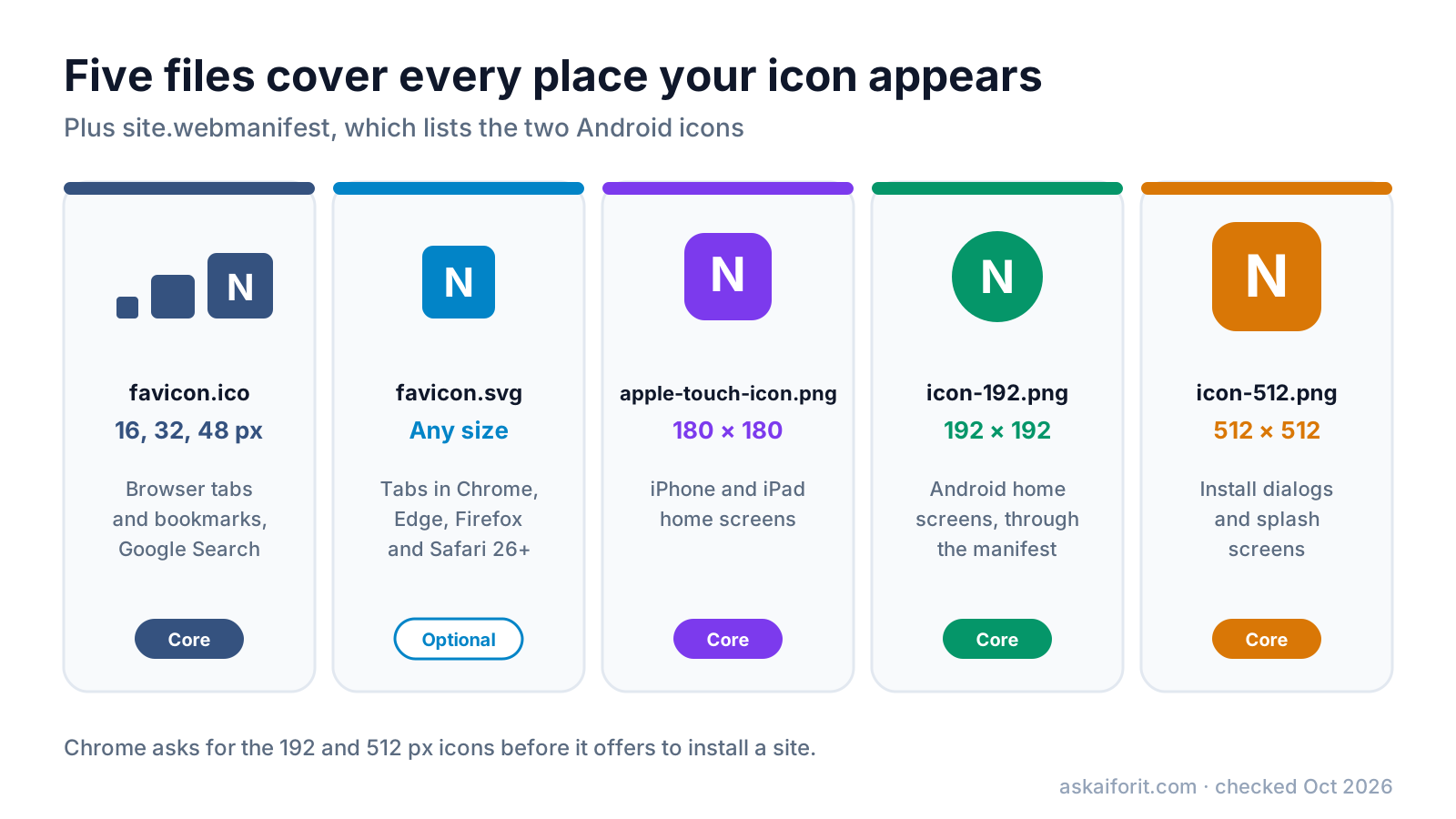
The favicon sizes you need are 16, 32 and 48 px inside one favicon.ico, an SVG that scales to any size, a 180 × 180 px Apple touch icon, and 192 × 192 and 512 × 512 px PNG icons listed in a web manifest. Those five files and five lines of HTML cover browser tabs, bookmarks, Google Search results, iPhone and Android home screens and install dialogs. You do not need the long lists of sizes that older favicon guides recommend.
Each file has one job, and the rules behind them come from different places: the HTML standard, Apple, Chrome and Google Search. This checklist explains each file, gives you the HTML and manifest to copy, and lists the conditions Google applies before it shows your icon next to your results. All details were checked against the vendors' documentation in October 2026.
Copy the minimal set: five files and five lines of HTML
The minimal favicon set
| File | Size | Used by | Needed? |
|---|---|---|---|
| favicon.ico | 16, 32 and 48 px in one file | All browsers, bookmarks, Google Search | Yes |
| favicon.svg | Scales to any size | Chrome, Edge, Firefox, Safari 26 and later | Optional |
| apple-touch-icon.png | 180 × 180 | iPhone and iPad home screens | Yes |
| icon-192.png | 192 × 192 | Android home screens, through the manifest | Yes |
| icon-512.png | 512 × 512 | Install dialogs and splash screens | Yes |
| site.webmanifest | – | Lists the two PNG icons, the name and the colours | Yes |
The Favicon Generator builds these files, the manifest and this HTML from one letter, emoji or image. It makes the SVG only from a letter or emoji. Put the files in the root folder of your site and add this to the <head> of every page:
<link rel="icon" href="/favicon.ico" sizes="32x32">
<link rel="icon" href="/favicon.svg" type="image/svg+xml">
<link rel="apple-touch-icon" href="/apple-touch-icon.png">
<link rel="manifest" href="/site.webmanifest">
<meta name="theme-color" content="#35527f">
When a page lists several icons, MDN explains that the browser picks one using their type, sizes and media attributes, and uses the last one if several fit equally well. The sizes="32x32" on the ICO line marks it as a small bitmap, so Chrome does not prefer it over the SVG. If you have no SVG, drop the second line and the sizes attribute.
Keep favicon.ico: the oldest format still does the most work
The ICO format is a container that holds several images in one file. A good favicon.ico has three: 16 px, the size browser tabs draw the icon at on standard screens; 32 px, the same tab on a high-density screen; and 48 px for larger surfaces.
It stays in the set for two reasons:
- Browsers look for it on their own. The HTML standard lets a browser request /favicon.ico when a page has no icon link, so the file at that exact address catches feed readers, bookmarking tools and any page where the link tag is missing.
- Google Search needs a bitmap. Google's favicon guidelines, last updated in August 2026, list BMP, GIF, ICO, PNG, JPEG, PPM and TIFF as the supported formats. SVG is not on the list.
Write rel="icon", not rel="shortcut icon". MDN calls shortcut non-conforming and says authors "must not use it anymore", although Google still accepts it for historical reasons.
Add an SVG favicon for sharp tabs at any zoom
An SVG favicon is one small file that stays sharp at every size and zoom level. Chrome, Edge and Firefox support it, and Apple added SVG icon support in Safari 26, released in 2025. Declare it with type="image/svg+xml" so browsers that cannot use it skip it.
Keep the file simple: a background shape and one letter or symbol. Convert any text to outlines, because an SVG used as an icon cannot load external files such as web fonts, and the letter would otherwise fall back to whatever font the visitor has. If you want, the SVG can include a prefers-color-scheme media query in its own styles, so the icon switches colours in a dark browser theme. Test that in every browser you care about before relying on it.
Give iOS a 180 × 180 Apple touch icon
For home screen shortcuts, iPhones and iPads look for the non-standard apple-touch-icon link, as MDN notes. Since Safari 15.4, iOS can fall back to manifest icons, but WebKit says the touch icon takes precedence when both exist.
Apple's Safari documentation gives the rules:
- A PNG named apple-touch-icon.png in the root folder is used for the whole site, even without a link tag.
- Apple's example sizes are 152 × 152 and 167 × 167 for iPads and 180 × 180 for iPhones with Retina displays.
- When no icon matches the device, iOS uses the smallest icon larger than the size it needs.
That last rule is why one 180 × 180 file is enough: the iPads that want 152 or 167 px scale it down. Make it a full square with a solid background. iOS rounds the corners itself, and transparent areas do not stay transparent on the home screen, so a pre-rounded or see-through icon ends up with odd corners. Google Search also reads apple-touch-icon links, which gives it a large PNG to work with.
List 192 and 512 px icons in the web manifest
Android and desktop Chrome read icons from the web manifest, a small JSON file. web.dev's manifest guide says that for Chromium "you must provide at least a 192x192 pixel icon and a 512x512 pixel icon", and Chrome scales those two to whatever a device needs.
{
  "name": "Example Notes",
  "short_name": "Notes",
  "icons": [
    { "src": "/icon-192.png", "sizes": "192x192", "type": "image/png" },
    { "src": "/icon-512.png", "sizes": "512x512", "type": "image/png" }
  ],
  "theme_color": "#35527f",
  "background_color": "#ffffff",
  "display": "standalone"
}
That is enough for icons. If you also want Chrome to offer to install the site, its install criteria ask for a name, the 192 and 512 px icons, a start_url, a supported display mode and HTTPS. Keep theme_color the same as the theme-color meta tag in your HTML, as web.dev recommends.
Maskable icons are optional. Android crops home screen icons into circles, squircles and other shapes. An icon marked "purpose": "maskable" tells the system it was designed for that crop. The W3C manifest specification defines the safe zone as a centred circle with a radius of 40% of the icon size. On a 512 px icon, keep the logo inside a circle about 410 px across, fill the whole square with background colour, and avoid transparent pixels. Add it as a separate file with its own entry rather than reusing your regular icon, which would look too small once padded.
Meet Google's rules so your icon shows in search results
Google shows a favicon next to your site's results only if it can find and fetch one that meets its guidelines. As of October 2026 they say:
- Shape and size. Square (1:1) and at least 8 × 8 px. Google recommends larger than 48 × 48 px so it looks good on various surfaces.
- Format. BMP, GIF, ICO, PNG, JPEG, PPM or TIFF.
- Placement. A
<link>tag in the head of your home page withrelset toicon,shortcut icon,apple-touch-iconorapple-touch-icon-precomposed. The file can live on a CDN. - One per hostname. example.com and news.example.com can have different favicons; example.com/news cannot have its own.
- Crawlable. Googlebot must be able to crawl the home page and Googlebot-Image the icon file. Neither may be blocked.
- Stable. Do not change the favicon URL often.
- Appropriate. Google replaces icons it considers inappropriate with a default one.
Updates are slow. Google says crawling can take "anywhere from several days to several weeks". You can speed it up by requesting indexing of your home page with the URL Inspection tool in Search Console. Even then, Google says a favicon is not guaranteed to appear when every guideline is met.
Design an icon that still reads at 16 pixels
A 16 × 16 icon has 256 pixels in total. Whatever you draw has to survive that:
- Use one or two letters or a symbol. A full wordmark turns into a grey smudge. Take the first letter of your brand or the symbol from your logo without its text.
- Use strong contrast. Tabs can be light or dark depending on the browser theme. A solid background shape keeps the icon visible on both.
- Leave some padding. In a circle or rounded square, keep the letter about 10–16% away from the edge.
- Start big. Begin from a square image of 512 px or more, or from an SVG. Small sources enlarged to 180, 192 or 512 px look soft.
- Check the small sizes by eye. Downscaled automatically, a detailed icon can blur at 16 px. A simpler version for the smallest sizes often reads better.
Use the same colours and symbol in your share image, so a link looks like the same product in a tab and in a feed. The Open Graph image guide covers sizes and templates for that, and the product launch checklist lists the other files to prepare before launch day.
Check that every icon works
- Open /favicon.ico, /favicon.svg, /apple-touch-icon.png and /site.webmanifest directly in the browser. Each should load, not redirect to a login page or a 404.
- Reload with the cache cleared, or open a private window. Browsers cache favicons hard, so an old icon can hang around after you deploy a new one.
- In Chrome DevTools, open Application, then Manifest. It lists the icons Chrome found and any problems with the manifest.
- On an iPhone, tap Share, then Add to Home Screen, and look at the icon it offers.
- In Search Console, inspect your home page URL and request indexing so Google fetches the new icon sooner.
If your site runs on a website builder, check whether its favicon setting covers all five files or only one image. To make the files yourself, start with these favicon and icon generators:
FAQ
What size should a favicon be?
Put 16, 32 and 48 px images in favicon.ico, and add a 180 px Apple touch icon and 192 and 512 px PNGs listed in a web manifest. An SVG favicon is optional and stays sharp at every size.
Do I still need favicon.ico if I have an SVG favicon?
Yes. Browsers request /favicon.ico on their own, older browsers cannot use SVG icons, and Google Search does not list SVG among its supported favicon formats.
Why doesn't my favicon show in Google results?
Check that the icon link is on your home page, that Googlebot and Googlebot-Image can crawl both the page and the file, and that the icon is square and in a supported format. Then allow several days to several weeks, or request indexing of the home page in Search Console.
Do I need several Apple touch icon sizes?
No. One 180 × 180 PNG is enough. When there is no exact match, iOS uses the smallest icon larger than the size it needs, so iPads scale the 180 px file down.
Can I use one 512 px PNG for everything?
Browsers will scale it, but tabs show it at 16 px, where detail blurs, and iOS still looks for an Apple touch icon. A small ICO, a touch icon and two manifest icons give each place a file made for it.