The Product Launch Checklist: What to Do Before, During and After Launch Day
What to do four weeks out, two weeks out, on launch day and in the month after, and why the work before and after the launch post matters most.
 Roman Shalabanov
Published
11 min read
Roman Shalabanov
Published
11 min read
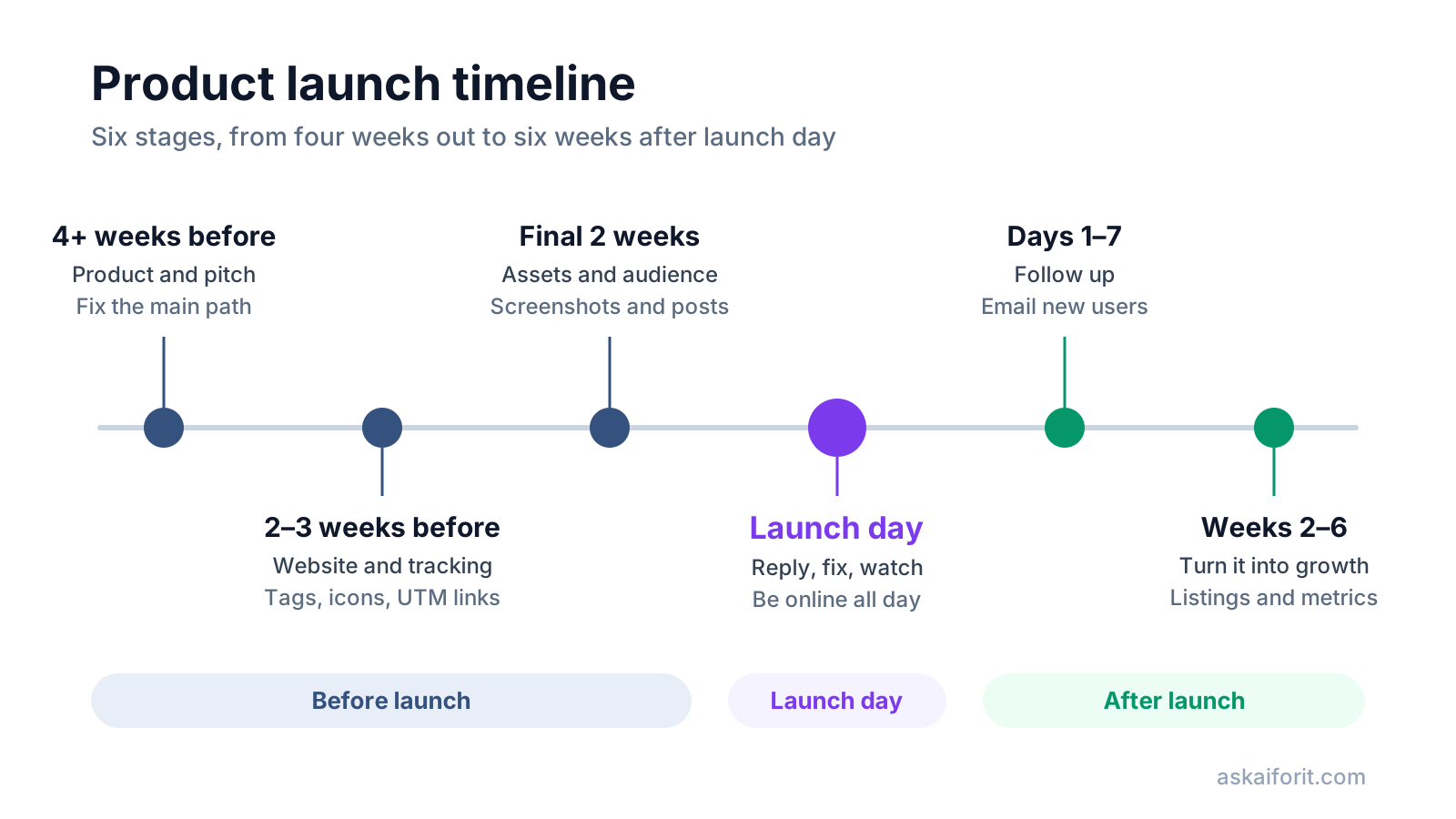
A product launch checklist works best as a timeline, not a pile of tasks. Fix the product and the pitch four or more weeks before launch, set up the website and tracking two to three weeks out, and prepare assets and your first audience in the final two weeks. On launch day you reply and fix. In the month after, you turn visitors into users. A common mistake is to skip the first and the last stage and put all the effort into the launch post itself.
This guide explains why each stage matters and what to do in it. The same 60 steps are in our interactive Product Launch Checklist, which saves your progress in the browser and exports to Markdown or CSV. Every step is an action, not a rule of a particular launch site. Platforms change their rules on timing and self-promotion, so read the current guidelines of each place you post.
Start four weeks out: fix the product and the pitch
Launch traffic is a one-time test. People who arrive, get confused and leave often do not come back for a second look. That is why the work that pays off most happens before you write a single post.
- Say what the product does in one sentence. Name who it is for and what changes for them. If it takes a paragraph, visitors will not get it in the first five seconds on your page either.
- Choose the first audience. Pick one group you can reach directly, such as freelance designers or small online shops. "Everyone who writes" is not a group you can post to.
- Write a tagline under 60 characters. Launch pages and social cards cut long lines. Lead with the result for the user, not with the technology behind it.
- Decide pricing. Publish your prices, or say plainly that the product is free during the beta and what happens after.
- Watch someone new sign up. Do not help them. Every question they ask is a fix to make in the interface or the copy.
- Fix the main path. Sign-up, the first useful action and payment must work on desktop and on a phone. Everything else can wait.
- Check that you survive a spike. API quotas, rate limits, email sending limits and database connections usually fail first. If your product calls an AI model, check the provider's rate limits and your spending cap as well.
- Prepare support. Add a feedback link inside the product, set up a support inbox and write answers to the questions you expect about pricing, privacy and refunds. Publish a privacy policy and terms of service.
Two to three weeks out: get the site ready to be shared and measured
Every launch post is a link. When someone shares it, the platform reads your page's tags to build the preview. When someone clicks it, your analytics reads the link's parameters to record where the visit came from. Both need to work before the first visitor arrives.
Website steps and a free tool for each
| Step | Why it matters | Free tool |
|---|---|---|
| Titles and meta descriptions | They become the text of search results and many link previews | Meta Tags & Social Preview |
| Share image, 1200 × 630 px | A shared link without an image is easy to scroll past | OG Image Generator |
| Favicon and app icons | Tabs, bookmarks and home screens each use a different file | Favicon Generator |
| Structured data | Tells search engines your category and price in a form they can read | Schema Markup Generator |
| Tagged links for each channel | Shows which places sent sign-ups, not only visits | UTM Builder |
| AI crawler rules | Decides which AI search and training bots may read the site | AI Crawler robots.txt Generator |
| llms.txt | Gives AI assistants a short map of your key pages | llms.txt Generator |
Start with the landing page. Its first screen should answer three questions: what the product does, who it is for and why it beats the current way. That means a clear headline, one line of detail, a screenshot or short demo and one main call to action. Then open the page on a phone. Much launch traffic arrives on mobile, so compress images and load what sits below the first screen later.
Install analytics and test your conversion events now, not on the morning of the launch. Sign up yourself, buy a plan if you can refund it, and check that both events reach your reports. Then prepare one tagged link for every place you will post. Our guide to UTM naming for a launch has a table of sources and mediums that Google Analytics 4 sorts into the right channels.
Finish with the plumbing. Click every link in the navigation and footer, check that the 404 page works and that every address redirects to HTTPS. Set up email authentication for your domain too. As of October 2026, Gmail's sender guidelines require SPF or DKIM from everyone who sends to Gmail accounts, and SPF, DKIM and DMARC from senders of 5,000 or more messages a day. Without them, sign-up confirmations are more likely to land in spam on the day you need them most.
Each of these steps has its own guide: Open Graph image sizes, favicon sizes, SoftwareApplication schema, robots.txt rules for AI crawlers and how to write llms.txt.
The final two weeks: prepare assets and your first audience
Two weeks out, the product and the site should be stable enough that you can spend your time on what people will see and who will see it first.
Prepare the assets
- Screenshots that show real results. Use realistic data, not an empty dashboard. Frame them and size them for launch galleries and social posts with the Screenshot Mockup Generator.
- A demo video under two minutes. Show the main job from start to finish and add captions, since many people watch without sound.
- The launch post and your first comment. Explain why you built the product, who it is for and what is new. Keep a version for each length limit you will meet. Our guide to writing a product description for launch sites covers taglines, short and long versions.
- Answers to likely objections. Comparisons with alternatives, pricing, privacy and what happens to user data come up in almost every launch thread.
- A press kit. Logo, screenshots, a founder photo and short and long descriptions, all in one shared folder.
Warm up your first audience
- Tell your email list and early users the date. Ask them to try the product and share honest feedback on the day.
- Take part in the communities where you will post. Accounts with a history of useful posts get more attention than new ones that appear only on launch day.
- Read each platform's current rules. Timing, self-promotion and asking for support are all regulated differently, and the rules change.
- List the product in directories. They keep sending visitors after the launch spike is over. You can get listed on Ask AI For It as soon as the product is ready.
- Pick the date and time, and clear your calendar. Avoid days that clash with big events or holidays in your main market.
- Agree who handles comments, support and bugs. Write it down with hours, so no question waits because everyone thought someone else had it.
- Test any launch offer. A time-limited discount gives people a reason to act today. Try the code yourself before you announce it.
Launch day: reply, fix and watch the numbers
The morning sets up the day. Work through it in this order:
- Run through sign-up and payment once more, with a fresh account on your phone. Fix anything that broke overnight.
- Publish the launch post at the time you planned, then check the links, images and video in the published version, not only in the draft.
- Post your first comment: the story behind the product, the feedback you want and an invitation to ask questions.
- Send the launch email with tagged links, and share on your own accounts with a post written for each network.
- Ask friends and colleagues personally to pass it on to people who care about the problem.
For the rest of the day, reply to every comment quickly and answer the actual question. Keep your error tracker and dashboards open, and know how to roll back a bad deploy. When someone reports a bug, fix it and reply in public that it is fixed. That builds more trust than a flawless launch.
Around midday, open your analytics' real-time report by source and medium. Every tagged link should appear. Fix any link that reports nothing while there is still traffic to measure. Save useful comments as they come in: good feedback becomes a testimonial (ask first), and repeated questions become FAQ entries.
In the evening, post an update that thanks people and says what you will fix next. Then write down what worked and what broke while it is fresh. These notes make the next launch much easier.
The first week: follow up while people remember you
New users' attention fades fast, so the first week is when follow-ups get answered.
- Email new users personally. Ask what they hoped the product would do for them. The replies tell you more than any dashboard.
- Sort feedback into bugs, requests and confusion. Confusion is usually a copy or onboarding problem, not a request for a new feature.
- Ship the quick fixes people asked for, then tell them. It turns early users into fans.
- Compare channels by sign-ups and activation, not visits. Which places sent people who completed the first useful action? This is where your tagged links pay off.
- Update the landing page. Use the words customers used to describe their problem, and add the testimonials you collected.
- Publish a launch recap. A post with real numbers and lessons gets shared and can bring a second, smaller wave of visitors.
Weeks two to six: turn the spike into steady growth
The launch spike fades within days. What stays are directory listings, search traffic and word of mouth, so this stage decides whether the launch was a peak or a start.
- Keep your directory listings current. Add new screenshots, features and pricing to every listing so they keep converting.
- Write articles that answer your users' questions. Each one can bring search visitors for months.
- Check retention after a week and after a month. It says more about product fit than launch-day numbers. The churn rate calculator does the math.
- Review pricing against real usage. See which plan people choose, where they stop in checkout and what they ask before buying.
- Ask happy users for reviews and referrals. Send a direct link to the review page or a short message they can forward.
- Start a monthly metrics review. MRR, churn and acquisition cost checked once a month show the trend better than daily numbers. Our guide to MRR, churn and LTV explains the formulas, and the SaaS Metrics Calculators do the arithmetic.
- Plan the next launch moment. A major feature, an integration or a new audience is a reason to launch again.
If you only have a week, do these five things
Not every step matters equally. With a week instead of a month, do these first:
- Make sure sign-up, the first useful action and payment work on a phone.
- Rewrite the first screen of your landing page so it says what the product does and for whom.
- Install analytics and prepare tagged links for every place you will post.
- Prepare a share image, screenshots and a short launch post.
- Tell the people who already know you, and plan to answer every comment on the day.
The rest makes the launch smoother and the results easier to read. These five decide whether visitors understand the product and whether you can see what worked.
Tools from our directory for several of the steps above, from the demo video to launch-day errors and feedback:

Record and share personalized video messages effortlessly.
Email marketing solution for creators to engage their audience.
Real-time error tracking for developers to enhance software reliability.
FAQ
How far ahead should I start preparing a launch?
Four to six weeks gives you time to fix onboarding, prepare assets and build some presence in the communities you plan to post in. With less time, start with the five priorities above.
Which steps are easiest to forget?
Tracking and limits. Without tagged links you cannot tell which channel brought paying users, and an email quota or API rate limit hit at noon can break sign-up for the busiest hours of the day.
Should I launch on several sites on the same day?
You can, but every launch needs someone answering comments. Many makers spread launches over a few days or weeks so each one gets full attention.
Does this checklist cover the rules of Product Hunt or Hacker News?
No. The steps are general on purpose, so they stay correct. Rules for posting, timing and asking for support on sites like Product Hunt change, so read each platform's current guidelines before you post.
What if the launch is quiet?
That is common, and it is not the end. Talk to the users who did sign up, improve the product and the page, and use the next feature as a reason to launch again.