Should You Block GPTBot? Robots.txt Rules for Every AI Crawler Explained
GPTBot, OAI-SearchBot, ClaudeBot, Google-Extended and the rest: what each AI bot collects, what blocking it changes, and robots.txt rule sets you can copy today.
 Roman Shalabanov
Published
Updated
11 min read
Roman Shalabanov
Published
Updated
11 min read
Block GPTBot if you do not want OpenAI to use your pages to train future models. That is all it controls. GPTBot does not decide whether ChatGPT can find, cite and link your site; OpenAI uses a separate crawler, OAI-SearchBot, for that. And when someone asks ChatGPT to open your page, the request comes from a third agent, ChatGPT-User.
So the real question is not "GPTBot, yes or no" but which of three groups of AI bots you want on your site. If you sell a product and want people to find it through ChatGPT, Perplexity or Claude, the usual choice is to block training crawlers and allow AI search. This guide lists 21 AI user agents that their operators document, as of October 2026, explains what blocking each one does, and gives you robots.txt rule sets to copy and test.
Know the three kinds of AI bots before you block any
Most AI companies split the work between several bots, and each robots.txt rule reaches only one of them.
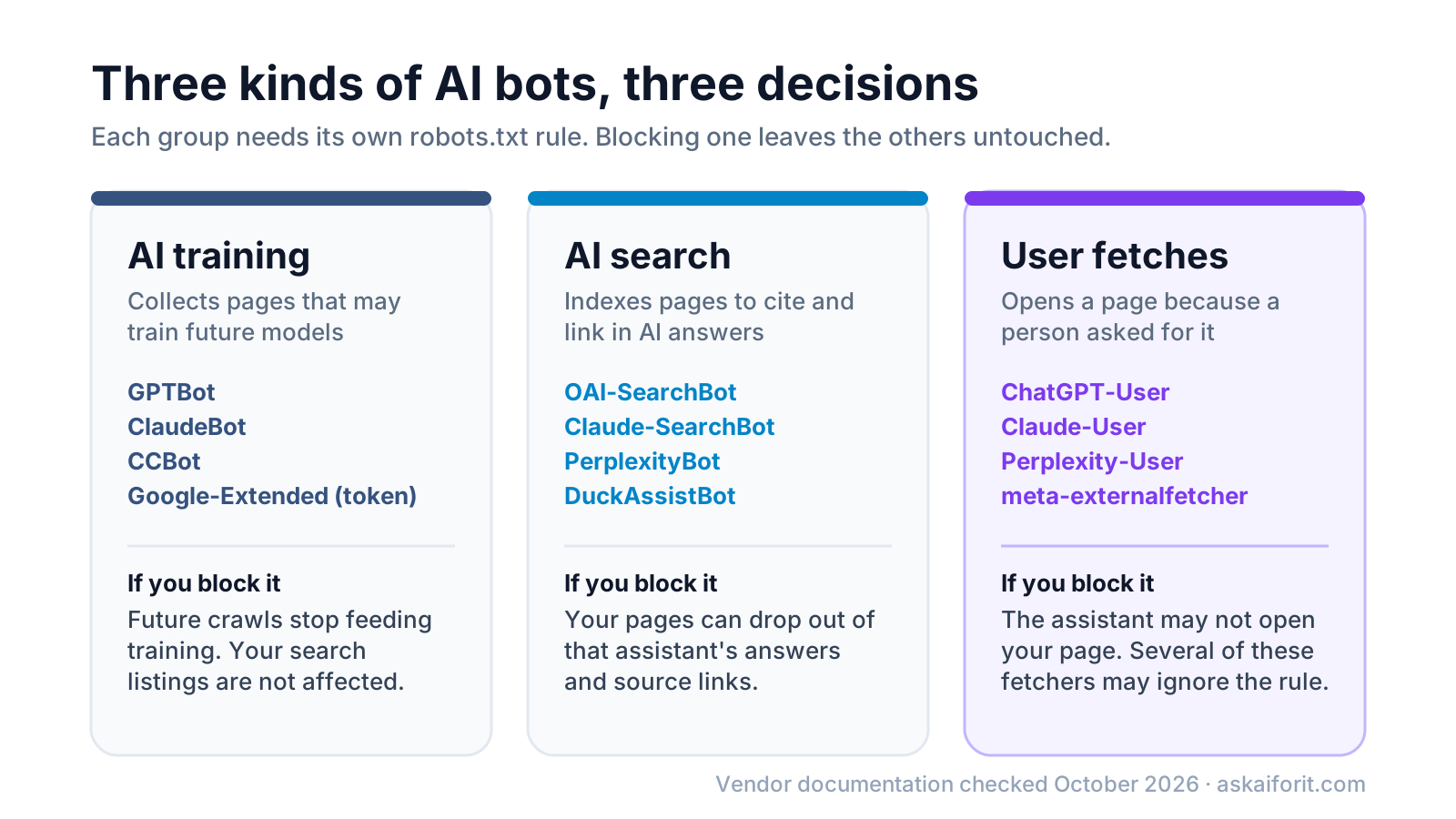
- Training crawlers collect public pages that may end up in the datasets used to train future models. Blocking them is the opt-out most people mean when they say "block AI".
- AI search crawlers build an index that an assistant searches when it answers a question, then cites and links. Blocking them is closer to blocking a search engine: you lose the citations and the clicks they bring.
- User fetchers open a single page because a person asked, for example by pasting your URL into a chat. They do not crawl on their own, and several vendors say these fetchers may not follow robots.txt at all.
OpenAI states that "each setting is independent of the others" in its crawler documentation. You can disallow GPTBot and still allow OAI-SearchBot. Anthropic, Meta, Amazon and Mistral run the same kind of split, and Perplexity has separate search and user bots.
Every AI crawler and what it does (as of October 2026)
The table lists the tokens you put after User-agent: in robots.txt. We include only bots whose operator documents them publicly; we checked each vendor's page on October 19, 2026.
AI user agents and how they treat robots.txt
| Token | Operator | Job | Follows robots.txt |
|---|---|---|---|
| GPTBot | OpenAI | Training | Yes |
| OAI-SearchBot | OpenAI | AI search (ChatGPT search) | Yes |
| ChatGPT-User | OpenAI | User fetch | Not always |
| ClaudeBot | Anthropic | Training | Yes |
| Claude-SearchBot | Anthropic | AI search | Yes |
| Claude-User | Anthropic | User fetch | Yes |
| PerplexityBot | Perplexity | AI search | Yes |
| Perplexity-User | Perplexity | User fetch | Generally ignores it |
| Google-Extended | Training and Gemini grounding (control token) | Yes | |
| Applebot-Extended | Apple | Training (control token) | Yes |
| CCBot | Common Crawl | Open web dataset | Yes |
| meta-externalagent | Meta | Training and product indexing | Yes |
| meta-webindexer | Meta | AI search (Meta AI) | Yes |
| meta-externalfetcher | Meta | User fetch | Not always |
| Amazonbot | Amazon | Products, may train models | Yes |
| Amzn-SearchBot | Amazon | Search (Alexa and others) | Yes |
| Amzn-User | Amazon | User fetch | Not always |
| DuckAssistBot | DuckDuckGo | AI answers with sources | Yes |
| MistralAI-Training | Mistral AI | Training | Yes |
| MistralAI-Index | Mistral AI | AI search | Yes |
| MistralAI-User | Mistral AI | User fetch | Not stated |
A few rows need context:
- CCBot builds Common Crawl, a free archive of the web that many AI datasets start from. In the GPT-3 paper, filtered Common Crawl made up 60% of the training mix. Blocking CCBot keeps your future pages out of an archive that anyone can download.
- meta-externalagent and Amazonbot do more than training. Meta says its agent crawls "for use cases such as training foundation AI models" or for improving products by indexing content. Amazon says Amazonbot improves its products and services and "may be used to train Amazon AI models". Meta and Amazon each run a separate search bot (meta-webindexer and Amzn-SearchBot) that you can keep allowed.
- Microsoft documents no separate AI crawler token. Bing instead uses the
noarchiveandnocacherobots meta tags to limit how your content is used in its AI answers and model training, as described in its 2023 announcement for Bing Chat, now Copilot. - Undocumented bots such as ByteDance's Bytespider are not in the table because we found no operator documentation to check. You can still add a group for any token you see in your logs.
- Some documented agents are left out on purpose. OpenAI's OAI-AdsBot only visits pages submitted as ChatGPT ads. Google's user-triggered fetchers, such as Google-Agent, "generally ignore robots.txt rules", Google says, so a rule for them changes little.
Understand what Google-Extended and Applebot-Extended control
These two tokens are not crawlers. Googlebot and Applebot keep crawling for search either way; the token tells Google or Apple whether the content they collect may be used for AI.
Google's crawler documentation says Google-Extended "doesn't have a separate HTTP request user agent string", so you will never see it in your logs. It controls whether your content may train future Gemini models and whether it may be used for grounding, which means feeding search results to Gemini at the moment it answers. Google also says the token "does not impact a site's inclusion in Google Search nor is it used as a ranking signal".
That has a consequence people miss: Google-Extended does not keep you out of AI Overviews or AI Mode, because those are part of Search. Google lists other controls for them on its AI features page: nosnippet, data-nosnippet, max-snippet and noindex. And as of August 31, 2026, Google has rolled out a Search generative AI control to every site in Search Console, under Settings. It excludes a site's links and content from AI Overviews, AI Mode and Discover's AI features without affecting regular results.
Apple's Applebot page says "Applebot-Extended does not crawl webpages". Disallowing it opts your content out of training Apple's foundation models, and Apple says such pages "can still be included in search results" in Spotlight, Siri and Safari. One detail: if your robots.txt has no Applebot rules but does have Googlebot rules, Apple says Applebot follows the Googlebot rules.
Know what blocking does and does not do
A Disallow line changes future crawling by a bot that chooses to obey it. It does less than many people expect.
- It does not delete anything. Anthropic, for example, says blocking ClaudeBot excludes the site's "future materials" from training. Pages collected before your change stay in existing datasets.
- It is not access control. RFC 9309, the robots.txt standard, says plainly: "These rules are not a form of access authorization." A scraper can ignore the file or fake a known user-agent name.
- User fetchers are the exception. OpenAI says robots.txt rules may not apply to ChatGPT-User because a user started the request. Perplexity says Perplexity-User "generally ignores robots.txt rules". Meta and Amazon say the same of their fetchers.
- Search bots take your citations with them. OpenAI says sites opted out of OAI-SearchBot "will not be shown in ChatGPT search answers, though can still appear as navigational links." Anthropic warns that blocking Claude-SearchBot may reduce your visibility in Claude's search results.
- Changes are not instant. RFC 9309 asks crawlers not to use a cached robots.txt for more than 24 hours. OpenAI says search changes take about 24 hours, Perplexity says up to 24 hours, and DuckDuckGo says 72 hours for DuckAssistBot.
Copy one of these robots.txt rule sets
Two parsing rules decide how every set below behaves. First, a crawler follows the group that names its token and uses User-agent: * only when no group names it. Second, several User-agent lines can share one group of rules. That first rule is the most common trap: once GPTBot has its own group, it ignores your * rules, so repeat any private paths there.
Block AI training, allow AI search and user fetches
This is the default we suggest for SaaS and product sites. Assistants can still find, cite and open your pages; model makers are asked not to train on them.
# AI training: opt out
User-agent: GPTBot
User-agent: ClaudeBot
User-agent: Google-Extended
User-agent: Applebot-Extended
User-agent: CCBot
User-agent: meta-externalagent
User-agent: Amazonbot
User-agent: MistralAI-Training
Disallow: /

# Everyone else, including AI search bots and user fetchers
User-agent: *
Disallow: /admin/

Sitemap: https://example.com/sitemap.xml
Block every documented AI bot
Use this if you would rather not appear in AI answers at all. Expect to lose citations and referral clicks from ChatGPT search, Claude, Perplexity and the others, and remember that some user fetchers may still visit.
User-agent: GPTBot
User-agent: OAI-SearchBot
User-agent: ChatGPT-User
User-agent: ClaudeBot
User-agent: Claude-SearchBot
User-agent: Claude-User
User-agent: PerplexityBot
User-agent: Perplexity-User
User-agent: Google-Extended
User-agent: Applebot-Extended
User-agent: CCBot
User-agent: meta-externalagent
User-agent: meta-webindexer
User-agent: meta-externalfetcher
User-agent: Amazonbot
User-agent: Amzn-SearchBot
User-agent: Amzn-User
User-agent: DuckAssistBot
User-agent: MistralAI-Training
User-agent: MistralAI-Index
User-agent: MistralAI-User
Disallow: /

User-agent: *
Disallow: /admin/
Keep training bots out of one section only
Say your docs and pricing pages should be open to everyone, but your paid guides should not train models. Note that /admin/ is repeated: without it, GPTBot would be allowed into /admin/.
User-agent: GPTBot
User-agent: ClaudeBot
User-agent: Google-Extended
User-agent: CCBot
Disallow: /guides/
Disallow: /admin/

User-agent: *
Disallow: /admin/
If you want every bot in, you need no AI rules at all. Just make sure the file loads: under RFC 9309, a robots.txt that answers with a server error (5xx) tells crawlers to assume they may not crawl anything.
Test your rules before and after you deploy
- Open
https://your-site.com/robots.txtin a private window. It should return status 200 as plain text, without a login wall or a bot challenge page. Each subdomain needs its own file. - Paste the file into the checker in the AI crawler robots.txt generator and pick a path, such as
/or/guides/. It shows which bots each rule lets in, using the RFC 9309 matching rules. - For Google, open the robots.txt report in Search Console under Settings. It shows the version Google fetched and any parsing errors, and lets you request a recrawl after a critical fix.
- Wait a day, or three for DuckAssistBot, then check your server logs for the tokens you blocked.
- If a "blocked" bot keeps showing up, compare its IP address with the vendor's published ranges. A visitor that claims to be GPTBot from an unlisted address is not GPTBot.
These two commands cover step 4 and step 5 on a typical Nginx server:
# Count requests per AI bot in the current log
grep -oE "GPTBot|OAI-SearchBot|ChatGPT-User|ClaudeBot|Claude-SearchBot|Claude-User|PerplexityBot|Perplexity-User|CCBot|meta-externalagent|Amazonbot" /var/log/nginx/access.log | sort | uniq -c | sort -rn

# List OpenAI's published GPTBot ranges to compare with the IPs in your log
curl -sL https://openai.com/gptbot.json | jq -r '.prefixes[] | .ipv4Prefix // .ipv6Prefix'
Anthropic publishes its ranges at https://claude.com/crawling/bots.json and Perplexity at https://www.perplexity.com/perplexitybot.json, in the same format.
Decide what fits your site
There is no single right answer. Here is the trade-off for blocking training bots:
Pros
- Vendors that honor the rule stop collecting your new pages for training
- Less crawl traffic from large crawlers such as CCBot
- No effect on your Google or Apple search listings, or on AI search bots you leave allowed
Cons
- Nothing already collected is removed
- Bots that ignore robots.txt are not stopped
- Future models may learn less about your product from your own wording and more from what others write about it
That last point matters for makers. If you want assistants to describe your product accurately, they need to read about it somewhere. Some SaaS teams allow training on marketing pages and block it only on docs or paid content. Others block training everywhere and rely on AI search, where the assistant reads the live page and links to it. Both are reasonable. Blocking AI search bots, on the other hand, rarely helps a product site: it removes you from answers where buyers compare tools. Our guide to getting recommended by ChatGPT, Perplexity and AI Overviews covers that side.
If people should find the right pages once bots are allowed in, add a short llms.txt file as an optional extra.
To edit and test robots.txt on a live site, and to find AI bots in your server logs, start with these:
Website auditing and SEO analysis for improved search visibility.
FAQ
Does blocking GPTBot remove my site from ChatGPT?
No. GPTBot only collects training data. ChatGPT search relies on OAI-SearchBot, and pages ChatGPT opens at a user's request come from ChatGPT-User. Block OAI-SearchBot too if you want to stay out of ChatGPT search answers; OpenAI says you may still appear as a plain navigational link.
Does blocking Google-Extended remove me from AI Overviews?
No. AI Overviews and AI Mode are part of Google Search, and Google-Extended does not affect Search. Use nosnippet, max-snippet or the Search generative AI control in Search Console instead.
Should I block CCBot?
If you want to keep future pages out of AI training, yes. Common Crawl's archive is free to download and many training datasets are built from it, so one rule covers data that many model makers can use.
Will blocking AI crawlers hurt my SEO?
Blocking training bots and control tokens does not affect Google rankings. Blocking AI search bots removes you from those assistants' answers, which costs you citations and visits but does not change your Google position.
Can I block AI bots from only part of my site?
Yes. Use path rules such as Disallow: /guides/ in the bot's group. Remember to copy into that group any rules from User-agent: * that should still apply, because a bot with its own group ignores the * group.