How to Write a Product Description for Launch Sites and Directories: Tagline, Short and Long Versions
Templates for a 60-character tagline, a one-sentence summary and a 500-character description, with SaaS tagline examples, field limits checked in October 2026 and a checklist.
 Roman Shalabanov
Published
9 min read
Roman Shalabanov
Published
9 min read
Every launch site and directory asks for the same three things in different boxes: a one-line tagline, a short summary and a longer description. Write all three before launch day, in one document, and paste them in. The templates are simple. Tagline: what the product does, for whom, in under 60 characters. Short description: one or two sentences, about 150 characters, with the job, the audience and one concrete detail. Long description: 300 to 500 characters that answer what it is, how it works, who it is for and what it costs.
The hard part is not length but specificity. "AI-powered productivity platform" fits any field and says nothing. "Turn receipt photos into expense reports" fits the same field and tells a reader whether to click. The rest of this guide gives you the templates, the limits we checked in October 2026, worked examples for an invented product and a checklist.
Write three versions once, then reuse them
Think of your description as a ladder. Each rung adds detail to the one above it, and each one must make sense on its own, because sites show them separately.
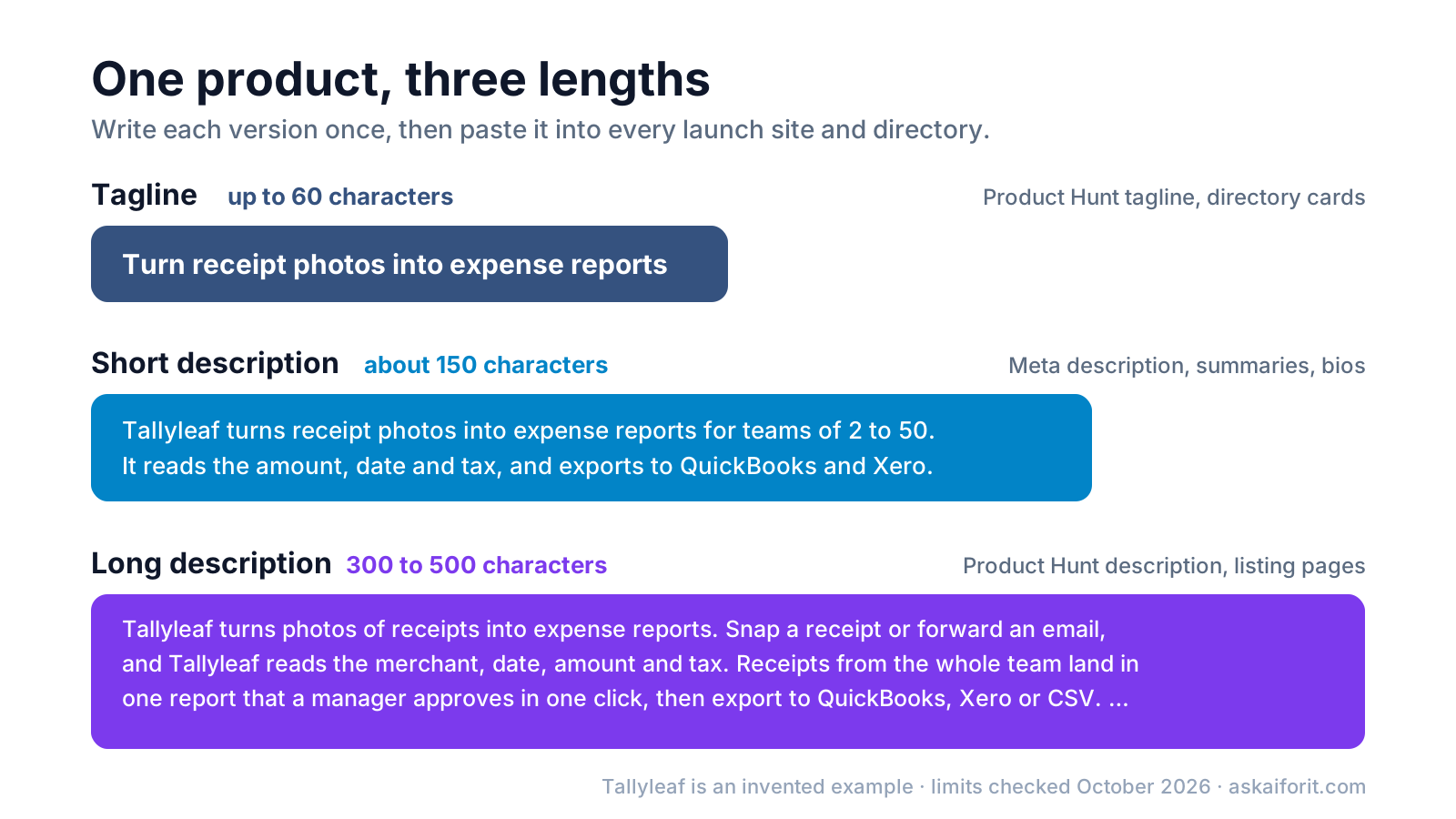
The examples in this guide are for Tallyleaf, an invented app that reads receipt photos and builds expense reports for small teams. Swap in your own product as you go.
Check the length limits before you write
Limits differ by site and change without notice. These are the ones we checked on the platforms' own pages in October 2026.
Field limits on common launch platforms (as of October 2026)
| Field | Limit | Where it is stated |
|---|---|---|
| Product Hunt tagline | 60 characters | Product Hunt launch guide |
| Product Hunt description | 500 characters | Product Hunt launch guide |
| Google Play short description | 80 characters | Play Console Help |
| Google Play full description | 4,000 characters | Play Console Help |
| App Store subtitle | 30 characters | Apple developer site |
| App Store promotional text | 170 characters | Apple developer site |
| Chrome extension description | 132 characters | Chrome extension docs |
| Google search snippet | No fixed limit, cut to fit the screen | Google Search Central |
Sources: Product Hunt, Google Play, Apple, Chrome and Google Search.
Many AI and SaaS directories use the same pattern: a one-line field, a summary of roughly 100 to 200 characters and a free-form description. As a rule of thumb, if you write to 60, 150 and 500 characters, you will rarely need to cut. When a site has a stricter limit, shorten the version you have instead of writing a new one.
Write a tagline that says what the product does
Product Hunt's launch guide asks for "a very short description of the product" with "no gimmicks or over-the-top language". That is good advice for every site. The reader sees your tagline next to dozens of others and decides in a second whether it is relevant.
Four formulas that work:
- Verb + result: "Turn receipt photos into expense reports"
- Category + audience: "Expense reports from receipt photos, for small teams"
- Result + without + pain: "Expense reports without typing in receipts"
- Job + channel: "Record calls and get notes with action items in Slack"
Leave your product name out of the tagline. Launch sites and directories show the name right next to it, so repeating it wastes characters you need for the benefit.
These SaaS tagline examples are invented, but the weak versions are the kind that fill every launch feed:
Weak and better taglines (invented examples)
| Weak | Better | Why it is better |
|---|---|---|
| Expense software reimagined for the modern team | Turn receipt photos into expense reports | Names the input and the output |
| Meeting notes that write themselves | Record calls and get notes with action items in Slack | Says how it works and where results go |
| The all-in-one platform for growth | Uptime alerts by SMS and Slack for small SaaS teams | Names the job and the buyer |
| Your AI-powered productivity copilot | Find and fix broken links on your site every night | Concrete task, concrete schedule |
| Revolutionizing how teams collect feedback | Feedback forms that sync answers to Google Sheets | A specific feature people search for |
Notice that "AI" is missing from most of the better versions. If AI is how the product works rather than what it delivers, the category or tags usually say it already. Keep it when it is the point, as in "AI voiceovers in 30 languages".
Write a short description of one or two sentences
The short version is the one that travels furthest. It becomes your meta description, the summary on directory cards, your social bio and the first line of a press note. Use this template:
[Product] [does what] for [who]. [One concrete detail: how it works, an integration, a limit or the free plan].For Tallyleaf, that gives 144 characters:
Tallyleaf turns receipt photos into expense reports for teams of 2 to 50. It reads the amount, date and tax, and exports to QuickBooks and Xero.Google says there is no length limit for a meta description, but it truncates the snippet "to fit the device width". In practice that tends to leave around 150 to 160 characters on desktop. Put the important words first. Before you submit, paste the text into the meta tag preview to see where Google and social cards would cut it.
Write a long description that answers buyer questions
The long version is for people who already clicked. They want to know whether the product fits them, so answer the questions they would ask a salesperson, in this order:
- What it is and who it is for. One sentence. You can reuse the start of your short description.
- How it works. What the user does and what the product does in return.
- Two or three concrete features, each written as an outcome: "one report a manager approves in one click", not "streamlined approval workflows".
- Pricing model and platforms. Free plan, trial, per user, web, iOS, API. Prefer the model over exact prices on long-lived listings, since prices change.
- Who it is built for, or what is new, if this is a launch.
Here is Tallyleaf's version at 409 characters, inside Product Hunt's 500:
Tallyleaf turns photos of receipts into expense reports. Snap a receipt or forward an email, and Tallyleaf reads the merchant, date, amount and tax. Receipts from the whole team land in one report that a manager approves in one click, then export to QuickBooks, Xero or CSV. Free for one user; team plans are billed per user. Built for teams of 2 to 50 who still keep receipts in a shoebox or a shared folder.For directories that allow longer text, extend the same structure to 150 to 250 words. Add a short list of features, the integrations, the main limits and a line on how you differ from the best-known alternative. Do not add adjectives; add facts.
Keep the facts consistent across every directory
Put everything in one launch document and copy from it. It saves time, and it means a reader, a moderator or an AI search engine sees the same facts wherever your product appears. Consistent descriptions across many sites also help assistants describe you correctly, as we explain in our guide to getting recommended by ChatGPT and Perplexity.
Your launch document should hold:
- Product name, exactly as you want it written, and the URL
- Tagline, short description and long description
- Category and three to five tags
- Pricing model, free plan or trial, and platforms
- Logo, a 1200 × 630 share image and three to five screenshots
- Maker names and a one-line bio for each
- A tagged link for each site, so you can see which one sends visitors
As of October 2026, Product Hunt asks for a square thumbnail and at least two gallery images. It recommends 240 × 240 px for the thumbnail and 1270 × 760 px for gallery images, and every file must be under 3 MB. Our guide to OG image sizes covers the share image, and the UTM naming guide shows how to tag each link. Mark up the same facts on your own site with SoftwareApplication schema, so search engines read the name, category and price you use everywhere else.
Avoid the mistakes that get descriptions skipped
- Superlatives. "Best", "#1" and "revolutionary" read as filler. Product Hunt's guide asks for no over-the-top language, and readers skip it everywhere else.
- The same sentence in every field. If the tagline and the description are identical, you wasted the description.
- Features without outcomes. "Advanced OCR engine" means less to a buyer than "reads the amount and tax from a photo".
- Jargon and acronyms your buyer does not use. Write the words they would type into a search box.
- Unchecked AI drafts. If you draft with an assistant, cut the stock phrases and check the length. The word counter flags phrases AI tends to overuse.
- Exact prices in permanent listings. A price that changes next quarter will be wrong on 30 sites. Say "free plan, paid plans per user" and keep amounts on your own pricing page.
- Claims you cannot back up. "Used by 10,000 teams" invites the question "which ones?" Use numbers you would be happy to prove.
Run this checklist before you submit
- The tagline is under 60 characters, has no product name and no superlatives
- Someone outside your team can say what the product does after reading only the tagline
- The short description names the job, the audience and one concrete detail
- The long description covers what, how, who and the pricing model, in under 500 characters
- Name, category, pricing model and URL are the same in every version
- The short version previews well as a search snippet and a social card
- Each site gets a link tagged with its own UTM source
- Logo, share image and screenshots are ready at the sizes each site asks for
Once your texts are ready, list your product where buyers browse by category. On Ask AI For It you can submit it from the pricing page. A Featured listing is a one-time payment, is reviewed by hand within 48 hours and keeps a permanent dofollow link.
For the first draft and the editing pass, these tools help:
Generate catchy taglines and product descriptions effortlessly.
FAQ
How long should a SaaS tagline be?
Under 60 characters, which is Product Hunt's limit as of October 2026 and fits most directories. Aim for 40 to 55, so it also works where space is tighter.
What is the difference between a tagline and a product description?
The tagline is one line that says what the product does. The description explains how it works, who it is for and what it costs. Sites show them in different places, so each must make sense alone.
Should I put my product name in the tagline?
No. Launch sites and directories display the name next to the tagline, so repeating it wastes space you need for the benefit.
Can I use AI to write my product description?
You can use it for a first draft, then edit hard. Replace general claims with facts about your product, cut stock phrases and check each version against the field limits.
Should I use the same description on every directory?
Use the same facts everywhere. Reusing your short and long versions is normal; some makers adjust the long version per site to match its audience, but it is not required.