How to Edit AI-Assisted Text So It Sounds Like You
A practical editing method for AI-assisted drafts, with before and after examples: feed in your own notes, then cut, sharpen and rephrase until the text says what you would say.
 Roman Shalabanov
Published
10 min read
Roman Shalabanov
Published
10 min read
To make AI-assisted text sound like you, give the assistant your own material before it writes, and edit the draft in passes after. Most of the voice in a piece comes from its content: the example you chose, the number you remember, the opinion you hold. An assistant cannot invent those, so a draft written from a one-line prompt sounds like nobody in particular.
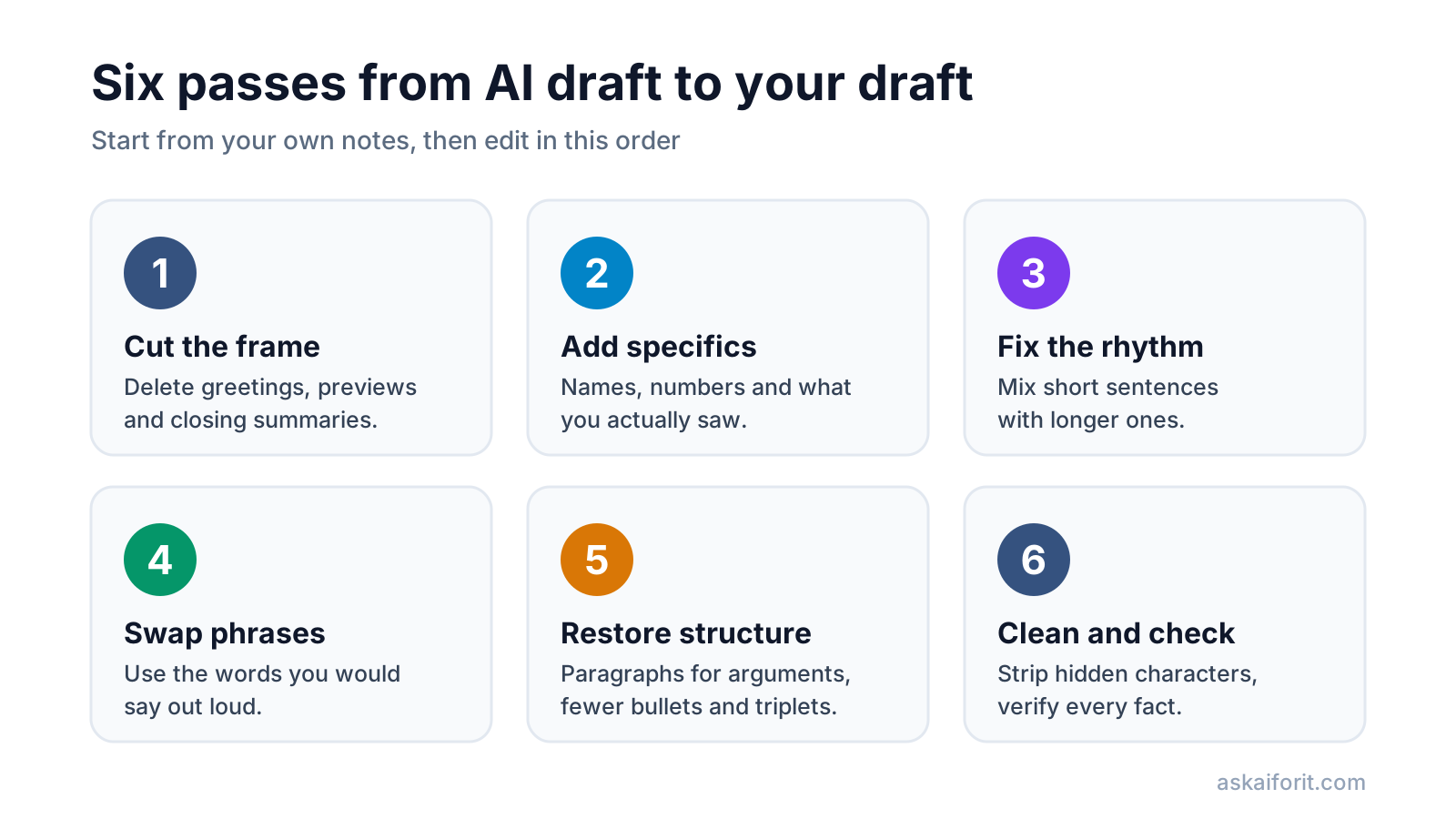
The edit then does the rest. Cut the openers and closers, replace general claims with your specifics, vary sentence length, swap stock phrases for words you would say out loud, and put back your own structure. This guide walks through each pass with before and after examples. It is about writing that reflects what you think, not about hiding that you used AI: if your school, publisher or client has rules on AI use, follow them.
Why AI drafts sound like nobody
A language model writes one likely word after another, based on your prompt. Likely means common, and common means the safe middle of everything it has read. Without your input, the draft fills the gaps with general statements that are true of every company, every team and every reader.
That shows up as a recognizable set of habits:
- Openers that restate the question and closers that summarize what you just read.
- Abstract claims ("communication is crucial") where a person would give an example.
- Sentences of similar length, paragraph after paragraph.
- Lists of three, bold lead-ins and contrasts like "It's not X. It's Y."
- A stock vocabulary: "delve", "seamless", "robust", "leverage", "navigate the complexities".
Readers notice these habits, and Google's guidance for site owners points the same way: its checklist for helpful content asks whether a page shows "first-hand expertise and a depth of knowledge", such as experience "from having actually used a product or service" (Google Search Central). First-hand detail is exactly what a generic draft lacks.
Start from your own notes and a voice sheet
The cheapest edit is the one you never have to make. Give the assistant your raw material and it will draft closer to what you would write.
- Record a three-minute voice memo about the topic, as if you were explaining it to a colleague. Transcribe it with your phone or any transcription tool.
- Underline the parts that only you could have said: a story, a number, a mistake, a strong opinion.
- Build a short voice sheet from two or three pieces you wrote without AI.
- Paste the transcript and the voice sheet into the prompt, and tell the assistant to draft from them only.
A voice sheet is a few lines about how you write. Run a sample of your own writing through the Word Counter to get your average sentence length, then add the rest by rereading it.
Voice sheet: Dana, product newsletter
- Sentences: short, about 12 words on average. At most one long sentence per paragraph.
- I say: "folks", "here's the thing", "ship".
- I never say: "leverage", "utilize", "journey", "game-changer".
- I open with a story or a number, never with a definition.
- Contractions yes. Exclamation marks and emoji no.
- I end with one concrete next step.
Then ask for a draft that stays inside your material:
Here is the transcript of my voice memo and my voice sheet.
Write a 400-word draft of the newsletter section from these notes only.
Keep my examples and opinions. Do not add facts, numbers or quotes I did not give you.
Where you need a detail from me, write [TK] instead of guessing.
The [TK] marker, an old newsroom habit for "to come", gives you a list of gaps to fill instead of invented details to catch.
Edit the draft in six passes
Work through the draft once per pass, in this order. Each pass looks for one kind of problem, which is faster than fixing everything at once.
Pass 1: Cut the frame around the point
AI drafts often wrap the answer in packaging: a greeting, a restatement of the question, a promise of what is coming, and a summary at the end. Cut all of it and start where the useful part starts.
Before and after: cutting the frame
| Before | After |
|---|---|
| Great question! Choosing a CRM can feel overwhelming. In this guide, we'll dive into the key factors to consider. | Pick the CRM your sales team will update without being chased. |
| It's important to note that pricing varies widely. | Prices per seat differ a lot, so compare the plan you will actually need. |
| In conclusion, the right CRM depends on your unique needs. I hope this helps! | (cut) |
A good test: delete your first paragraph and read the piece again. If nothing is lost, leave it deleted. Do the same with the last one.
Pass 2: Replace general claims with your specifics
This pass does the most for your voice. Go through the draft and stop at every sentence that would be equally true for your competitor. Ask it the questions a curious friend would ask: who, how many, what happened, what did you see, what would you do differently?
Before and after: adding specifics (example)
| Before | After |
|---|---|
| Our new feature significantly improves efficiency for users. | Exports that took four clicks now take one, and they arrive as CSV instead of PDF. |
| Effective communication is crucial for remote teams. | With the team spread over three time zones, a question asked at 5 pm used to wait until the next morning. |
| Many customers found the product helpful. | Two of our first ten customers asked for an annual plan in their first week. |
The "after" column uses facts the assistant did not have. If you do not have a specific for a sentence, that is a signal: either find one or cut the sentence.
Pass 3: Fix the rhythm by varying sentence length
Read the draft out loud. Generated paragraphs often settle into a steady beat of medium sentences, and the ear hears it before the eye does. People mix short sentences with longer ones that carry a thought through to the end.
Before: "Remote work offers flexibility for employees. It also presents challenges for managers. Communication can become more difficult across time zones. Teams need clear processes to stay aligned."
After: "Remote work gives people their mornings back. It also gives managers a new problem: nobody sees the work happening. When half the team is asleep while the other half ships, a question asked at 5 pm gets its answer the next day, and those delays add up."
The Word Counter helps here. It highlights sentences of 25 words or more in amber and 35 or more in red, flags passive voice and adverbs, and gives a Flesch Reading Ease score. That score depends on just two inputs:
Flesch Reading Ease = 206.835 − 1.015 × (words ÷ sentences) − 84.6 × (syllables ÷ words)Most web copy reads best at 60 or above. The score measures length, not voice, so use it to find the sentences that drag, then fix them by ear.
Pass 4: Swap overused phrases for words you would say
Some words appear far more often in AI drafts than in edited writing. None of them is wrong; people wrote "moreover" long before chatbots did. The question for each one is simple: would you say it to a colleague across the table? If not, replace it. These come from the phrase list the Word Counter highlights:
Overused phrases and plainer options
| Phrase | Try instead |
|---|---|
| delve into | look at, dig into |
| leverage | use |
| seamless | smooth, easy |
| robust | strong, reliable |
| navigate the complexities of | handle, deal with |
| plays a crucial role | matters for, helps |
| a testament to | shows, proves |
| in order to | to |
| it's important to note that | cut it and state the point |
| moreover, furthermore | also, and |
| whether you're a… | name one reader |
| not only… but also | check whether the contrast is needed |
Swap in your own words, not the first synonym. If your voice sheet says you call customers "folks", that is the replacement. A text with none of these phrases can still sound generic, so this pass comes after specifics, not instead of them.
Pass 5: Put your own structure back
Assistants like structure: headings every few paragraphs, bullet lists, bold lead-ins, and ideas grouped in threes. Some of that helps readers. Much of it turns an argument into a slide deck.
- Turn argument lists into paragraphs. If the bullets depend on each other ("because", "so", "but"), they are a paragraph.
- Break the triplets. "Fast, reliable and secure" often hides that you only have evidence for one. Keep the ones you can back up.
- Drop the false contrast. "It's not about the tools. It's about the people." becomes "Tools fail when nobody owns them."
- Keep headings for navigation. A 600-word post rarely needs more than two or three.
Pass 6: Clean the characters and check the facts
Last, the mechanical pass. Paste the final text into the AI Text Cleaner to remove Markdown leftovers, hidden spaces and citation markers, and decide what to do with em dashes and curly quotes. Why those characters appear at all is covered in why ChatGPT text has hidden characters.
Then check every name, number, date, quote and link against its source. A draft written from your notes can still slip in a detail you never gave it, which is one more reason to ask for [TK] markers.
See one paragraph before and after
Here is one paragraph through every pass. The writer's notes said: our trial users who quit rarely connected a calendar, so we cut onboarding to that one step. (Example.)
Before:
In today's fast-paced digital world, onboarding new customers is more important than ever. A seamless onboarding experience not only boosts retention but also fosters long-term loyalty. Moreover, it's important to note that every interaction plays a crucial role in shaping how customers perceive your brand. By leveraging automated emails, interactive tutorials and personalized check-ins, businesses can unlock the full potential of their customer relationships.
After:
Most trial users who quit had never connected a calendar. So we cut onboarding to one step: connect Google or Outlook and see your week. Everything else, the tour, the tips and the team invite, now waits until day three. If you run a trial, find the one action your keepers have in common and put it first.
The second version is shorter, and every sentence carries something the reader can use. It also sounds like a particular person who runs a particular product, which is the whole point.
These tools help with the steps above: checking sentence length and phrasing, turning a voice memo into text and drafting from your notes. The voice still has to come from you:
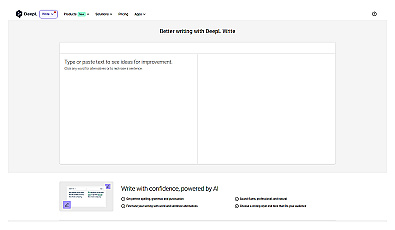
Enhance your writing with style and clarity suggestions.

FAQ
Will this make my text pass AI detectors?
That is not what this method is for, and no editing method can promise it. Edit so the text is accurate and sounds like you, and disclose AI help wherever your school, publisher or client asks for it.
Should I say that I used AI?
Follow the rules of the place you publish. For websites, Google suggests disclosing AI or automation where readers would reasonably wonder how the content was made.
How much of the draft should I rewrite?
Enough that every claim is yours and every example is real. In practice, the specifics pass changes the most; the phrase swaps are quick.
Can I teach an assistant my style?
Partly. Paste a voice sheet and two or three samples of your writing, or save them in the assistant's standing instructions. You will still need the editing passes, because the assistant does not know your facts.
Does a good readability score mean the text sounds like me?
No. Flesch Reading Ease only measures sentence length and syllables per word. It finds sentences that are hard to read, not sentences that sound unlike you.