Why ChatGPT Text Has Hidden Characters and Em Dashes, and How to Clean It
The invisible spaces, curly quotes and em dashes in AI answers are ordinary Unicode characters. Here is where each one comes from, what it breaks and how to find and remove it.
 Roman Shalabanov
Published
11 min read
Roman Shalabanov
Published
11 min read
The odd characters in ChatGPT text are real Unicode characters that look like a space, look like nothing at all, or look like nicer punctuation. The usual suspects are the no-break space (U+00A0), the narrow no-break space (U+202F), the zero-width space (U+200B), the soft hyphen (U+00AD), the byte order mark (U+FEFF), curly quotes (U+201C, U+201D, U+2018, U+2019) and the em dash (U+2014).
They are not a secret signature. Some are characters the model writes because edited text is full of them; others ride along when you copy from a web page or a chat window. They matter because software compares code points, not looks: a no-break space is not a space to Python, a JSON parser or Excel's TRIM. Paste the text into the AI Text Cleaner to see every one with a label, or use the commands below.
Which characters show up, with their code points
These are the characters you are most likely to find in text copied from ChatGPT, Claude, Gemini or a web page.
Hidden and typographic characters in AI text
| Character | Code point | On screen | Usual source |
|---|---|---|---|
| No-break space | U+00A0 | A normal space | HTML , rendered chat windows, word processors |
| Narrow no-break space | U+202F | A slightly narrow space | Typesetting: between a number and a unit, before French punctuation |
| Thin space | U+2009 | A narrow space | Typeset numbers and units |
| Zero-width space | U+200B | Nothing | Web pages that allow line breaks inside long words and URLs |
| Zero-width joiner and non-joiner | U+200D, U+200C | Nothing | Emoji sequences, Persian and Indic scripts |
| Word joiner | U+2060 | Nothing | Text that must not break at a point |
| Soft hyphen | U+00AD | Nothing, or a hyphen at a line end | Hyphenated web and PDF text |
| Byte order mark | U+FEFF | Nothing | The start of files saved as "UTF-8 with BOM" |
| Tag characters | U+E0000–U+E007F | Nothing | Flag emoji for England, Scotland and Wales; hidden-text tricks |
| Em dash | U+2014 | — | Model output, autocorrect |
| Curly quotes | U+201C, U+201D, U+2018, U+2019 | “ ” ‘ ’ | Model output, smart-quote settings |
| Ellipsis | U+2026 | … | Model output, autocorrect |
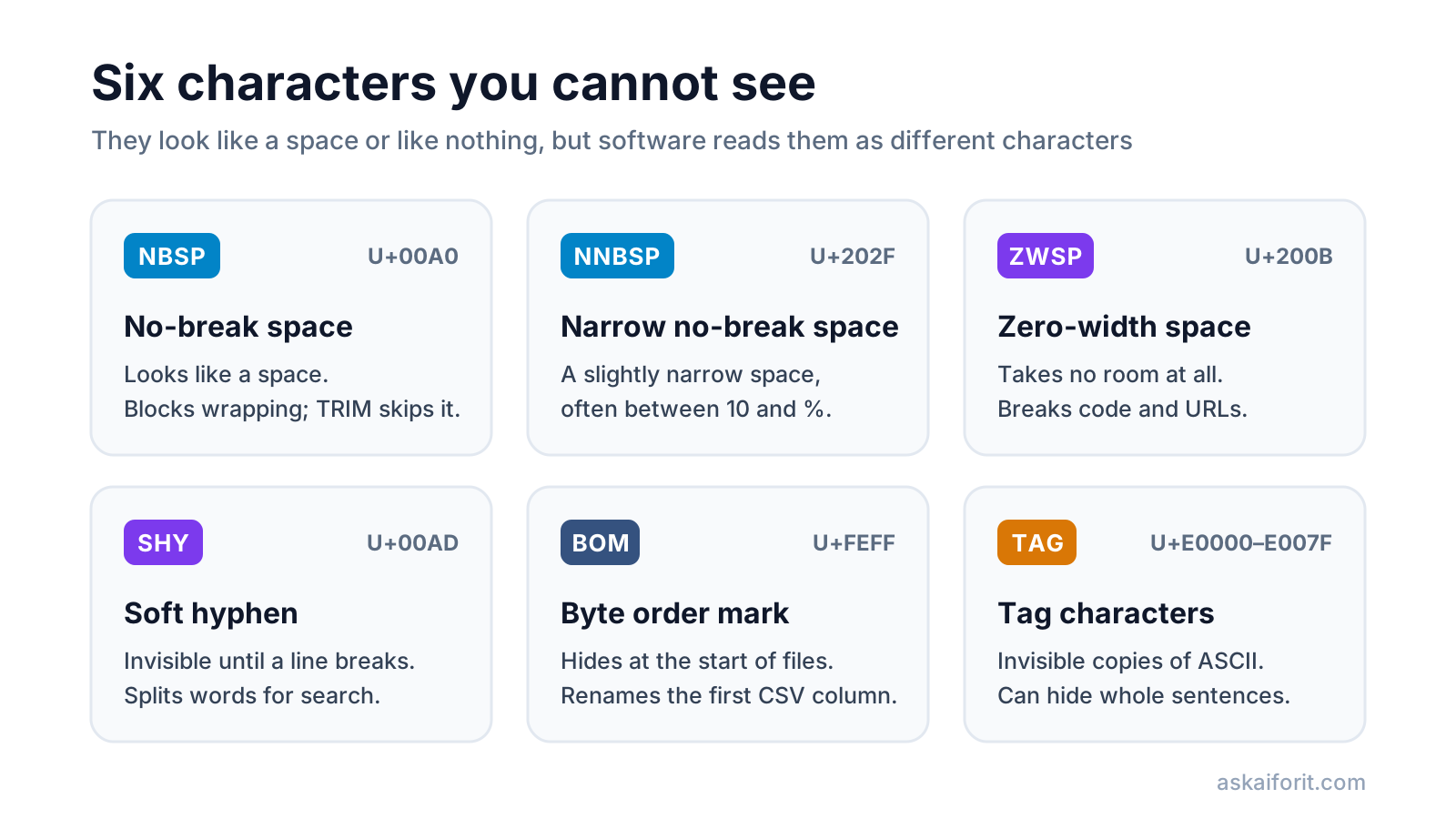
The tag block deserves a note. Unicode keeps U+E0020 to U+E007E as invisible copies of the ASCII letters, digits and symbols, and its own chart says using them for language tags is "strongly discouraged". Today they are used legitimately inside a few flag emoji, and illegitimately to hide whole sentences inside text that looks clean (see the Unicode Tags chart).
Where the characters come from
There are four routes into your text. Knowing which one you are dealing with tells you how to stop it.
The model writes them. An em dash, a curly quote or an ellipsis is a character in the model's vocabulary, just like the letter "e". Models learn from published, edited prose, where these marks are common, so they produce them. A narrow no-break space between "10" and "%" follows the same typesetting habit. We know of no official explanation for why models favor em dashes; what is clear is that the dash is written by the model, not added by the chat window.
The copy path adds them. A chat window is a web page. When you select rendered text and copy it, the browser hands over what the page contains, including any entities as U+00A0. The copy button in many assistants gives you the Markdown source instead: asterisks, hash signs and pipes rather than invisible spaces.
The source text carries them. Paragraphs you quote from web pages, PDFs and Word files bring their own soft hyphens, zero-width spaces and byte order marks. If you paste a page into the chat and ask for a rewrite, some of that baggage can survive.
Your own software converts them. Word's AutoFormat, macOS "Use smart quotes and dashes" and iOS Smart Punctuation turn straight quotes and double hyphens into curly quotes and dashes as you type. Assistants with web search add citation leftovers such as 【4:0†source】 or :contentReference[oaicite:0]{index=0} when you copy their answers.
What is known about AI text watermarks
You may have read that ChatGPT marks its output with special spaces. OpenAI has never documented a character-based watermark, and a hidden character would be a poor one: any cleaner removes it in a millisecond.
What OpenAI has documented works differently. On October 5, 2026 it announced textGrain, a watermark that "adds a statistical signal through the model's word choices" (OpenAI). The technical report describes it as a change to how the model samples tokens, keyed to a secret. It does not insert characters. As of October 2026:
- API customers can opt in for some models, and it stays off by default in the API.
- OpenAI said it will add the watermark to eligible ChatGPT and Codex text generated in the EU in the weeks after the announcement.
- The detector is limited to approved researchers and expert organizations.
Google's SynthID Text follows the same idea: it adjusts token probabilities during generation and is open source.
What hidden characters break
The text looks fine on screen, so the failures are confusing. These are the common ones.
Code, JSON and the command line
Python rejects all three kinds of character with a clear error. In the lines below, a label in brackets marks where the invisible character sits:
x = 1[U+200B]          SyntaxError: invalid non-printable character U+200B
print(1[U+00A0]+ 1)    SyntaxError: invalid non-printable character U+00A0
print(“hi”)            SyntaxError: invalid character '“' (U+201C)
JSON allows only four whitespace characters between tokens: space, tab, line feed and carriage return (RFC 8259). A no-break space after a colon is a parse error, and a byte order mark at the start of a file makes Python's json.loads fail with "Unexpected UTF-8 BOM". In a shell, curly quotes are not quotes at all: ls “My Files” looks for two files named “My and Files” and finds neither.
Spreadsheets and CSV files
Microsoft's own documentation says TRIM removes the ordinary space (character 32) but "does not remove this nonbreaking space character" (character 160) (Microsoft Support). The results:
- "1 000" with a no-break space is text, so
SUMskips it. - "Acme" with a trailing no-break space does not match "Acme" in
XLOOKUPorVLOOKUP. - A CSV file that starts with a byte order mark turns the first header into "[U+FEFF]id", so code that reads the column
idfinds nothing. In Python, open the file withencoding="utf-8-sig"to drop it.
CMSs, SEO fields and site search
- A no-break space glues words together, so a long title cannot wrap and overflows on a phone.
- A soft hyphen inside "pricing" stores the word as "pri" + U+00AD + "cing", and site search for "pricing" misses the page.
- A zero-width space in a slug produces a URL that looks right and returns a 404, or a duplicate page.
- Shortcodes and HTML attributes written with curly quotes break, because parsers treat only the straight quote U+0022 as a quote.
- Character counters count invisible characters, so a meta description can be "too long" with nothing visible to cut.
Hidden instructions
Because tag characters can spell out ASCII invisibly, they are used to slip instructions to AI tools inside ordinary-looking text, for example in a product review that an assistant later summarizes. If you paste third-party text into an AI workflow, strip tag characters first. The AI Text Cleaner decodes any hidden tag text it finds and shows it to you before removing it.
How to see hidden characters
The quickest check is the cleaner, which runs in your browser and does not upload the text.
- Open the AI Text Cleaner and paste your text.
- Open What will change. Invisible characters get a short label such as ZWSP or NBSP, with the code point on hover.
- Read the list of characters and counts to see which rules your text needs.
- Switch off the rules you do not want and check the Clean text tab.
If you work in other tools:
- VS Code highlights uncommon invisible characters in source files by default since version 1.63, through the
editor.unicodeHighlight.invisibleCharacterssetting (release notes). - Word shows a no-break space as a small degree-like circle when you turn on formatting marks (¶). In Find,
^sfinds no-break spaces,^-optional hyphens,^+em dashes and^=en dashes. - Excel and Google Sheets: compare
=LEN(A1)with the length you expect, then use=UNICODE(MID(A1,5,1))to read the code of the fifth character. - The command line: GNU grep with Perl regex lists the lines that contain the usual suspects.
grep -nP '[\x{00A0}\x{00AD}\x{200B}-\x{200F}\x{202F}\x{2060}\x{FEFF}]' draft.txtTo name every character above ASCII, line by line:
import sys, unicodedata

text = open(sys.argv[1], encoding="utf-8").read()
for line_no, line in enumerate(text.splitlines(), 1):
    for ch in line:
        if ord(ch) > 126:
            print(line_no, f"U+{ord(ch):04X}", unicodedata.name(ch, "UNKNOWN"))
How to remove them
Pick the method that matches where the text is going.
Ways to clean AI text
| Method | Best for | Keeps emoji and scripts | Handles dashes and quotes |
|---|---|---|---|
| AI Text Cleaner | Any text, one rule at a time | Yes | Yes |
| Word Find and Replace | Documents already in Word | Yes | Yes |
| Spreadsheet formula | Columns of imported data | Yes | No |
| perl or sed | Files and pipelines | Depends on the pattern | Yes |
In a spreadsheet, this formula turns no-break spaces into spaces, drops zero-width spaces and trims the rest. UNICHAR works in current Excel and in Google Sheets.
=TRIM(SUBSTITUTE(SUBSTITUTE(A1, UNICHAR(160), " "), UNICHAR(8203), ""))On the command line, this removes zero-width characters, soft hyphens and byte order marks, and turns the special spaces into ordinary ones. It leaves the zero-width joiner alone so emoji survive.
perl -CSD -pe 's/[\x{200B}\x{200C}\x{2060}\x{FEFF}\x{00AD}]//g; s/[\x{00A0}\x{202F}\x{2009}]/ /g' draft.txt > clean.txtEm dashes need judgment rather than a blanket replace. The cleaner can swap them for a comma, a spaced hyphen or a spaced en dash, and it turns a dash between two numbers into a range like 10–20. Read the result once: sometimes a full stop or brackets fit the sentence better. For a full editing pass, see how to edit AI-assisted text so it sounds like you.
Keep the formatting instead of stripping it
Sometimes the problem is not invisible characters but visible Markdown: asterisks around bold text, hash signs before headings and pipes in tables. If the text is going into Word or Google Docs, you probably want those as real formatting.
Paste the answer into Markdown to Word & Google Docs, check the preview and copy it. Headings arrive as Heading 1 to 6 styles, tables keep their borders, and a table can also go to a spreadsheet as tab-separated values. Then paste with Ctrl+V; Ctrl+Shift+V pastes plain text and throws the formatting away.
How to stop them at the source
- Ask the assistant. Add "Use straight quotes and no em dashes" to your custom instructions. In November 2025 OpenAI CEO Sam Altman said ChatGPT now follows a custom instruction to avoid em dashes.
- Use the copy button for Markdown, selection for rich text. Decide which one your destination needs before you copy.
- Turn off smart punctuation where you write code. In macOS it is under Keyboard, Text Input; in Word it is under AutoFormat As You Type.
- Paste through plain text when the target is a form, a CSV or a config file, then clean it.
Once the characters are clean, these editors handle the next step, from grammar and punctuation checks to rewording a sentence:
Enhance writing quality by catching grammar and punctuation errors.
Enhance your writing with style and clarity suggestions.
FAQ
Does ChatGPT hide a watermark in invisible characters?
OpenAI has never documented one. Its textGrain watermark, announced in October 2026, works through word choice and adds no characters. Hidden characters in your text come from typography and copying.
Does removing hidden characters remove a watermark?
No. A word-choice watermark lives in which words were picked, not in extra characters. Cleaning changes characters and formatting only.
Should I replace every em dash?
No. The em dash is standard punctuation. Replace it when your style guide, your audience or the destination needs plain ASCII, and pick a comma, colon or full stop that fits each sentence.
Why does my character count look wrong?
Invisible characters count as characters. A zero-width space or soft hyphen adds one to the count while adding nothing you can see.
Is it safe to remove zero-width joiners?
In English text, yes. In Persian, Hindi and other scripts that use them, and inside emoji sequences, no. Keep them there.