How Much VRAM Do You Need for Local AI Models? Tables from 7B to 70B
How much GPU memory a local language model needs at each quantization and context length, how to work it out yourself, and what fits on common graphics cards and Macs.
 Roman Shalabanov
Published
10 min read
Roman Shalabanov
Published
10 min read

You need about 7 GB of VRAM to run an 8B model at 4-bit quantization (Q4) with an 8,192-token context, about 11 GB for a 14B model, about 22 GB for a 32B model and about 45 GB for a 70B model. At full 16-bit precision (FP16) the same models need roughly 18, 30, 66 and 140 GB. A longer context adds more on top.
These figures come from one formula: the model's weights, plus the KV cache that holds the conversation, plus runtime overhead. Below you will find the formula, tables for 7B to 70B models at five quantization levels and four context lengths, and notes on Apple Silicon Macs. The numbers match our LLM VRAM Calculator, so you can check any other size there.
How much VRAM each model size needs
The table shows the total memory for typical architectures at an 8,192-token (8K) context with the default 16-bit KV cache. Q8, Q6, Q5 and Q4 refer to the common GGUF formats Q8_0, Q6_K, Q5_K_M and Q4_K_M used by llama.cpp, Ollama and LM Studio.
| Model size | FP16 | Q8 | Q6 | Q5 | Q4 |
|---|---|---|---|---|---|
| 7B–8B | 17.6 GB | 10.3 GB | 8.4 GB | 7.6 GB | 6.7 GB |
| 13B–14B | 29.9 GB | 17.0 GB | 13.7 GB | 12.2 GB | 10.8 GB |
| 24B | 49.5 GB | 27.5 GB | 21.8 GB | 19.3 GB | 16.8 GB |
| 32B | 65.6 GB | 36.2 GB | 28.7 GB | 25.3 GB | 22.0 GB |
| 70B | 140.4 GB | 76.2 GB | 59.6 GB | 52.2 GB | 45.0 GB |
Source: Worked example: weights + KV cache + overhead formula from the LLM VRAM Calculator, Ask AI For It, October 2026
Show data
| Quantization | 8B | 14B | 32B | 70B |
|---|---|---|---|---|
| FP16 | 17.6 GB | 29.9 GB | 65.6 GB | 140.4 GB |
| Q8 | 10.3 GB | 17 GB | 36.2 GB | 76.2 GB |
| Q6 | 8.4 GB | 13.7 GB | 28.7 GB | 59.6 GB |
| Q5 | 7.6 GB | 12.2 GB | 25.3 GB | 52.2 GB |
| Q4 | 6.7 GB | 10.8 GB | 22 GB | 45 GB |
A model fits comfortably when the total stays under about 90% of the memory you have. Between 90% and 100% it usually loads, but there is little room left for a longer chat or for other programs that use the GPU, including your desktop.
How to calculate VRAM for any model
A running model keeps three things in memory. You can estimate each one from numbers on the model's page or in its config.json.
weights  = parameters × bits per weight ÷ 8
KV cache = 2 × layers × KV heads × head dimension × bytes per value × context length
overhead = 1 GB + 5% of the weights
total    = weights + KV cache + overhead
Weights. Quantized formats store small scaling factors next to the weights, so they take a little more than their name suggests. Q4_K_M averages about 4.85 bits per weight, Q5_K_M 5.69, Q6_K 6.56 and Q8_0 8.5. FP16 and BF16 take 16.
KV cache. For every token in the context, each layer stores a key vector and a value vector, which is where the 2 comes from. Most current models use grouped-query attention (GQA), where several query heads share one key and value head, so the cache is several times smaller than in older models.
Overhead. The runtime needs memory for its CUDA or Metal context, compute buffers and fragmentation. One gigabyte plus 5% of the weights is a cautious allowance for llama.cpp, Ollama and LM Studio.
A worked example: Llama 3.1 8B at Q4
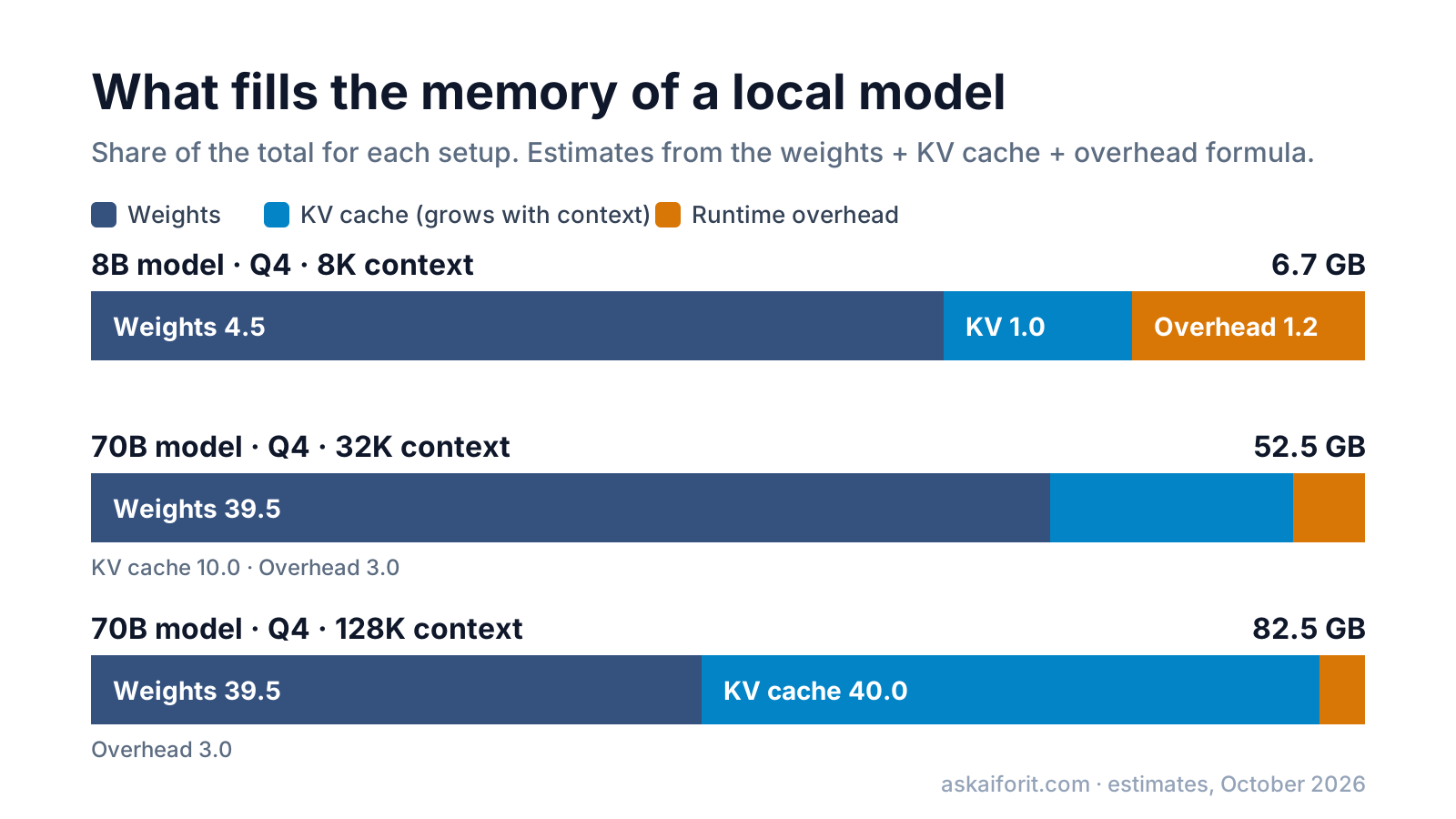
Llama 3.1 8B has 32 layers, 8 KV heads and a head dimension of 128, according to its configuration file.
- Weights: 8 billion × 4.85 ÷ 8 = 4.85 billion bytes, which is 4.5 GB.
- KV cache per token: 2 × 32 × 8 × 128 × 2 bytes = 131,072 bytes (128 KB). At 8,192 tokens that is 1.0 GB.
- Overhead: 1 GB + 5% of 4.5 GB = 1.2 GB.
- Total: 4.5 + 1.0 + 1.2 = 6.7 GB.
The weights estimate is close to the real files. The llama.cpp quantization README lists these sizes for Llama 3.1 8B:
Llama 3.1 8B: formula vs real GGUF file size
| Format | Formula (weights) | Real file |
|---|---|---|
| F16 | 14.9 GB | 14.96 GB |
| Q8_0 | 7.9 GB | 7.95 GB |
| Q6_K | 6.1 GB | 6.14 GB |
| Q5_K_M | 5.3 GB | 5.33 GB |
| Q4_K_M | 4.5 GB | 4.58 GB |
Memory tables from 7B to 70B by context length
Each table uses a typical architecture for its size, with a 16-bit KV cache and one conversation at a time. "Weights" is the model alone; the other columns are totals.
7B and 8B models
Based on Llama 3.1 8B (32 layers, 8 KV heads). A 7B model such as Mistral 7B needs about 0.6 GB less at Q4 and about 1.9 GB less at FP16.
| Quantization | Weights | 4K | 8K | 32K | 128K |
|---|---|---|---|---|---|
| FP16 | 14.9 | 17.1 | 17.6 | 20.6 | 32.6 |
| Q8 | 7.9 | 9.8 | 10.3 | 13.3 | 25.3 |
| Q6 | 6.1 | 7.9 | 8.4 | 11.4 | 23.4 |
| Q5 | 5.3 | 7.1 | 7.6 | 10.6 | 22.6 |
| Q4 | 4.5 | 6.2 | 6.7 | 9.7 | 21.7 |
What this means: an 8 GB card runs an 8B model at Q4 with up to about 8K of context. A 12 GB card runs it at Q8, and a 16 GB card gives you room for 32K.
13B and 14B models
Based on Qwen2.5 14B (48 layers, 8 KV heads), from its config.json.
| Quantization | Weights | 4K | 8K | 32K | 128K |
|---|---|---|---|---|---|
| FP16 | 26.1 | 29.1 | 29.9 | 34.4 | 52.4 |
| Q8 | 13.9 | 16.3 | 17.0 | 21.5 | 39.5 |
| Q6 | 10.7 | 13.0 | 13.7 | 18.2 | 36.2 |
| Q5 | 9.3 | 11.5 | 12.2 | 16.7 | 34.7 |
| Q4 | 7.9 | 10.0 | 10.8 | 15.3 | 33.3 |
Older models without GQA need far more memory for the same context. Llama 2 13B keeps 40 KV heads instead of 8, so its cache takes about 800 KB per token: 6.3 GB at 8K instead of 1.5 GB, for a Q4 total of about 15 GB.
32B models
Based on Qwen2.5 32B (64 layers, 8 KV heads), from its config.json.
| Quantization | Weights | 4K | 8K | 32K | 128K |
|---|---|---|---|---|---|
| FP16 | 59.6 | 64.6 | 65.6 | 71.6 | 95.6 |
| Q8 | 31.7 | 35.2 | 36.2 | 42.2 | 66.2 |
| Q6 | 24.4 | 27.7 | 28.7 | 34.7 | 58.7 |
| Q5 | 21.2 | 24.3 | 25.3 | 31.3 | 55.3 |
| Q4 | 18.1 | 21.0 | 22.0 | 28.0 | 52.0 |
A 24 GB card such as an RTX 3090 or 4090 runs a 32B model at Q4 with 4K to 8K of context, with little to spare. A 32 GB card runs it at Q5 or Q6. Not every model supports a 128K context, so check the model card before you plan for it.
70B models
Based on Llama 3.1 70B (80 layers, 8 KV heads), from its config.json.
| Quantization | Weights | 4K | 8K | 32K | 128K |
|---|---|---|---|---|---|
| FP16 | 130.4 | 139.2 | 140.4 | 147.9 | 177.9 |
| Q8 | 69.3 | 75.0 | 76.2 | 83.7 | 113.7 |
| Q6 | 53.5 | 58.4 | 59.6 | 67.1 | 97.1 |
| Q5 | 46.4 | 50.9 | 52.2 | 59.7 | 89.7 |
| Q4 | 39.5 | 43.7 | 45.0 | 52.5 | 82.5 |
At Q4 a 70B model needs two 24 GB cards, a 48 GB workstation card or a Mac with 64 GB or more, and it will be tight on all of them. At FP16 it needs several data-center GPUs.
Why context length changes the answer
The weights stay the same size whatever you do with the model. The KV cache does not: it grows by the same amount for every token in the context. For Llama 3.1 70B that is 320 KB per token, so the cache takes 2.5 GB at 8K, 10 GB at 32K and 40 GB at 128K.
Runtimes reserve the cache for the full context length when they load the model, not as the chat grows. If you set a 128K context, you pay for 128K even when you type one line. Two settings help:
- Set the context you need. Ollama picks a default by VRAM as of October 2026: 4K below 24 GB, 32K between 24 and 48 GB, and 256K at 48 GB and above, according to its context length docs. You can change it with
OLLAMA_CONTEXT_LENGTHor the slider in the app. In llama.cpp the flag is-c. - Quantize the KV cache. An 8-bit cache roughly halves its size and a 4-bit cache cuts it to about a quarter, with some loss in quality. For the 70B model at 32K that means about 5.3 GB or 2.8 GB instead of 10 GB.
# Ollama: 8-bit KV cache (works only with flash attention, forced on here)
OLLAMA_FLASH_ATTENTION=1 OLLAMA_KV_CACHE_TYPE=q8_0 ollama serve

# llama.cpp: 8-bit keys and values, 32K context
llama-server -m model.gguf -c 32768 -ctk q8_0 -ctv q8_0
The Ollama FAQ lists f16, q8_0 and q4_0 as cache types, notes that the setting applies to all models and says Ollama turns flash attention on automatically where the hardware supports it. The llama.cpp server README documents -ctk and -ctv.
How much memory an Apple Silicon Mac can use
A Mac with Apple Silicon has unified memory: the CPU and the GPU share one pool. That lets a Mac with 64 GB or 128 GB load models that would otherwise need several graphics cards. But macOS does not hand all of that memory to the GPU.
Apple does not publish a fixed share. The practical limit is the value Metal reports as recommendedMaxWorkingSetSize, which llama.cpp prints when it loads a model. Our calculator assumes about two thirds of memory on Macs with up to 36 GB and about three quarters on larger ones. Check the number your own Mac reports.
| Mac memory | Usable for the model (estimate) | Largest fit at Q4, 8K context |
|---|---|---|
| 16 GB | about 10.7 GB | 7B–8B (up to Q6) |
| 24 GB | about 16 GB | 14B (up to Q6) |
| 32 GB | about 21 GB | 24B at Q4, 14B at Q8 |
| 36 GB | about 24 GB | 32B at Q4, tight |
| 48 GB | about 36 GB | 32B at Q6 |
| 64 GB | about 48 GB | 70B at Q4, tight; 32B at Q8 |
| 96 GB | about 72 GB | 70B at Q6 |
| 128 GB | about 96 GB | 70B at Q8 |
Your browser, editor and other apps share the same memory. Close what you do not need before you load a large model.
What to do when a model does not fit
- Drop one quantization level. Going from Q8 to Q5 or Q4 saves 30–45% of the weights. Q4_K_M is the usual starting point; formats below 4 bits save more but lose noticeably more quality.
- Shorten the context. Halving it halves the KV cache.
- Quantize the KV cache to 8 bits, as shown above.
- Offload part of the model. llama.cpp can keep some layers in system RAM and run them on the CPU (the
-nglflag sets how many layers go to the GPU). The model then runs, but much more slowly, because system memory is slower than VRAM. - Pick a smaller model. A good 14B model at Q6 often beats a 32B model squeezed into too little memory with a tiny context.
The calculator does not estimate speed. Speed depends mostly on memory bandwidth and on how much of the model sits on the GPU, and it varies too much between setups to predict well.
Want software to run these models? See how to run an LLM locally. These apps run the GGUF files from the tables above, and each lets you set the context length:
FAQ
How much VRAM do I need for a 70B model?
About 45 GB at Q4 with an 8K context, and about 52 GB at 32K. That means two 24 GB cards, a 48 GB card with a short context or a Mac with 64 GB or more. At FP16 a 70B model needs around 140 GB.
Can I run an 8B model on an 8 GB graphics card?
Yes, at Q4 with a context of up to about 8K tokens, which needs around 6.7 GB. If the runtime reports out-of-memory errors, shorten the context or close other programs that use the GPU.
How much VRAM does a 7B model need?
About 6 GB at Q4 with an 8K context, about 9.3 GB at Q8 and about 16 GB at FP16, for a typical 7B model with grouped-query attention.
Is Q4 good enough?
For chat and most everyday tasks, Q4_K_M is the common choice because the quality loss is small for the memory it saves. Q5 and Q6 are closer to the original, and Q8 is generally treated as very close to FP16. If quality matters more than speed and the memory is there, use the higher level.
Why does my model use more memory than the table says?
Runtimes differ in buffer sizes, batch settings and drivers, and some load the full context the model supports by default. Check the context length first; it is the most common reason.
Does system RAM count?
Only if you offload layers to the CPU, and then generation slows down a lot. For full GPU speed the whole model and its KV cache must fit in VRAM or, on a Mac, in the share of unified memory the GPU can use.