UTM Parameters for a Product Launch: A Naming Convention That Keeps GA4 Clean
How GA4 reads UTM parameters, which mediums land in which channel, and a naming table for Product Hunt, Hacker News, Reddit, X, newsletters and directories that keeps your launch report in one piece.
 Roman Shalabanov
Published
10 min read
Roman Shalabanov
Published
10 min read
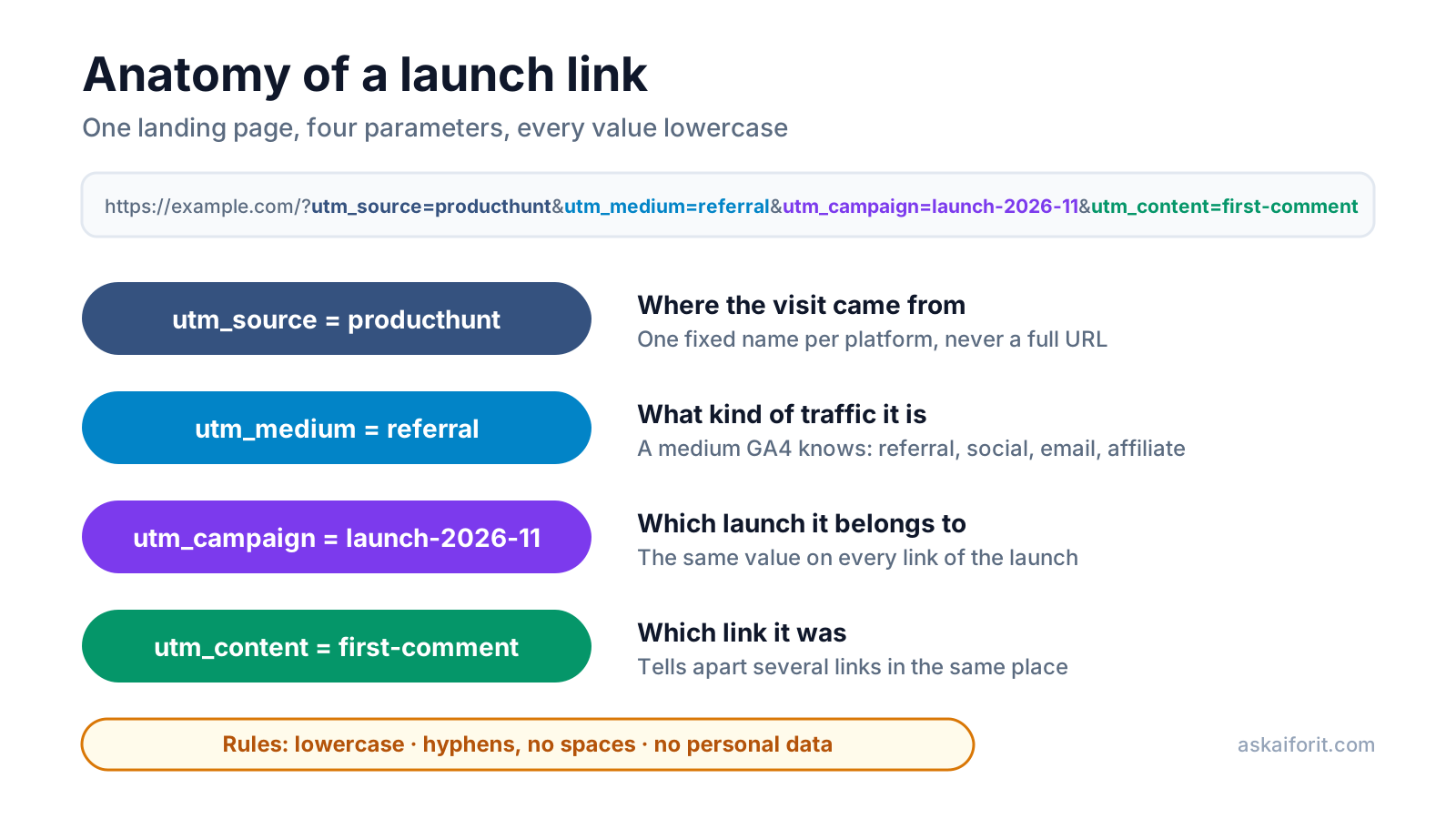
A good UTM naming convention for a launch has four rules: lowercase everything, separate words with hyphens, give each platform one fixed source name (producthunt, reddit, x), and pick each medium from the values Google Analytics 4 already recognises (referral, social, email). Then use one campaign name, such as launch-2026-11, on every link of the launch, and utm_content to say which link it was.
Those rules matter because GA4 splits values by spelling and sorts visits into channels by fixed rules. A launch tagged with three spellings of the same source shows up as three small rows, and a medium GA4 does not know drops into Unassigned. Below are the rules from Google's documentation as of October 2026 and a naming table you can copy for every launch channel.
Know what GA4 does with each UTM parameter
Google's page on URL builders and campaign parameters lists nine parameters. For a launch you need three or four of them:
UTM parameters in GA4 (October 2026)
| Parameter | What it records | Use it for a launch? |
|---|---|---|
| utm_source | The site, community or list that sent the visit | ✓ Always |
| utm_medium | The type of traffic; drives the channel | ✓ Always |
| utm_campaign | The launch or promotion | ✓ Always |
| utm_content | Which link or creative it was | ✓ When one place has several links |
| utm_term | Paid search keyword | ✗ Paid search only |
| utm_id | A campaign ID for imported campaign data | Optional |
| utm_source_platform | The buying or management platform, such as Search Ads 360 | Optional |
| utm_creative_format | Type of creative | ✗ Not reported in GA4 |
| utm_marketing_tactic | Targeting, such as remarketing | ✗ Not reported in GA4 |
Google says you "should always use utm_source, utm_medium, and utm_campaign". It also recommends setting utm_id and utm_source_platform, and warns that missing parameters show up as "(not set)". For organic launch posts those two add little; leaving them out only means "(not set)" in their own dimensions.
Two more details from Google's documentation are useful on launch day:
- Where the values appear. Traffic acquisition reports show them as Session source / medium and Session campaign. Content and term appear as manual ad content and manual term. UTM parameters are stripped from the "Landing page + query string" dimension, so look for them in Page location instead.
- Ads auto-tagging wins. If a link carries both UTM parameters and an ads click ID from a linked Google Ads account, GA4 uses the auto-tagged values for source and medium.
Write every value in lowercase, with hyphens
Google's documentation is direct: "Parameter values are case sensitive, e.g. utm_source=google is different from utm_source=Google." Its UTM best practices add "Use lowercase as a standard practice" and point out that SpringSale and Spring_Sale are distinct values.
On launch day this is an easy way to break a report. Three people post links, one writes ProductHunt, one producthunt and one product-hunt, and the launch traffic is split across three rows that you have to add up by hand.
The convention:
- Lowercase only. Every source, medium, campaign and content value.
- Hyphens between words.
first-comment, notfirst commentorFirstComment. Spaces turn into%20or+in the address and are easy to mistype. - No personal data. Never put an email address or a person's name in a UTM value. Google Analytics' policies do not allow sending personal data, and UTM values are stored in plain text.
- Short, stable names.
producthunt, notproducthunt.com/posts/example-notes.
There is one place where case does not matter. GA4's channel rules "aren't case sensitive", so Email still lands in the Email channel. The source and campaign rows in your reports are still split, though, so lowercase remains the rule.
Pick a medium that GA4 already understands
GA4 puts every session into a default channel using fixed rules on source, medium and campaign name. You cannot edit those rules, so the medium you choose decides the channel. Here are the rules for the mediums a launch is likely to use, from Google's default channel group page:
GA4 default channels for common launch mediums
| utm_medium | GA4 channel | Rule |
|---|---|---|
| referral, app, link | Referral | Medium is one of these |
| social, social-network, social-media, sm | Organic Social | Medium is one of these, or the source is on Google's list of social sites |
| email, e-mail, e_mail | Medium or source is one of these | |
| affiliate | Affiliates | Medium is exactly this |
| anything containing video | Organic Video | Or the source is on Google's list of video sites |
| cpc, ppc, paid_social and other paid mediums | Paid Search, Paid Social, Paid Video or Paid Other | Medium matches the paid pattern; the source decides which |
| display, banner, cpm | Display | Medium is one of these |
| sms | SMS | Medium or source is exactly sms |
| anything else | Unassigned | No rule matched |
Three consequences for a launch:
- Invented mediums go to Unassigned.
launch,post,ph-launchor a typo such assoicalmatch no rule. A medium for printed QR codes, such asqr, also ends up in Unassigned. That is fine if you read it by medium, but it will not appear in a channel. - The source can decide the channel. The list of social sites Google publishes with that page includes reddit, linkedin, facebook, twitter, t.co and news.ycombinator.com. A link tagged
reddit/referralstill lands in Organic Social, and so do untagged clicks from Hacker News, while links you taghackernews/referralcount as Referral. When you compare launch channels, compare by session source, not only by channel. - Avoid "shop" in campaign names. GA4's Organic Shopping rule matches any campaign name containing "shopping", or "shop" at the start of a word, such as
shopify-app-launchorblack-friday-shop, whatever the source. Google lists that rule above the Social, Referral and Email rules.
GA4 now also has an AI Assistant channel. Google assigns it to visits whose medium is exactly ai-assistant, and sets that medium itself when the referrer is on its list of AI assistants. Do not use ai-assistant for your own links. You may also see sources you never tagged: OpenAI says ChatGPT adds utm_source=chatgpt.com to the links it cites.
Copy this naming table for your launch channels
Use one campaign value for every row, for example launch-2026-11, and change only the source, medium and content. The sources and mediums below match the presets in our UTM Builder, and qr is in its list of mediums.
Launch UTM naming table (campaign: launch-2026-11)
| Where you post | utm_source | utm_medium | utm_content example | GA4 channel |
|---|---|---|---|---|
| Product Hunt | producthunt | referral | first-comment | Referral |
| Hacker News | hackernews | referral | show-hn | Referral |
| social | r-saas | Organic Social | ||
| X | x | social | launch-thread | Organic Social |
| social | founder-post | Organic Social | ||
| Facebook group | social | group-name | Organic Social | |
| Indie Hackers | indiehackers | social | milestone-post | Organic Social |
| Discord or Slack community | discord, slack | social | server-name | Organic Social |
| YouTube | youtube | video | demo-video | Organic Video |
| Your newsletter | newsletter | header-button | ||
| Sponsored newsletter | the newsletter's name | sponsored | ||
| Ask AI For It listing | askaiforit | referral | listing | Referral |
| Other directory | the directory's name | referral | listing | Referral |
| Partner or affiliate | the partner's name | affiliate | partner-page | Affiliates |
| Printed QR code | the event's name | qr | flyer | Unassigned |
A few notes on the table:
- Content values are yours to define. Use them for the placement (
first-comment,profile-link,header-button) or the variant (video-a,video-b). Keep a list so the same placement always gets the same value. - Untagged visits show the domain. Clicks that do not come through your tagged links, such as reshared links or links other people post, show the referring domain as the source, for example
producthunt.com. That row next to your taggedproducthuntrow is expected: one is your links, the other is everyone else's. - Paid posts need a paid medium. If you boost a post, tag it
paid_socialinstead ofsocial. GA4 files it under Paid Social only when the source is on its list of social sites; otherwise it goes to Paid Other. That list hastwitterandt.cobut notx, so a boosted X post taggedx/paid_sociallands in Paid Other.
Avoid the tagging mistakes that split launch reports
- Tagging your own internal links. A UTM link from your blog to your pricing page tells analytics the visit came from your own site, and the real source is lost. Tag only links that live outside your site.
- Changing the campaign name per platform.
ph-launchon one link andlaunch-2026-11on the rest splits the campaign report. Keep the platform in the source, not in the campaign. - Putting the platform in the medium. A medium of
producthuntmatches no channel rule and lands in Unassigned. The platform goes in the source; the medium says what kind of traffic it is. - Losing parameters in a redirect. Shorteners and redirects should keep the query string. Open each final link once and check the address bar before you post it.
- Never checking the data. Open the Realtime report a few minutes after you post each link and look for your source in the first user source card. That card shows where each user first came from, so test your own link in a private window. A link that reports nothing on launch day is a link you can still fix.
Read the results after launch day
In GA4, open Reports, then Acquisition, then Traffic acquisition. Set the primary dimension to Session source / medium and add a filter for Session campaign equal to your launch value, such as launch-2026-11. Each row is now one platform and one medium. Add Session manual ad content as a secondary dimension to compare individual links in the same place.
Look past sessions. Compare sign-ups, key events and, a week later, the users who came back. A channel that sent fewer visits but more active users is the one to repeat at the next launch. For the rest of the plan, the Product Launch Checklist covers what to do before and after the day, and our SaaS metrics guide explains how to turn sign-ups into MRR, churn and acquisition cost per channel.
Most analytics tools read UTM parameters, and some add funnels and retention by source. To build tagged links and read them after launch, start with these:
Create and manage short links with advanced tracking features.
Streamlined auditing for Google Analytics 4 accounts.
Privacy-focused analytics for tracking website visitors.
FAQ
Are UTM parameters case sensitive in GA4?
Yes. Google states that utm_source=google is different from utm_source=Google, and each spelling becomes its own row. Only the default channel rules ignore case.
Which UTM parameters are required?
Google says to always set utm_source, utm_medium and utm_campaign. Add utm_content when one place has several links. Missing values appear as "(not set)" in reports.
Why is my launch traffic in Unassigned?
Usually because the medium matches no default channel rule, for example launch, post or a typo. Use a medium from GA4's list, such as referral, social or email, or create a custom channel group for your own values.
Should I use underscores or hyphens?
Either works if you are consistent. Hyphens are easier to read in a URL and match the examples in this guide; what breaks reports is mixing first-comment and first_comment.
Do UTM parameters hurt SEO?
They do not change rankings, but tagged addresses can be crawled as separate URLs if you link to them publicly. Declare a canonical URL on your pages and use UTM links only outside your own site.
Should I tag links to my own site in my newsletter?
Yes, those are outside links: the email is not your website. Tag them with your newsletter as the source and email as the medium. Only links between pages of your own site should stay untagged.