Free Transcription Software That Doesn't Upload Your Audio
Interviews, patient notes, client calls and lectures do not belong on a stranger's server. These free tools transcribe on your own device, and here is how to check that they really do.
 Roman Shalabanov
Published
9 min read
If you want free transcription without uploading your audio, install a Whisper-based desktop app. Buzz and Vibe run on Windows, macOS and Linux, are MIT-licensed and describe their transcription as offline. noScribe adds speaker labels for interviews, MacWhisper's free version covers the Mac, and Subtitle Edit turns speech into subtitle files on Windows, macOS and Linux. After a one-time model download, none of them needs an internet connection to transcribe.
Precision matters here, because "private" and "offline" are not the same. A web service can promise to delete your file and still process it on its servers. Some local apps add cloud features for summaries or speaker detection. And your operating system's built-in tools differ: some are documented as on-device, others are not. This guide sorts the free options by where the audio actually goes, based on each project's documentation as of November 5, 2026.
Where your audio goes with each tool
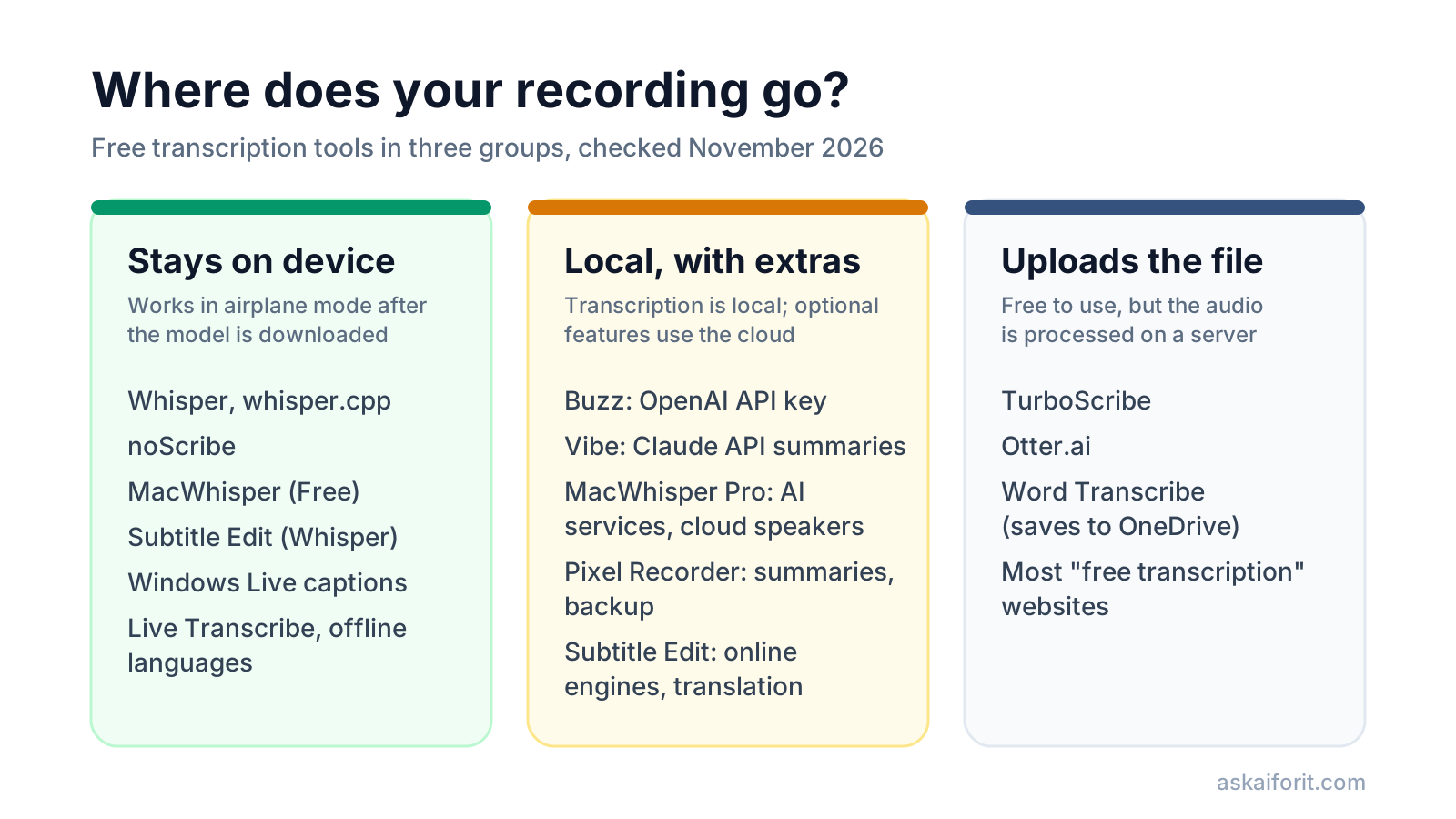
Free transcription tools that run locally, checked November 5, 2026
| Tool | Platforms | Licence or price | Offline after setup | Speaker labels | Cloud option to leave off |
|---|---|---|---|---|---|
| Buzz | Windows, macOS, Linux | MIT, free | Yes | Yes | OpenAI API key |
| Vibe | Windows, macOS, Linux | MIT, free | Yes | Yes | Claude API summaries |
| noScribe | Windows, macOS, Linux | GPL-3.0, free | Yes | Yes | None documented |
| MacWhisper Free | macOS 14 or later | Free; Pro is paid | Yes | Manual on Free, automatic in Pro | AI services and cloud transcription in Pro |
| Subtitle Edit | Windows, macOS, Linux | Open source, free | ✓ (Whisper) | ✓ (Crisp ASR engine) | Online speech-to-text, translation, TTS |
| Whisper and whisper.cpp | Any, command line | MIT, free | Yes | No | None |
| Windows Live captions | Windows 11 22H2 or later | Built in | Yes | No | None, but no saved transcript |
| Live Transcribe | Android | Free | ✓ for downloaded languages | No | Uses internet for other languages |
Desktop apps built on Whisper
Whisper is OpenAI's speech recognition model, released as open source under the MIT licence. It runs on your own hardware, which is why most offline transcription apps are built on it or on its faster ports.
Buzz is the easiest cross-platform start. Its README says it can "transcribe and translate audio offline on your personal computer". It handles files and live microphone input, identifies speakers, exports TXT, SRT and VTT, and can watch a folder for new recordings. Its preferences also accept an OpenAI API key; leave that empty and pick a local Whisper model if the audio must stay with you.
Vibe promises "fully offline transcription, no data ever leaves your device" in its README, with GPU support on all three systems, speaker diarization and exports to SRT, VTT, TXT, HTML, PDF, JSON and DOCX. It can also summarize transcripts through the Claude API, which sends the text to Anthropic, or through Ollama, which runs locally. Choose Ollama or skip summaries for confidential material. Vibe is not in our directory yet; you will find it as Vibe once it is listed.
noScribe is built for research interviews. Its README says it runs "completely locally on your computer, protecting the confidentiality of your interviews", tells speakers apart and handles around 60 languages. Its author warns that the domain noscribe.ai belongs to an unrelated paid service, so download it from the GitHub page.
MacWhisper is a native Mac app. Its product page states "All transcription is done on your device, no data leaves your machine." The free version supports Whisper models, with some larger ones fully available only in Pro. Pro adds speaker recognition (local on M-series Macs, or through ElevenLabs and Deepgram), plus AI services for prompting and optional cloud transcription, which are cloud features.
Subtitle Edit is a free, open-source subtitle editor. Version 5 runs on Windows, macOS and Linux as a self-contained build that needs no separate .NET install (Subtitle Edit on GitHub). It offers speech to text with local Whisper engines, can label speakers with its Crisp ASR engine, and saves to more than 300 subtitle formats (documentation). Its online speech-to-text engines, translation services and some text-to-speech options send data to third-party providers, so treat those as separate from the local transcription.
Use Whisper from the command line
If you are comfortable with a terminal, run Whisper directly. You need Python and ffmpeg, as the Whisper README explains:
pip install -U openai-whisper
whisper interview.mp3 --model turbo --output_format srt
The first run downloads the model, so do it online once. After that the same command works offline. For non-English audio, add --language, for example --language German.
Pick the model by your hardware. The README lists approximate memory needs:
Whisper models and memory, from the official README
| Model | Parameters | Required VRAM | Speed relative to large |
|---|---|---|---|
| tiny | 39M | ~1 GB | ~10x |
| base | 74M | ~1 GB | ~7x |
| small | 244M | ~2 GB | ~4x |
| medium | 769M | ~5 GB | ~2x |
| turbo | 809M | ~6 GB | ~8x |
| large | 1550M | ~10 GB | 1x |
The turbo model is an optimized version of large-v3 with "minimal degradation in accuracy", but it is not trained for translation. For translating speech into English, use a multilingual model such as medium.
On a Mac or a machine without a large GPU, whisper.cpp is a C/C++ port that runs on Apple silicon through Metal and Core ML. Its whisper-cli tool expects 16-bit WAV files, so convert your recording with ffmpeg first.
Built-in options on Windows, Mac, iPhone and Android
Your operating system may already transcribe, but each built-in tool has a different scope.
- Windows Live captions. Microsoft's support page says: "All processing of audio and generation of captions from detected voice data occurs on-device," and captions work without internet. It also says captions "are not stored anywhere", so you can read along but you do not get a transcript file. Available in Windows 11, version 22H2 and later.
- Android Live Transcribe. On all Pixel phones and select Android devices running Android 12 or later, you can download several languages for offline use (Android Accessibility Help). Other languages need an internet connection.
- Pixel Recorder. It transcribes recordings in many languages, and Google has described that transcription as running entirely on the device (Google Research). Google's help says the summary feature on Pixel 8 and later "runs in a secure, isolated environment in the cloud", and some languages need internet for summaries (Pixel Phone Help). Back up & sync also stores recordings outside your device (Pixel Phone Help). For sensitive recordings, skip summaries and leave backup off.
- Apple Notes on iPhone. Notes can record and transcribe audio on iPhone 12 and later in ten languages, including English, Spanish, French, German and Japanese (Apple Support). Apple's guide does not say where the transcription runs, so run the airplane-mode test below before you rely on it for confidential audio.
Free transcription websites upload your file
The top search results for "free transcription" are mostly web services. They work well and many have generous free tiers, but your audio is processed on their servers:
- TurboScribe transcribed 3 files a day for free, each up to 30 minutes, one upload at a time, as of October 23, 2026 (pricing).
- Otter.ai includes 300 transcription minutes a month on its free Basic plan, but only 3 audio or video file imports in total (pricing).
For a published podcast or a public lecture, that trade-off is reasonable. For interviews with sources, patients, students or clients, or anything under a confidentiality agreement, use a local tool. If your organization has rules on where data may be processed, those rules decide, not the tool's marketing.
How to check that a tool really stays offline
Do not rely on the word "private" on a website. Five checks take ten minutes.
- Install and download the model while online. Most local apps fetch a speech model on first use. Transcribe a short test file to finish the setup.
- Turn on airplane mode or unplug the network. Transcribe a second file. If it works, transcription happens on your device. If it fails or waits, the tool needs a server.
- Look for optional cloud features. Summaries, translation, speaker detection and "AI chat about your transcript" are often the parts that upload. Leave API key fields empty.
- Check where files are saved. A local transcript in a synced folder such as OneDrive, iCloud Drive, Google Drive or Dropbox is uploaded anyway. Save sensitive work to a folder that does not sync.
- Read the privacy page once. It should say what, if anything, the app sends, such as crash reports or usage data.
Accuracy, hardware and when to pay
Local transcription is only as good as the model and your hardware. Three things improve results:
- Use the largest model your machine runs comfortably. Start with
baseorsmall, time a ten-minute file, and move up toturboorlargeif your GPU has the memory listed above. - Record clean audio. A close microphone and a quiet room help more than any setting.
- Proofread names and numbers. OpenAI's model card warns that Whisper can produce "texts that are not actually spoken in the audio input", and can repeat itself. Check quotes against the recording before you publish them.
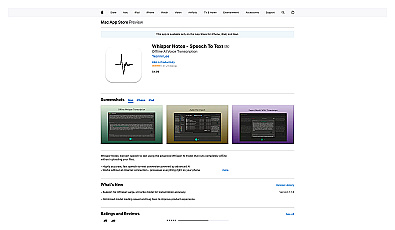
If you would rather pay a small one-time price for a phone app, two documented options run on the device. Aiko costs $24 as a one-time purchase for Mac and iPhone, uses Whisper locally and offers a 14-day trial (Aiko). Whisper Notes costs $7.99 on the App Store and says it works the same in airplane mode. Prices were checked on November 5, 2026.
These local transcription tools are already in our directory:
For more audio tools, browse the Audio category, or let the finder below filter by budget.
AI Tool Finder Answer three questions and get matching tools from our directory.FAQ
What is the best free offline transcription software?
For most people, a Whisper-based desktop app: Buzz or Vibe on Windows, macOS and Linux, noScribe for interviews with several speakers, or MacWhisper Free on a Mac. They are free and transcribe without an internet connection after the first model download.
Is OpenAI Whisper free to use offline?
Yes. Whisper is open source under the MIT licence. You install it once, the first run downloads the model, and after that it transcribes on your own computer without sending audio to OpenAI.
Does Windows have built-in offline transcription?
Windows 11 Live captions processes audio on your device and works without internet, but Microsoft says the captions are not stored. For a transcript file, use a Whisper-based app instead.
Are free online transcription services safe for confidential audio?
They upload your file to their servers. For public content that is usually fine. For confidential interviews, medical, legal or client recordings, use a tool that runs locally and follow your organization's data rules.
How accurate is local transcription compared with cloud services?
It depends on the model size, the language and the recording quality. Larger Whisper models are more accurate but slower and need more memory. Whatever you use, check names, numbers and quotes against the audio.