How to Write Image Prompts: Style, Lighting and Camera Terms That Change Results
A working vocabulary for AI image prompts, from golden hour to 85mm lenses, plus how Midjourney, ChatGPT, Gemini, Stable Diffusion, FLUX and Firefly handle aspect ratio and negative prompts.
 Roman Shalabanov
Published
10 min read
Roman Shalabanov
Published
10 min read
To write a good image prompt, start with the subject and what it is doing, then add the medium or style, the light, the camera view and the composition. "A red fox trotting through fresh snow, watercolor, golden hour light, low angle, lots of negative space" gives a generator five clear decisions. "A beautiful fox picture" leaves all five to chance.
The words that change results most are borrowed from photography and film: golden hour, rim light, 85mm lens, shallow depth of field, wide establishing shot. This guide gives you that vocabulary in tables, shows how the same prompt changes between tools, and explains how aspect ratio and negative prompts work in Midjourney, OpenAI's image API, Gemini, Stable Diffusion, FLUX and Adobe Firefly, as of October 2026.
Build the prompt in a fixed order
Generators tend to pay more attention to the start of a prompt, so lead with what matters most. A reliable order:
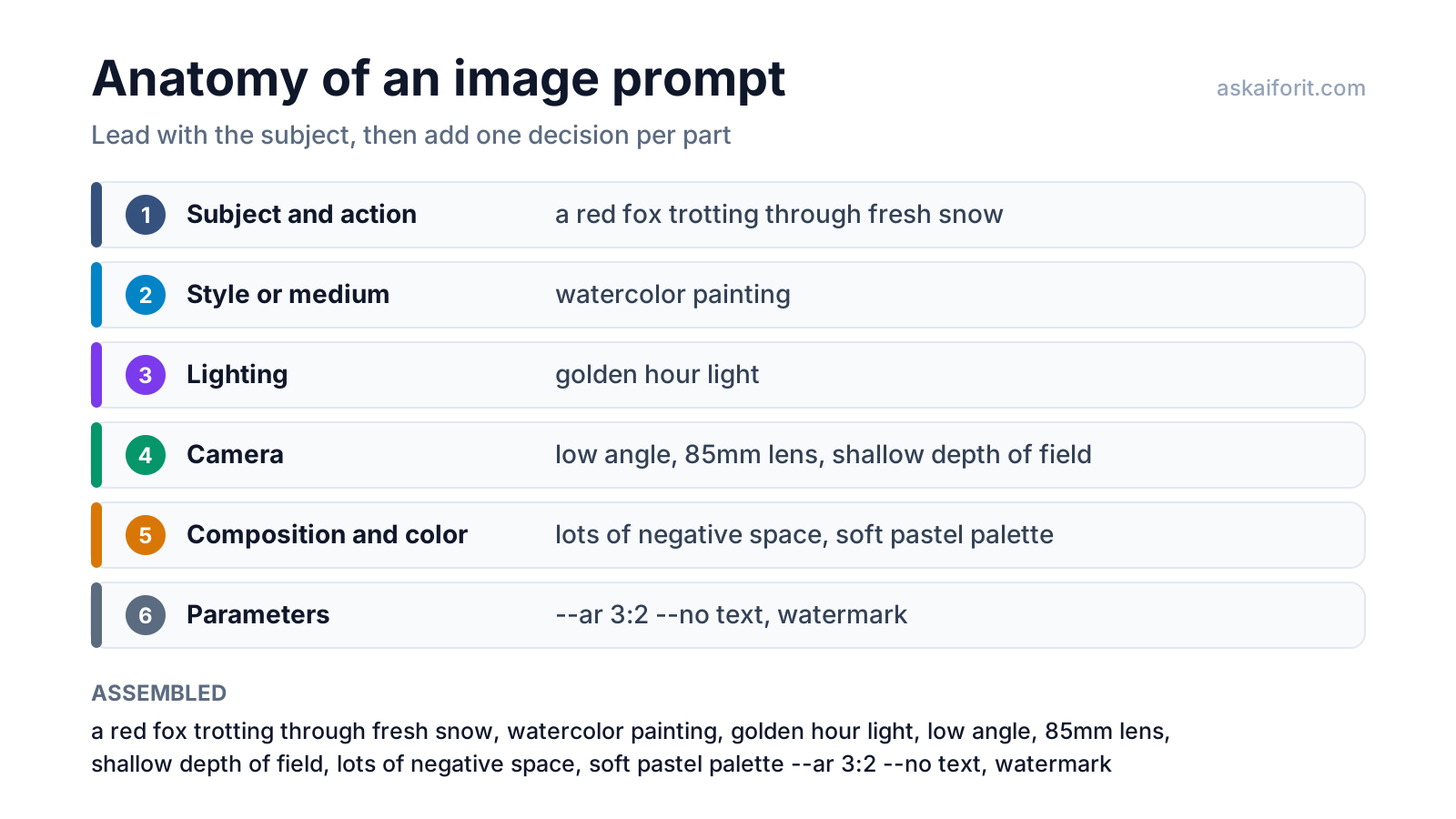
- Subject and action: who or what, doing what, where. Use numbers: "three cats", not "some cats".
- Style or medium: photo, film still, watercolor, 3D render, flat vector.
- Lighting: golden hour, softbox, neon, candlelight.
- Camera: shot type, angle, lens, depth of field.
- Composition and color: rule of thirds, negative space, a named palette.
- Parameters: aspect ratio, what to leave out, settings specific to your tool.
Keep it specific rather than long. Midjourney's own guide says "Short and simple prompts typically generate the best images" and warns that long lists "can confuse the process". Google's Gemini guide asks for rich detail instead, with the same goal in mind: "The more specific you are, the more control you have over the results." Both reward concrete nouns over adjectives like "beautiful" or "stunning".
Use lighting terms to set the mood
Lighting often changes a picture more than the style word does. These terms come from photography and film, which is why generators trained on captioned photos respond to them.
Lighting terms and what they do
| Term | What it looks like | Good for |
|---|---|---|
| Golden hour light | Low, warm sun with long soft shadows | Portraits, landscapes, lifestyle shots |
| Soft diffused daylight | Even light, gentle shadows | Faces, food, products |
| Overcast light | Flat, shadowless, muted | Calm scenes, true colors |
| Studio softbox lighting | Controlled, soft and clean | Product shots, headshots |
| Rim lighting | A bright outline around the subject | Separating a subject from a dark background |
| Backlit silhouette | Dark subject against bright light | Drama, posters |
| Low-key lighting | Mostly dark with deep shadows | Mystery, film noir, luxury |
| High-key lighting | Bright, almost no shadows | Clean commercial and medical looks |
| Neon glow | Saturated pink, blue and purple light | Night cities, sci-fi |
| Volumetric light rays | Visible beams through fog or dust | Forests, churches, epic scenes |
Add a direction when it matters: "soft light from the left" or "lit from below" changes the shadows in a predictable way.
Use camera terms to control the view
Shot type sets how much of the scene you see; the lens sets perspective and background blur. Name both when you care about the result.
Shot types and angles
| Term | Effect |
|---|---|
| Extreme close-up | A detail fills the frame: an eye, a texture, a stitch |
| Close-up | Head and shoulders, or one object |
| Medium shot | A person from the waist up |
| Full-body shot | The whole person with a little setting |
| Wide establishing shot | The place matters more than the person |
| Low angle | Looking up: the subject feels large or powerful |
| High angle | Looking down: the subject feels small |
| Top-down flat lay | Objects arranged on a surface, seen from above |
| Aerial drone view | A landscape or city from high above |
Lenses and depth of field
| Term | Effect |
|---|---|
| 14mm or 24mm wide-angle lens | Shows the setting; stretches edges, exaggerates depth |
| 35mm lens | Natural, documentary feel |
| 50mm lens | Close to how the eye sees |
| 85mm portrait lens | Flattering faces, softly blurred background |
| 135mm telephoto lens | Compressed perspective, background pulled closer |
| 100mm macro lens | Tiny subjects at life size: insects, jewelry, water drops |
| Fisheye lens | Strong circular distortion |
| Tilt-shift lens | Real scenes look like miniatures |
| Shallow depth of field | Sharp subject, blurred background (bokeh) |
| Deep focus | Everything sharp from front to back |
A classic portrait combination is "close-up, 85mm lens, shallow depth of field". For a room or a landscape, try "wide shot, 24mm lens, deep focus". Google's Gemini guide puts it simply: "Use photographic and cinematic language to control the composition."
Pick composition, color and style words
Composition tells the generator where things go:
- Rule of thirds: the subject sits off center, which feels natural.
- Centered symmetrical composition: formal, calm, good for products and architecture.
- Leading lines: roads, rails or rivers that draw the eye to the subject.
- Lots of negative space: empty area around the subject, useful when you will add text later.
- Framed by a doorway or window: a frame within the frame adds depth.
- Tightly cropped: intimate and graphic.
Color works best when named: "warm earth tones", "soft pastel palette", "teal and orange color grading", "black and white". For brand work, name your colors in plain words, such as "deep navy and coral".
Style sets the medium. Pick one and be precise:
- Photography: photorealistic photograph, cinematic film still, vintage 35mm film, studio product photograph.
- Painting and drawing: watercolor, oil painting with visible brushstrokes, graphite pencil sketch, ink with cross-hatching.
- Illustration: flat vector, digital illustration, children's book illustration, comic book with halftone shading, anime style.
- 3D and craft: 3D render, isometric 3D, low-poly, claymation, layered paper cut-out.
- Period styles: ukiyo-e woodblock print, Art Nouveau poster.
Set the aspect ratio in each tool
Choose the shape before you generate, because changing it later crops or extends the image. Common choices: 1:1 for square posts, 4:5 for portrait feed posts, 9:16 for stories and vertical video, 16:9 for widescreen and video thumbnails, 3:2 for a classic photo, 2:3 for posters.
How tools handle aspect ratio and negative prompts (October 2026)
| Tool | Aspect ratio | Negative prompt | Prompt style |
|---|---|---|---|
| Midjourney | --ar 16:9 at the end; default 1:1 |
--no text, logo |
Short and specific |
| OpenAI image API | size: 1024×1024, 1536×1024, 1024×1536 or auto; newer models accept custom sizes |
No parameter | Full sentences |
| Gemini image generation | aspectRatio in the image config; default 1:1 or the input image's shape |
No field | Rich description |
| Stability AI API | aspect_ratio, such as 16:9 or 9:16; default 1:1 |
negative_prompt |
Sentences or keywords |
| Stable Diffusion WebUI | Width and height in pixels | Negative prompt box | Comma-separated tags |
| FLUX (BFL API) | aspect_ratio, or width and height on older models |
No field | Prose, no quality tags |
| Adobe Firefly (web) | Menu: 1:1, 4:3, 3:4, 16:9, 9:16 | No documented setting | At least three words |
A few details from the docs:
- Midjourney takes whole numbers only: "Use 139:100 instead of 1.39:1" (Midjourney).
- OpenAI custom sizes must be multiples of 16, between 1:3 and 3:1, with no edge over 3,840 pixels (OpenAI).
- Gemini lists 1:1, 2:3, 3:2, 3:4, 4:3, 4:5, 5:4, 9:16, 16:9 and 21:9, among others, though not every model supports every ratio (Google).
- FLUX defaults to a square image for text-to-image requests, so set the ratio yourself; its docs add that the ratio and the prompt "should agree" (Black Forest Labs).
- In chat apps, ask for the shape in words ("a wide 16:9 banner") or use the ratio control if the app has one.
Say what to leave out, the right way
Where a tool has a negative prompt, use it for things you never want: text, watermarks, logos, extra fingers, a cluttered background. In Midjourney, --no fruit works like giving "fruit" a negative weight (Midjourney). Stable Diffusion interfaces and Stability AI's API take a separate negative prompt.
Writing "no" inside the main prompt often backfires, because the generator still sees the word. Midjourney's guide warns: "If you mention a party with 'no cake,' a cake might still appear." Tools without a negative field want a positive description instead. Google calls these "semantic negative prompts": not "no cars" but "an empty, deserted street with no signs of traffic". Black Forest Labs gives the same advice for FLUX: "an empty promenade" instead of "no crowds".
Before: A city street at night, no people, no cars, no signs.
After: An empty city street at night, wet asphalt reflecting the streetlights, shuttered shops, the only movement a cat crossing the road.
Adjust weights, style and variety
Some tools give you dials beyond the words:
- Emphasis in Stable Diffusion WebUI.
(word)raises attention to a word by 1.1,(word:1.5)by 1.5 and[word]lowers it (AUTOMATIC1111 wiki). Stability AI's API also reads(word:weight), with weights between 0 and 1. - Midjourney stylize.
--stylizeruns from 0 to 1000, default 100. Lower values follow your words more literally; higher values add more of Midjourney's own look.--rawturns down the default styling further. - Midjourney chaos and seed.
--chaos 0to100makes the four results more or less different from each other.--seedrepeats a result for the same prompt, but Midjourney notes that seeds "can't capture or bookmark a specific style, character, or appearance across different prompts". - Style references. Midjourney's
--srefwith an image URL copies the overall style of that image, "like colors, medium, textures, or lighting", not its objects or people.
Change one thing per generation. If you swap the lighting, the lens and the style at once, you will not know which word made the difference.
See one prompt in three formats
Here is a product shot written for three kinds of tools. The AI Image Prompt Builder produces these same three formats from the blocks you pick.
Sentences (ChatGPT, Gemini, Copilot, Firefly, FLUX):
A studio product photograph of a matte black ceramic coffee mug on a plain
light grey paper backdrop. Soft diffused daylight from the left, 50mm lens,
centered composition with empty space on the right for text. Vertical 4:5 image.
Parameters (Midjourney):
studio product photograph, matte black ceramic coffee mug, plain light grey paper backdrop, soft diffused daylight from the left, 50mm lens, centered, negative space on the right --ar 4:5 --no text, logoTags with a negative prompt (Stable Diffusion interfaces):
Prompt:   product photo, matte black ceramic mug, plain light grey backdrop, soft diffused light, 50mm, centered, negative space
Negative: text, watermark, logo, blurry, cluttered backgroundThese generators take the three prompt formats above, from sentences in ChatGPT to Midjourney parameters and Stable Diffusion tags:
Generate unique and imaginative visuals through AI-driven creativity.
For text assistants, the same habit of specific instructions applies; see how to write better prompts.
FAQ
What is the best order for an image prompt?
Subject and action first, then style, lighting, camera, composition and color, then parameters such as aspect ratio. Most generators pay more attention to the start of the prompt.
Do longer prompts give better images?
Not necessarily. Midjourney recommends short, specific prompts; chat-based generators such as Gemini handle longer descriptions well. In both cases, concrete nouns beat stacks of adjectives.
Why does my generator ignore "no text" in the prompt?
Because it still sees the word "text". Use the tool's negative prompt or --no if it has one, or describe the scene positively, such as "a plain wall".
Should I add "4K, masterpiece, best quality"?
Black Forest Labs advises leaving quality tags such as "masterpiece" out of FLUX prompts. In any tool, describing the light, lens and detail you want gives the generator more to work with.
Should I put a model version in the prompt?
No. Choose the version in your tool's settings. A version flag copied from an old prompt can switch you to an older model.